EasyManua.ls Logo

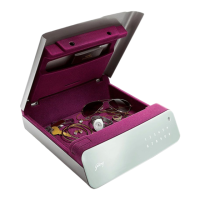
Godrej Goldilocks - User Manual

Godrej Goldilocks
2 pages
Print Icon
To Next Page IconTo Next Page
Loading...
How do I insert the batteries in the locker for the first time?
Unpack the product, lift the lid. Just above the touchpad, to the top left corner, there is a
detachable cover. Remove the cover. Gently pull out the battery connector. Connect a Z and
insert the battery in the slot with the connector facing upwards.
What if someone tampers with the lock or lifts the safe in my absence?
In such a scenario, if the locker is armed, the alarm will get activated. However, for enhanced
security, a laptop lock cable will restrict the movement of the locker from its current location.
I have forgotten my password, how do I open the locker?
If you have forgotten the user password, you can open the locker with the master password.
I have forgotten my user and master password. How do I open the locker?
Contact Godrej Security Solutions’ authorized call centre on 1800 209 9955.
The safe would probably have to be broken open.
How do I enable the alarm?
The locker must be in open condition first to enable the alarm. Enter the user code / master
code and open the safe. Press ‘*’ once followed by pressing ‘#’ key twice. The buzzer will beep
a string of sounds to indicate that vibration alarm is enabled.
How do I disable the alarm?
The locker must be in open condition first to disable the alarm. Enter the user
code/master code and open the safe. Press ‘*’ twice followed by pressing ‘#’ key. The
buzzer will beep twice confirming that the alarm is disabled.
Question and Answer IconNeed help?

Do you have a question about the Godrej Goldilocks and is the answer not in the manual?

Summary

Locker Operations and Security

Insert Batteries

Instructions for inserting batteries in the locker for the first time.

Tamper and Alarm Response

Details on alarm activation and anti-theft measures when the locker is armed.

Forgotten Password Recovery

Procedure to open the locker using the master password if the user password is forgotten.

Lost Master Password

Guidance for forgotten user and master passwords, suggesting contact with customer care.

Enable Vibration Alarm

Steps to enable the vibration alarm on the locker.

Disable Vibration Alarm

Steps to disable the vibration alarm on the locker.

Locker Settings and Troubleshooting

Change User Password

Instructions for changing the user password on the locker.

Reset Master Password

Procedure for resetting the master password of the locker.

Low Battery Indicator

Explanation for continuously flickering panel lights, indicating low battery.

Cleaning the Locker

Guidance on cleaning the touchpad and interior of the locker.

Troubleshooting Buzzer

Steps to take when the buzzer rings despite entering the correct password.

False Alarm Resolution

Advice for frequent false vibration alarms and disabling the sensor.

Locker Grouting and Security

Information about whether the locker can be grouted and alternative security.

Power Button Not Responding

How to access the locker if panel lights are not coming on due to battery drain.

Locker Not Closing

Troubleshooting steps for when the locker fails to close properly.

Summary

Locker Operations and Security

Insert Batteries

Instructions for inserting batteries in the locker for the first time.

Tamper and Alarm Response

Details on alarm activation and anti-theft measures when the locker is armed.

Forgotten Password Recovery

Procedure to open the locker using the master password if the user password is forgotten.

Lost Master Password

Guidance for forgotten user and master passwords, suggesting contact with customer care.

Enable Vibration Alarm

Steps to enable the vibration alarm on the locker.

Disable Vibration Alarm

Steps to disable the vibration alarm on the locker.

Locker Settings and Troubleshooting

Change User Password

Instructions for changing the user password on the locker.

Reset Master Password

Procedure for resetting the master password of the locker.

Low Battery Indicator

Explanation for continuously flickering panel lights, indicating low battery.

Cleaning the Locker

Guidance on cleaning the touchpad and interior of the locker.

Troubleshooting Buzzer

Steps to take when the buzzer rings despite entering the correct password.

False Alarm Resolution

Advice for frequent false vibration alarms and disabling the sensor.

Locker Grouting and Security

Information about whether the locker can be grouted and alternative security.

Power Button Not Responding

How to access the locker if panel lights are not coming on due to battery drain.

Locker Not Closing

Troubleshooting steps for when the locker fails to close properly.

Godrej Goldilocks Specifications

General IconGeneral
MaterialSteel
AlarmYes
ColorBlack
Warranty1 year
Lock TypeElectronic
Power Source4 AA Batteries
FixingWall-mounted/Floor-standing

Related product manuals