EN - 14
EN
OPERATIONS
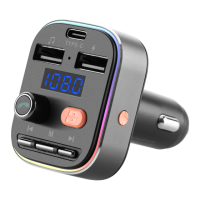
• Power On/Off - Plug/Unplug the transmitter into/out from your
car charger port.
• Frequency Up/Down - Press the „Frequency“ button, then press
the „Next“ / ‚Previous“ button or rotate the „MFB“ to add/reduce
frequency.
• Play / Pause / Answer / Hang up - Press the MFB once.
• Reject a call - Long press the „MFB“ for about 2 seconds.
• Redial the last number - Press the „MFB“ twice.
• Volume Up/Down - Rotate the „MFB“.
• Next / Previous Song - Press the „Next“/ “Previous“ button once
• Bass Boost on/off - Press the „Bass boost“ button once, display
show Eq0 means normal, Eq1 means bass boost.
• Switch light mode - Press the „Light switch“ button to change light.
• Switch music source - Long press the „ Frequency“ button 2
seconds to switch from Bluetooth, micro SD card or USB disk
music, when switch to Bluetooth music, you have to press „MFB“
to start the music.
BLUETOOTH OPERATION INSTRUCTION
Plug the transmitter into your car charger port, the display ashes
means it is in pairing mode. Turn on the Bluetooth function of your
phone, search for Bluetooth devices and connect „ CTR 348 BT C“.
If pairing is successful, the display will stop ash and show FM
frequency. Tune the car FM radio to a blank FM station from 87,5 to
108,0 MHz. Tune the FM transmitter into the same frequency with
the car FM radio.
Open the music player/navigation of your phone, turn the phone
volume and transmitter volume into max level, then tune your car
volume to appropriate level, now it can transmit the phone calls,
music or navigation to car stereo system.
AUTO-CONNECT
The transmitter will auto-connect the last connected device when
turned on next time. (Please turn on the Bluetooth function of your
device before turn on the transmitter.)


 To Next Page