
 Need help?
Do you have a question about the Gogen TWS MATE W and is the answer not in the manual?
Important safety guidelines for headset usage, including volume, hazardous situations, driving, children, water, and temperature limits.
Automatic power on and pairing process when opening the charging case lid.
Manual power on and pairing instructions, including LED indicators and L/R pairing.
Steps to connect the headset to your mobile device via Bluetooth, including device discovery and selection.
How to power on the earphones using touch controls or from the charging case.
Instructions for activating voice assistants like Siri or Google Assistant using tap controls.
Using tap controls to answer, reject calls, and redial the last number.
Using tap controls to play, pause, adjust volume, and skip tracks.
Instructions for automatic power off and manual reset using tap controls.
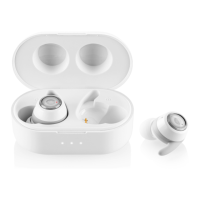
Procedure for charging the individual earbuds in the charging case, including indicator lights.
How to charge the charging base using the USB cable and its indicator lights.
 General
| Type | In-ear |
|---|---|
| Connectivity | Bluetooth |
| Bluetooth version | 5.0 |
| Impedance | 32 Ohm |
| Frequency range | 20 Hz - 20 kHz |
| Microphone | Yes |
| Charging time | 1.5 hours |
| Playback time | 4 hours |
| Water Resistance | IPX4 |
| Connection Range | 10 meters |
| Charging Port | USB-C |

 To Next Page