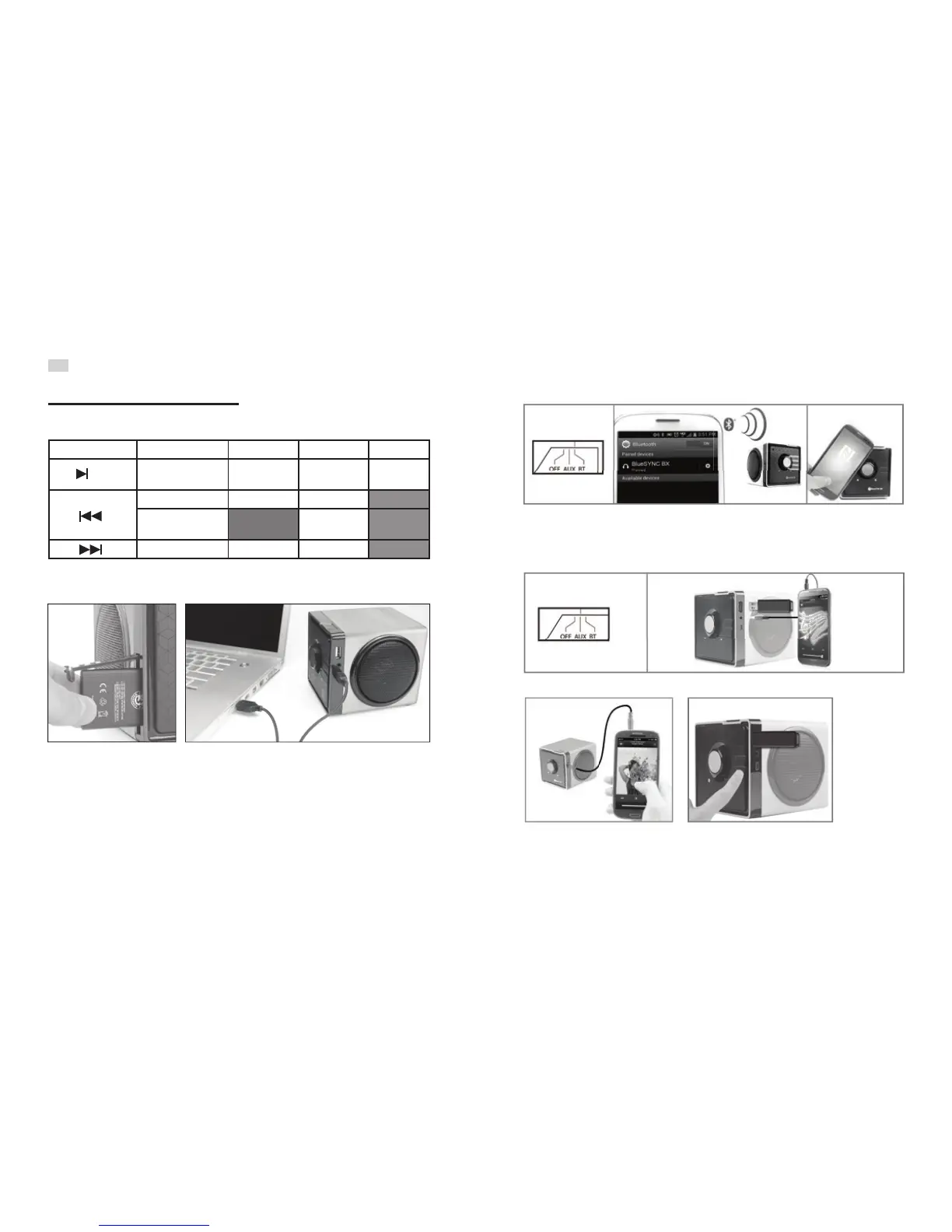
Insert battery and connect to USB power. LED indicator RED= charging, OFF= 100% (2.5 hours).
Move the function switch to BT. Pair your device. NFC enabled devices can tap to pair on the touch area.
Use PIN “0000” if prompted. After initial Bluetooth pairing, BlueSYNC BX will auto-pair to the last device
when turned on.
Move the function switch to AUX. Connect ash drive or 3.5mm cable (connect one at a time).
For AUX input, control playback from your device. For USB ash input, control playback with front buttons.
Button guide
AUX audio (3.5mm or USB Flash)
Charging and power
Bluetooth® audio
Operating instructions
EN
Button Press sequence Bluetooth USB Flash drive 3.5mm audio
Quick press Pause/Play music,
Answer/End call
Pause/Play music Mute music
Quick press Previous track Previous track
Press and hold 2 seconds Enter/Exit random
mode
Quick press Next track Next track
/M


 To Next Page