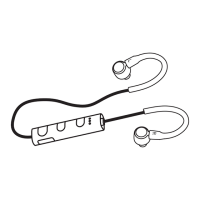
The Goji GSHOKBT18 are Ear Hook Wireless Sports Headphones designed for active use. They offer a wireless audio experience with a focus on comfort and stability during physical activities.
Function Description:
These headphones are primarily designed for listening to music and handling calls wirelessly via Bluetooth. The ear hook design ensures a secure fit, making them suitable for sports and other dynamic movements. They feature integrated controls for volume adjustment, track navigation, call management, and power on/off. The built-in microphone allows for hands-free calling.
Important Technical Specifications:
- Model: GSHOKBT18
- Sensitivity: 103±3 dB
- Impedance: 32 Ω
- Rated Input: DC 5V === 500 mA
- Frequency Response: 20 Hz – 20 kHz
- Frequency Band(s): 2400 – 2482 MHz
- Max. Radio Frequency Power Transmitted: 1 dBm
- Bluetooth Interface: Bluetooth 4.1
- Bluetooth Profiles: A2DP, AVRCP, HFP, HSP
- Operating Distance: 10 m
- Battery Type: Lithium ion 110 mAh
- Battery Life: Up to 5 hours
- Charging Time: 3 hours
- Net Weight: 18 g
Usage Features:
Power On/Off:
To switch on, press and hold the multi-functional button (labeled as 'U' or '2' in the product overview) until the status indicator lights up. To switch off, press and hold the same button until the status indicator flashes 3 times.
Bluetooth Pairing:
- Ensure the earphones are switched off.
- Press and hold the multi-functional button for 5 seconds to enter Bluetooth pair mode. The red and blue indicators will flash rapidly and alternately.
- Activate the Bluetooth feature on your device and search for "GSHOKBT18".
- If prompted, enter the passcode "0000". Some devices may also require confirmation of the headset connection after pairing.
- A blue indicator will blink, and the earphones will beep upon successful pairing.
Note: If no Bluetooth device is paired within 7 minutes, the headphones will automatically switch off.
Automatic Reconnection: If the earphones were previously paired with a Bluetooth device, they will automatically connect to the last paired device when both are in pairing mode.
Call Functions:
- Answer / End a Call: Press the multi-functional button once.
- Reject a Call: Hold the multi-functional button for 2 seconds, then release.
- Redial Last Call: Press the multi-functional button twice.
Playback Functions:
- Play / Pause Track: Press the multi-functional button once.
- Increase Volume: Press the '+' button repeatedly as desired.
- Decrease Volume: Press the '-' button repeatedly as desired.
- Go to Next Track: Hold the '+' button.
- Go to Previous Track: Hold the '-' button.
Note: Call and playback functions may not be compatible with all smartphone brands. Users should check their individual smartphone user manual for compatibility.
Charging the Battery:
- Connect the USB charging cable to the charger connector on the earphones.
- Connect the other end of the USB charging cable to a powered USB device.
- Low Battery: The red indicator will flash slowly.
- Charging: The red indicator will light up.
- Fully Charged: The blue indicator will light up.
Note: The Bluetooth function is disabled while the earphones are charging.
It is recommended to fully charge the unit before first use.
Maintenance Features:
Resetting the Headphones:
To perform a hardware reset, connect the USB cable to a charging source.
Troubleshooting (Hints and Tips for "Product not working"):
- Recharge the product: Ensure the battery has sufficient charge.
- Ensure the product is switched on: Verify the headphones are powered on.
- Ensure your Bluetooth-enabled device's wireless function is active: Check that Bluetooth is enabled on your source device.
- Ensure there are no other wireless devices in discovery mode: Minimize interference from other Bluetooth devices.
- Move the product closer to the device: Reduce the distance between the headphones and the paired device for better connection.
- Pair again the product and the device: Re-establish the Bluetooth connection if issues persist.
Safety Warnings:
- Do not use earphones while driving or cycling for traffic safety.
- Inspect the unit for damage after unpacking. Do not operate if damaged or not working normally; consult your dealer.
- Avoid extreme temperatures (hot or cold) and place the unit away from heat sources (radiators, gas/electric fires, direct sunlight).
- Never place candles or naked flames on or near the unit.
- Avoid placing the unit near appliances that may cause electromagnetic interference, as this can affect performance and sound quality.
- Listening to loud sounds for prolonged periods can permanently damage hearing. Turn down the volume before putting on earphones and slowly increase to a comfortable level.
Environmental and Battery Disposal:
The product and its packaging should be disposed of according to local regulations for waste electrical and electronic equipment. Batteries contain chemicals harmful to the environment and should be disposed of separately from household waste, following local laws.
Compliance:
DSG Retail Ltd. declares that the GSHOKBT18 radio equipment type complies with Directive 2014/53/EU. The full text of the EU declaration of conformity is available online at https://www.teamknowhow.com/ by searching for the model number.
The Bluetooth® word mark and logos are registered trademarks owned by the Bluetooth SIG, Inc., and DSG Retail Limited uses them under license.

 Need help?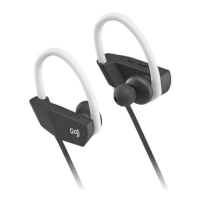

 To Next Page
 General