The GOLABS R300 is a portable power generator designed to provide reliable power on-the-go, during power cuts, and for outdoor activities. It serves as a solar generator, offering a versatile power supply solution.
Function Description
The GOLABS R300 is a portable power station that can be charged via solar panel, AC adapter, car charger, or PD (Power Delivery) mode. It provides various output options including DC, USB (Quick Charger 3.0 and USB-C PD), and AC (Pure Sine Wave) to power a wide range of devices. It features an LCD display to show battery status and includes an LED light with multiple modes (strong, SOS, flashing) for illumination. The device is designed for emergency situations and cannot replace standard AC power for household appliances or digital products.
Important Technical Specifications
Battery:
- Cell Type: LiFePO4
- Pack Capacity: 299 Wh (12.8V/23.4Ah)
- Lifecycles: 2000 Cycles to 80% Capacity
- Battery Maintenance: Charge Every 5-7 Months
Ports:
- USB Port (Output): 2x Quick Charger 3.0 (5V/3A; 9V/2A; 12V/1.5A)
- USB-C Port (Output): 5V/3A; 9V/3A; 12V/2.25A; 15V/2A; 20V/1.5A
- USB-C Port (Output / Input): PD 60W (5V/3A; 9V/3A; 12V/3A; 15V/3A; 20V/3A)
- 5.5mm Port (Output, 5mm): 12V/10A (two ports, max 10A total)
- AC Port (Output): 110V 300W Pure Sine Wave (max)
- Charging Port (Input, 5.5mm): Adapter: DC 15V/3.2A; Solar Panel: 5-22V
General:
- Weight: About 3.8kg
- Dimensions: 230x195x157mm
- Operating Usage Temp: -10°C to 40°C
- Illumination: 1 Ultra-bright LED (3W Light & SOS & Flashing)
Protection Modes:
- DC Input: Under-voltage protection.
- DC Outputs: Short circuit protection.
- AC Output: Undervoltage protection, overload protection, short circuit protection, overtemperature protection (double isolation circuit).
Error Codes:
The device displays error codes for various issues, including:
- E01: DC output current protection
- E02: DC output short circuit protection
- E03: AC output overload, over temperature, under voltage protection
- E04: PD (bidirectional) output short circuit
- E05: PCBA high temperature
- E06: PCBA low temperature
- E07: UVP
- E08: USBA/PD (unidirectional) output protection
- E09: DC charging COVP protection
- E10: BAT OTP (Battery Over Temperature Protection)
- E11: BAT OCP (Battery Over Current Protection)
- E12: BAT LOW (Battery Low)
Usage Features
Charging the Product:
- Solar Panel: Connect a solar panel (output voltage 18-22V, max 22V) to the input port. The LCD display indicators will blink during charging. Charging efficiency depends on weather, temperature, sunlight strength, and panel angle.
- AC Adapter: Plug the original 15V 3A adapter into the DC input port. It takes about 9 hours for a full charge. The PD 60W port cannot output when charging via DC input.
- Car Charger: Plug the original car charger (with 10A protector tube) into a 12V car cigarette lighter socket and then into the DC input port. Only charge when the car engine is started to avoid car battery power loss. This function is for 12V cars only.
- PD Mode: Plug a PD charger into the PD 60W IN/OUT Dock.
Operating the Product:
- Power On/Off: Long press the power button for 3 seconds to turn the machine on.
- AC Function: Press the AC button to turn on/off. The AC icon will display on the screen when active.
- DC Function: Press the DC button to turn on/off. The DC function automatically shuts down after 30 seconds without load.
- USB Function: Press the USB button to turn on/off. The USB function automatically shuts down after 30 seconds without load.
- LED Light: Press the light button to cycle through strong mode, SOS mode, flash mode, and off. Avoid staring directly at the light.
Output Features:
- USB Output: Two Quick Charger 3.0 ports and one PD 30W USB-C port. If two USB-A ports and the PD 30W port are used simultaneously, the total output is limited to 5V/5.5A.
- DC Output: Two 12V/10A DC5521 ports, automatically distributing current up to 10A. Each port can connect to a cigarette lighter (max 100W).
- AC Output: 110V 300W Pure Sine Wave. Ensure connected AC appliances are less than 300W. The AC output automatically closes after 8 hours of inactivity.
Safety Features:
- The product will alarm and display fault code E11 if AC, DC, and USB output simultaneously, and total battery current exceeds 38A for 5 minutes. If not cleared within 30 seconds, DC output is forcibly turned off.
- DC output function is forcibly closed if battery voltage is less than 11.6V and requires charging to release.
- LCD screen backlight dims after 2 minutes of no operation and the machine automatically shuts down when not in use.
- AC output function is forcibly closed if battery voltage is less than 11.6V and requires charging to release.
- In case of overload, overtemperature, or short circuit, the machine will beep, the AC icon will flash, and then the machine automatically shuts down.
Maintenance Features
- Battery Maintenance: Charge the battery every 5-7 months to maintain its health. The LiFePO4 battery is internal and non-removable.
- Storage: If not using the product for a long time, disconnect all cables before storing it away.
- Cold Weather Usage: In temperatures between -10°C and 40°C, battery capacity can be affected. For sub-zero conditions, it's recommended to keep the product in an insulated cooler and connected to a power source (12V car/AC adapter/solar panel) to maintain battery capacity.
- Disposal and Recycle: Dispose of or recycle the product and its battery according to local rules and regulations, not with household waste.
- Warranty: The company provides a 12-month warranty from the date of purchase.
- Service: 24-hour customer service is available at support@golabs.com.
Cautions:
- Avoid short-circuiting by keeping the product away from metal objects.
- Do not heat the product, dispose of it in fire, water, or other liquids. Keep it away from high ambient temperatures and direct sunlight.
- Keep the product away from humid, dusty places.
- Do not disassemble or reassemble the product.
- Do not drop, place heavy objects on, or allow strong impact.
- Not intended for use by persons with reduced physical, sensory, or mental capabilities.
- Keep away from children.
- Do not cover the product with towels, clothing, or other items.
- Do not overcharge the product.
- Disconnect from the power source immediately when fully charged.
- For some portable electronic devices, you may need to set them to charge mode first.

 Need help?
 General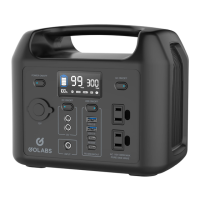

 To Next Page