Need help?
Do you have a question about the golden interstar ALPHA X and is the answer not in the manual?
Essential safety warnings to prevent electric shock, damage, and ensure proper usage.
Guidelines for ventilation, location, lightning protection, and handling foreign objects.
Description of all connectivity ports including LNB IN, AV, HDMI, Ethernet, USB, and RS232.
Step-by-step instructions for connecting the satellite antenna and initial setup.
Procedure for powering on the receiver for the first time and scanning for channels.
This document serves as a user manual for the Golden Interstar ALPHA X, a digital DVB-S/S2 HDTV H.265 receiver, IPTV, and OTT mediaplayer. It provides essential information for safe operation, installation, and usage of the device.
The manual emphasizes critical safety measures to prevent electric shock and damage. Users are warned against disassembling the receiver, as it contains no user-serviceable parts, and all servicing should be referred to qualified personnel. The device adheres to international safety standards.
Power Supply: The receiver operates on a 100-240V ~ 50/60Hz power supply. Users must connect it only to the specified network type and unplug it from the electrical outlet before any maintenance or installation.
Antenna and TV Connections: Before connecting or disconnecting the satellite antenna or TV cables, the receiver must be unplugged from the network. Failure to do so can damage the receiver or connected equipment.
Liquids: The receiver must not be exposed to liquids of any kind.
Cleaning: Before cleaning, the receiver should be unplugged. Dust can be removed with a lightly damp cloth, avoiding solvents.
Ventilation: Proper ventilation is crucial. The receiver should not be placed on furniture or carpets, nor should any objects be placed on top of it. Air circulation around the receiver must not be restricted.
Earthing: The antenna cable must be grounded.
Foreign Objects: Users should avoid inserting anything through the receiver's openings to prevent touching hazardous voltage points or damaging the device.
Location: The receiver is designed for indoor use to protect it from weather. It should not be installed near radiators or other heat sources. Dropping the product can cause personal injury and serious damage.
Lightning and Storms: During lightning storms or extended periods of disuse, the receiver should be unplugged from the wall outlet, and the antenna disconnected to prevent damage from lightning or voltage fluctuations.
Repair: Any necessary repairs must be performed by qualified service personnel. Unauthorized repairs can lead to additional damage.
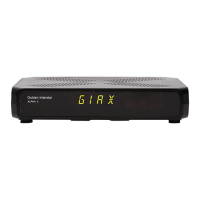
The Golden Interstar ALPHA X features a front panel with a digital channel/time display, which shows the current channel number or time depending on the menu settings. An LED status indicator displays the receiver's current status (red for standby, green for active). An IR signal receiver sensor is also present on the front panel to receive commands from the remote control.
The rear and side panels offer various connection ports:
LNB IN: For connecting the satellite antenna.
AV: Composite AV output for connecting to a TV.
DIGITAL AUDIO: Digital audio output.
HD OUT: High-quality digital audio and video output (HDMI).
ETHERNET: For network connection.
RS232 (on the left side): For connecting to a PC via a serial port.
DC-12V (on the left side): Power socket. Users must use the original 12V DC, 1.5A power adapter included in the box.
LED/IR (on the right side): For connecting an external IR sensor with an LED display.
2 USB ports (on two side panels): These ports can be used for playing media files, updating software, and connecting USB-WIFI or 3G dongles.
The remote control provides comprehensive functionality for operating the Golden Interstar ALPHA X. Key buttons and their functions include:
On/Off STB power supply: Toggles the device power. + PAGE -: Changes channels up or down. 0 ~ 9: Direct input for channel numbers. Mute: Mutes or unmutes the audio. AUDIO: Selects audio tracks. SAT: Calls up the satellites list. MENU: Displays the main menu. EXIT: Exits to the last menu. OK: Performs actions or confirms selections. LEFT/RIGHT/UP/DOWN arrows: For navigation within menus. EPG: Calls the Electronic Program Guide. INFO: Shows channel or event information. TV/RADIO: Switches between TV and Radio modes. FAV: Shows the Favorites list. RECALL: Calls the last channel. SUBTITLE: Activates subtitles. TEXT: Enters Teletext mode. SLEEP: Sets the sleep timer. REC: Initiates recording. F1-F4: Programmable buttons. V.FORMAT: Changes the screen format. OPTION: Accesses options. RESOLUTION: Changes screen resolution. Stop play or record: Stops playback or recording. PAUSE: Pauses playback. Rewind/Fast Forward: Controls media playback speed.
Antenna Connection: Connect the satellite antenna to the LNB IN port.
TV Connection:
Switching On: Plug the STB power adapter into an electrical outlet and press the red power button on the remote control.
First Installation and Channel Search: Upon the first power-on, the "First install menu" will appear. Users can select the menu language and proceed to the antenna setup.
Antenna Setup: In the antenna setup menu, users must select available satellites, configure LNB settings, and DiSEqC settings. After configuration, pressing the red button initiates the channel search. Once complete, a list of found channels will be displayed.
Unicable Support: The Alpha X supports Unicable LNBs. Settings for Unicable LNBs can be configured in the Installation menu.
Channels Editor: After the channel search, users can edit the channel list via the "Channel Editor" menu, using the function buttons to sort, rename, delete, group, or lock channels according to their preferences.
Audio/Video Settings: The "Audio / Video settings" menu allows users to adjust image format, resolution (quality), and digital audio output.
Access Password: The default factory password is "0000".
EPG (Electronic Program Guide): The TV Guide provides electronic program information for the week ahead, supplied by the operator for each satellite channel. Pressing the EPG button on the remote control accesses the guide, which can be displayed in vertical or horizontal formats.
Mediaplayer: The Alpha X can play high-quality media files from a USB drive or a local network using DLNA.
DLNA: The DLNA function is enabled by default and operates continuously when the receiver is on, requiring no special settings.
Connecting to the Internet: The Alpha X is equipped with an Ethernet/LAN port for network connection. It also supports external USB-WiFi or USB-3G adapters.
Software Update: Software updates for the Alpha X can be found on the Golden Interstar website (www.golden-interstar.de) or through the "online update" option in the receiver menu.
While the manual explicitly states that there are no user-serviceable parts inside the receiver and that all servicing should be referred to qualified personnel, it does outline some basic maintenance aspects:
Cleaning: The receiver can be cleaned by unplugging it and wiping it with a light damp cloth, avoiding solvents. This prevents dust accumulation that could hinder performance or ventilation.
Software Updates: The ability to update software via USB or over the internet (online update) is a key maintenance feature. Regular software updates can improve performance, add new features, and fix bugs, ensuring the device remains up-to-date and functional.
Ventilation Management: Ensuring the receiver is placed in a location with adequate ventilation and that no objects obstruct its airflow is a user-level maintenance task that prevents overheating and prolongs the device's lifespan.
Cable Management: The instructions for properly connecting and disconnecting antenna and TV cables, including unplugging the device first, are crucial for preventing damage to the ports and internal components, which can be considered a form of preventative maintenance.
Power Supply Care: Using only the original power adapter and ensuring the receiver is unplugged during storms or long periods of disuse helps protect the internal circuitry from power fluctuations and electrical damage.
In summary, the Golden Interstar ALPHA X is a versatile digital receiver and media player designed for ease of use, with a strong emphasis on safety and basic user-level care to ensure its longevity and optimal performance.
 General
| Standby Power | <0.5W |
|---|---|
| Audio Output | HDMI, AV |
| Video Output | AV |
| Supported Resolution | 1080p |
| Video Decoding | H.264 |
| Supported File Formats | AVI, MKV, MP4, TS |

 To Next Page