Need help?
Do you have a question about the GOLDEN MASK 7 and is the answer not in the manual?
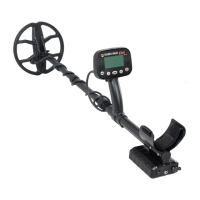
Describes key capabilities and components of the detector, including frequencies, wireless headphones, and build.
Details attaching the coil, cable, and extending the telescopic shaft for setup.
Explains powering the device on/off and the crucial coil balancing process for accurate detection.
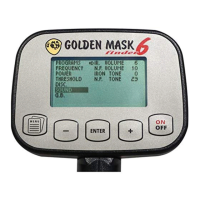
Identifies and explains the parameters shown on the detector's screen during operation.
Details button functions and how to navigate the detector's 3-level menu system.
Details the 3-level menu system, including programs, frequency, and other settings.
Explains how the detector displays target identification numbers and graphical signal representations.
Describes how the detector rejects unwanted targets and handles iron signals.
Provides guidance on selecting the appropriate search coil for different conditions.
Details the four preset programs and the four operating frequencies for versatile use.
Explains settings affecting depth, stability, and target response characteristics.
Explains the 1 TONE, 2 TONE, and ALL METAL discrimination modes.
Details the discrimination depth adjustment and its impact on target detection.
Covers BOOST, Iron/Nonferrous Volume, and Iron/Nonferrous Tone adjustments.
Explains FX, AUTO, and MANUAL ground balance procedures for soil compensation.
Guides on performing manual ground balancing for optimal performance on mineralized soils.
Discusses GB stability, mineralization impact, and relevant settings.
How to adjust the LCD screen backlight and contrast for better visibility.
Usage, pairing, and charging instructions for the provided wireless headphones.
Details on charging the detector's internal Li-Ion battery using the provided charger.
Rules for maintaining battery health and essential safety precautions.
Solutions for instability, lack of depth, and other operational issues.
Tips for optimal performance, site respect, and legal compliance.
Important warnings regarding water, impact, cleaning, and charger usage.
Lists key technical details of the Golden Mask 7 metal detector.
The Golden Mask 7 is a high-performance 4-frequency VLF metal detector designed for effective metal object detection in various ground conditions. It utilizes new 7G coils for enhanced depth and stability compared to older designs. The detector features a rain-resistant control block, allowing for continued use in wet weather. The main menu is in English, making it accessible for a wide range of users.
The Golden Mask 7 operates on four working frequencies: 4 kHz, 14 kHz, 24 kHz, and 44 kHz, offering versatility for different search conditions. The 4 kHz frequency is suitable for relic searching and highly mineralized ground, especially with a large coil, though it may miss tiny targets or those made from low conductive metals. The 14 kHz frequency is the main universal setting, ideal for coin shooting, jewelry, and beach hunting, and performs well on moderately mineralized soils. The 24 kHz frequency is also universal but better suited for non-mineralized soils, offering increased sensitivity to gold and low-conducting metals, and faster recovery speed in trash-polluted areas. The 44 kHz frequency is the dedicated "Gold frequency," highly sensitive to low conductive metals and tiny targets, best used on clean soils and with the smallest possible search coil.
The detector includes a new FX ground balance mode, recommended for its stability and performance on highly mineralized, clay, wet beach, or salty soils, and for eliminating hot rocks. It is also ideal for gold prospecting in riverbeds. The AUTO ground balance mode automatically adjusts for non-mineralized soils and areas without strong electromagnetic fields. For more precise balancing, especially on mineralized soils, clay soils, or wet beach sand, a MANUAL ground balance option is available. The G.B. STAB (Ground Balance Stability) setting controls the detector's stability over unevenly mineralized ground, offering increased stability at the cost of slight depth reduction.
The PowerBox (PBOX) setting adjusts the power (voltage) in the coil, influencing penetration depth and soil influence. LOW is recommended for mineralized soils, MED for normal soils, and HIGH for low-mineralized soils. The Threshold setting controls the detector's response to targets, with separate SIGNAL and AUDIO thresholds. SIGNAL (default 80, max 90) manages the coil's signal response, while AUDIO (default 30, max 40) limits the audio signal for a smoother, more sensitive threshold.
Discrimination modes include 1 TONE (mono-tone), 2 TONE (bitonal), and ALL METAL. In 1 TONE, only nonferrous targets produce sound, masking ferrous signals, which is useful in iron-polluted areas. 2 TONE mode provides distinct low sounds for ferrous targets and high sounds for nonferrous targets, offering comprehensive information about detected metals. ALL METAL mode omits discrimination entirely, providing the best depth of detection for all metal types, though it is less comfortable in iron-polluted areas. The DISC. DEPTH setting controls the depth at which the detector discriminates targets, with lower values discriminating objects closer to the surface and higher values increasing recovery speed.
The detector's sound can be customized with four settings. BOOST amplifies the audio signal, useful for weak signals but potentially increasing noise. IR. VOLUME (Iron Volume) controls the sound volume for iron targets (0-10, default 6), allowing users to effectively switch to 1 TONE mode if set to 0. N.F. VOLUME (Nonferrous Volume) controls the sound volume for nonferrous targets (0-10, default 10). IR. TONE (Iron Tone) and N.F. TONE (Nonferrous Tone) adjust the tone frequency for ferrous (0-30, default 0) and nonferrous (0-30, default 29) target responses, respectively.
The Golden Mask 7 features a 3-level menu system navigated by four buttons: MENU, MINUS, PLUS, and ENTER. The ON/OFF button powers the detector on/off and controls the LCD backlight. To turn on, hold ON/OFF for 3 seconds; a world map graphic appears, followed by a 10-second software load. To turn off, press and hold ON/OFF until a POWER OFF screen appears. The detector requires a BALANCING procedure upon startup, or after changing the program, working frequency, or PowerBox settings. This involves holding the coil at least 50 cm (20") from the ground and any metal objects while the software loads.
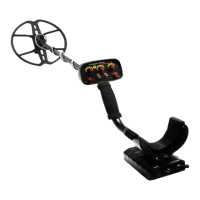
The detector's collapsible carbon-fiber shaft makes it lightweight and easy to transport. Assembly involves attaching the coil to the lower stem with a plastic bolt and screw, then connecting the coil cable to the main unit and securing it with velcro straps. The coil cable must be kept outside the active zone of the search coil. The telescopic shaft extends by turning fixing screws counter-clockwise, pulling sections, and then fixing them clockwise. A minimum of 15 cm (6 inches) of the third section must remain inside the handle section's fixing screw for stability.
The LCD screen displays working parameters, Target ID, and a Spectrum VDI scale, which graphically represents target signal response. Target ID numbers indicate ferrous targets with negative values and nonferrous targets with positive values. The Spectrum VDI graphic, with bars of varying height, provides detailed information about metal type and signal strength. The Iron Audio setting, shown as a dual-color bar, allows users to adjust the discrimination border for ferrous and nonferrous targets.
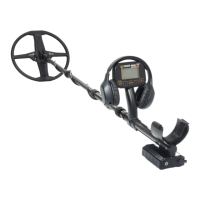
Wireless headphones are included (except in the LITE version) and are factory-paired. To use them, switch the sound output to WS mode and turn on the headphones. If unpaired, switch the detector to speaker (SP) mode, turn on the detector and headphones, place them close to the battery box, switch to WS mode, and short-press the headphone power button within 8 seconds. Wired headphones can be connected via the 6.35 mm (1/4") jack; high impedance stereo headphones with volume control are recommended.
The detector's electronics and battery compartment must be kept away from water and moisture. Search coils are waterproof and can be washed or submerged, but mechanical impact should be avoided. The coil connector should be kept clean and dry to ensure good contact. Do not use contact sprays or other liquids on coil contacts.
The Golden Mask 7 is powered by a pre-installed 2500 mAh Li-Ion battery, providing at least 12 hours of operation. The battery should be charged after 2-3 hours of use, or when the battery icon shows empty. A continuous BEEP sound indicates minimum power level. To charge, connect the Smart charger to the charging port on the battery box and plug it into a wall socket. A red light indicates charging, turning blue when complete. Do not turn on the detector while charging.
For battery longevity, use only the dedicated Golden Mask charger. Avoid charging at temperatures below 5°C; allow the detector to warm up for 2-4 hours after cold weather use before charging. Store the detector/battery between 5°C and 25°C. Do not leave the battery unused for extended periods; check charge status every 6 months and charge to 50% capacity if needed. The typical lifespan of a Li-Ion battery is 2-3 years or 300-500 charge cycles.
Li-Ion battery safety rules include not disassembling, crushing, or puncturing the battery; avoiding shorting external contacts; not disposing of the battery in fire or water; not exposing it to temperatures above 60°C (140°F); and avoiding excessive shock or vibration. Do not use a damaged battery. If the detector is stored for an extended period, follow storage instructions. If the battery has no charge remaining, it may be damaged and should not be recharged or used; contact the dealer for replacement instructions. If battery run time drops below 70% or charge time increases significantly, consider replacing the battery. In case of eye contact with battery fluid, flush eyes thoroughly with water and seek medical attention. Always check local, national, and international regulations for transporting and disposing of Lithium-Ion batteries.
 General
| Technology | VLF (Very Low Frequency) |
|---|---|
| Weight | 1.3 kg |
| Battery Life | up to 20 hours |
| Ground Balance | Automatic and manual |
| Search Mode | All Metal, Discrimination |
| Discrimination | Adjustable |
| Pinpoint | Yes |
| Display Type | LCD |
| Search Coil Size | 11 inch |
| Audio Output | Speaker and headphone jack |
| Target Identification | Visual |

 To Next Page