EasyManua.ls Logo

Goldline AquaTrol - User Manual

Goldline AquaTrol
24 pages
Print Icon
To Next Page IconTo Next Page
Loading...
2019-2628
2019-10-10
T-CELL-5
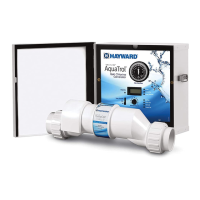
Replacement cell for Aqua Trol Above-Ground Pool Automation
REGISTRATION NUMBER 28593, PEST CONTROLPRODUCTS ACT. This cell must only be used on
this model of chlorine generating device.
KEEP OUT OF REACH OF CHILDREN
Read the Label, the Installation and Operation Manual of the Aqua Trol Above-Ground Pool
Automation before using.
Hayward Pool Products Canada Inc.
2880 Plymouth Drive
Oakville, ON L6H 5R4
1-888-238-7665 (POOL)
Question and Answer IconNeed help?

Do you have a question about the Goldline AquaTrol and is the answer not in the manual?

Summary

Wiring Procedures

Turbo Cell Connection

Refer to diagrams for proper location of control's plug-in.

Flow Switch Connection

Refer to diagrams for proper location. Ensure connector snaps for reliable connection.

System Compatibility

Plumbing Installation

Turbo Cell Plumbing

Plumb after filter/heater. For pool/spa combo, plumb before return valve.

Flow Switch Plumbing

Plumb in same section as Turbo Cell. Must have 12" (30cm) straight pipe run before it.

Important Safety Instructions

System Operation

Recommended Water Parameters

Maintain chemical makeup, salt level, and stabilizer for pool enjoyment and to prevent corrosion.

Saturation Index Calculation

Relates calcium and alkalinity to water balance. Use equation/chart to determine Si.

Salt Level Management

Type of Salt to Use

Use only 99% pure sodium chloride (NaCl). Avoid rock salt, anti-caking additives, or iodized salt.

Adding and Removing Salt

Add salt to pool with pump running. Drain to lower concentration. Allow 24 hrs for dispersion.

Stabilizer (Cyanuric Acid)

Control Panel Features

Timer Operation

Set pool filter pump run time using trippers. Arrow indicates current time. Manual control available.

Main Switch Modes

Modes: AUTO (normal), SUPER CHLORINATE (shock), OFF (no chlorine generation).

Desired Level Adjustment

Controls chlorine output. Raise to increase, lower to decrease. Adjust for pool conditions.

Indicator LEDs

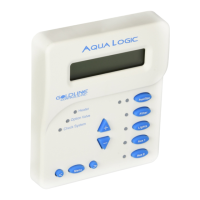
POWER, GENERATING, SUPER CHLORINATE LEDs indicate system status and conditions.

Troubleshooting Guide

Diagnostic Displays

Sequential button pushes display pool temp, cell voltage/current, salinity, product name, software revision.

Common Problems and Solutions

Addresses issues like no power, pump not running, no generation, flashing LEDs, and low/no chlorine.

Maintenance and Care

Cell Inspection and Cleaning

Inspect cell every 3 months or after filter cleaning. Clean if scale appears. Use mild acid wash if needed.

Winterizing and Spring Start-up

Drain system before freezing. Balance water chemistry before starting in spring.

Installation Procedures

Preparing Pool Water

Balance pool chemistry before activation. Add metal remover and algaecide if needed for new water.

Control Unit Mounting

Mount control in raintight enclosure, min. 2m (5ft) from pool. Ensure ventilation for heat sink.

Plumbing Connections

Return Jet Plumbing

Install right-angle adaptor below return jet for gas dissipation. Mount cell vertically. Hand-tighten unions.

Wiring and Electrical Setup

Input Power Connection

Use GFCI receptacle. Twist lock models use GFCI breaker. Ground and bond unit properly.

Bonding

Pump Output

Electrolytic Cell Connection

Limited Warranty Information

Residential Pool Warranty

5-year warranty for Canada. Repair/replace defective product within 3 years, 60% charge after 3 years.

Accessory Parts Warranty

1-year warranty on parts/accessories. Repair/replace defective product within 1 year.

Warranty Exclusions

Excludes issues from improper installation, lack of maintenance, tampering, accidents, or acts of God.

Summary

Wiring Procedures

Turbo Cell Connection

Refer to diagrams for proper location of control's plug-in.

Flow Switch Connection

Refer to diagrams for proper location. Ensure connector snaps for reliable connection.

System Compatibility

Plumbing Installation

Turbo Cell Plumbing

Plumb after filter/heater. For pool/spa combo, plumb before return valve.

Flow Switch Plumbing

Plumb in same section as Turbo Cell. Must have 12" (30cm) straight pipe run before it.

Important Safety Instructions

System Operation

Recommended Water Parameters

Maintain chemical makeup, salt level, and stabilizer for pool enjoyment and to prevent corrosion.

Saturation Index Calculation

Relates calcium and alkalinity to water balance. Use equation/chart to determine Si.

Salt Level Management

Type of Salt to Use

Use only 99% pure sodium chloride (NaCl). Avoid rock salt, anti-caking additives, or iodized salt.

Adding and Removing Salt

Add salt to pool with pump running. Drain to lower concentration. Allow 24 hrs for dispersion.

Stabilizer (Cyanuric Acid)

Control Panel Features

Timer Operation

Set pool filter pump run time using trippers. Arrow indicates current time. Manual control available.

Main Switch Modes

Modes: AUTO (normal), SUPER CHLORINATE (shock), OFF (no chlorine generation).

Desired Level Adjustment

Controls chlorine output. Raise to increase, lower to decrease. Adjust for pool conditions.

Indicator LEDs

POWER, GENERATING, SUPER CHLORINATE LEDs indicate system status and conditions.

Troubleshooting Guide

Diagnostic Displays

Sequential button pushes display pool temp, cell voltage/current, salinity, product name, software revision.

Common Problems and Solutions

Addresses issues like no power, pump not running, no generation, flashing LEDs, and low/no chlorine.

Maintenance and Care

Cell Inspection and Cleaning

Inspect cell every 3 months or after filter cleaning. Clean if scale appears. Use mild acid wash if needed.

Winterizing and Spring Start-up

Drain system before freezing. Balance water chemistry before starting in spring.

Installation Procedures

Preparing Pool Water

Balance pool chemistry before activation. Add metal remover and algaecide if needed for new water.

Control Unit Mounting

Mount control in raintight enclosure, min. 2m (5ft) from pool. Ensure ventilation for heat sink.

Plumbing Connections

Return Jet Plumbing

Install right-angle adaptor below return jet for gas dissipation. Mount cell vertically. Hand-tighten unions.

Wiring and Electrical Setup

Input Power Connection

Use GFCI receptacle. Twist lock models use GFCI breaker. Ground and bond unit properly.

Bonding

Pump Output

Electrolytic Cell Connection

Limited Warranty Information

Residential Pool Warranty

5-year warranty for Canada. Repair/replace defective product within 3 years, 60% charge after 3 years.

Accessory Parts Warranty

1-year warranty on parts/accessories. Repair/replace defective product within 1 year.

Warranty Exclusions

Excludes issues from improper installation, lack of maintenance, tampering, accidents, or acts of God.

Overview

The Aqua Trol Above-Ground Pool Automation is an advanced system designed for automatic chlorine generation in above-ground pools. It integrates a built-in filter pump timer, making it a comprehensive solution for pool sanitation and filtration management. The system operates by converting a low concentration of salt (sodium chloride) in the pool water into free chlorine through a process called electrolysis. This free chlorine effectively kills bacteria and algae, ensuring a clean and sanitized pool. A key advantage of this system is its continuous recycling of chlorine back into sodium chloride after sanitation, which significantly reduces the need for manually adding sanitizing chemicals. Salt replenishment is primarily required when water is lost due to backwashing, draining, or splashing, as salt is not lost through evaporation.

Function Description

The core function of the Aqua Trol Above-Ground Pool Automation is to produce hypochlorous acid, which acts as the primary sanitizing agent. It is designed to effectively treat most residential above-ground pools. The actual amount of chlorination needed can vary based on factors such as bather load, rainfall, ambient temperature, and the overall cleanliness of the pool. The integrated timer ensures that the pool filter runs for the appropriate duration daily, facilitating both filtration and sanitization. The cell, where chlorine generation occurs, can be mounted directly to the pool return jet, and electrical connections are made via a standard 120V/15A "straight blade" line cord and receptacle.

Usage Features

To ensure optimal performance and longevity of the Aqua Trol system, maintaining proper water chemistry is crucial. The recommended water parameters include specific ranges for free available chlorine, pH, total alkalinity, calcium hardness, salt, and cyanuric acid (stabilizer). The system requires a salt level between 2700-3400 ppm, with 3200 ppm being ideal. Low salt levels can reduce the efficiency of chlorine production, while excessively high levels can cause the system to shut down and may impart a salty taste to the pool water. Stabilizer (cyanuric acid) is important for outdoor pools to protect chlorine residuals from degradation by sunlight. It is recommended to avoid adding pool chemicals directly to the skimmer, as this can damage the cell. Regular testing of pool water is advised, and local pool stores can assist with chemical adjustments.

The Aqua Trol system features a timer for controlling the pool filter pump. The timer is set by rotating clock hands to the current time, and small slide trippers on the outside of the timer control 15-minute intervals for desired pump run times. Trippers pushed IN (toward the center) indicate OFF, while trippers pulled OUT (away from the center) indicate ON. A manual control switch on the timer allows for manual pump operation.

The main switch has three positions:

  • AUTO: For normal operation, the system produces chlorine based on the "Desired Level %" adjustment setting throughout the filtering/pumping cycle.
  • SUPER CHLORINATE: This setting is used for "shocking" the water when there is a high bather load, heavy rain, or cloudy water. It electronically super chlorinates the water for 24 hours (provided the filter pump is running) or until power is turned off. After super chlorination, the switch should be returned to AUTO.
  • OFF: In this position, the system prevents the electrolytic cell from energizing, meaning no chlorine is generated. This setting is used for servicing pool equipment or the Aqua Trol system, requiring power to be turned off at the circuit breaker.

A "Desired Level %" adjustment knob allows users to control the amount of chlorine generated. Increasing the setting raises chlorine levels, while lowering it decreases them.

Indicator LEDs provide status information:

  • POWER: Illuminates when the system has input power.
  • GENERATING: Stays steady during normal operation. Flashes if the pool water temperature is too hot or too cold for operation.
  • SUPER CHLORINATE: Illuminates during super chlorination.
  • NO FLOW: Illuminates when the flow switch detects no water flow, stopping chlorine generation. A flashing LED indicates a 15/60 second time delay.
  • TEST SALT LEVEL: Flashes when salt levels are low (below 2700ppm), indicating reduced efficiency. Illuminates steadily when salt levels are too low, causing the system to shut down. Professional salt level checks are recommended before adding large quantities of salt.
  • HIGH SALT: Illuminates when salt levels are too high, causing the system to shut down.
  • INSPECT CELL: A flashing indicator suggests reduced cell efficiency or that it's time for a scheduled inspection. Pressing the "diagnostic" button for 3 seconds stops the flashing. A steady illumination indicates greatly reduced cell efficiency and cessation of chlorine production, requiring inspection, cleaning, or replacement.

The Salt Display shows the current salt concentration in ppm (parts per million). The display can be switched to Metric units (grams per liter) and temperature to Celsius by a specific sequence involving the "diagnostic" button and main switch.

Maintenance Features

Regular maintenance is essential for the Aqua Trol Above-Ground Pool Automation. It is recommended to visually inspect the cell every 3 months or after cleaning the filter. The system will prompt an "Inspect Cell" LED flash after approximately 500 hours of operation. After inspection and cleaning, pressing the "diagnostic" button for 3 seconds resets the timer for the next 500-hour inspection period.

The electrolytic cell incorporates a self-cleaning feature that typically maintains optimum efficiency. However, in areas with hard water or if water chemistry is unbalanced, periodic cleaning may be necessary. If the "Inspect Cell" LED remains on after thorough cleaning, the cell may be worn and require replacement. Only replacement cells specifically labeled for the Aqua Trol Above-Ground Pool Automation, with registration number 28593, should be used. The typical life expectancy of the electrolytic cell is 10,000 hours under normal use.

Servicing and Cleaning the Cell:

  1. Turn off power to the system before removing the cell.
  2. Inspect the cell for scale formation (light-colored, crusty, or flaky deposits) and debris.
  3. If no deposits are visible, reinstall the cell.
  4. If deposits are present, use a high-pressure garden hose to flush off the scale.
  5. If flushing is unsuccessful, use a plastic or wood tool to gently scrape off deposits (avoid metal tools to prevent scratching the coating).
  6. Significant scale buildup indicates unusually high calcium levels in the pool, which should be corrected to prevent frequent cell cleaning.

Mild Acid Washing:

This method is reserved for severe cases where flushing and scraping are insufficient.

  1. Turn off power to the system.
  2. Remove the cell from the piping.
  3. In a clean plastic container, mix a 4:1 solution of water to muriatic acid (e.g., 3.78 liters of water to 1 liter of muriatic acid). Always pour acid into water, never water into acid.
  4. Wear rubber gloves and appropriate eye protection.
  5. Immerse the cell in the solution, ensuring the wire harness compartment is not submerged. Coiling the wiring before immersion can be helpful.
  6. Allow the cell to soak for a few minutes, then rinse with a high-pressure garden hose.
  7. Repeat soaking and rinsing if deposits remain.
  8. Replace the cell and inspect periodically.

Winterizing:

The electrolytic cell and flow detection switch are susceptible to damage from freezing water. In regions with severe or extended freezing temperatures, drain all water from the pump, filter, and supply/return lines. The electronic control unit is capable of withstanding winter weather and does not need to be removed.

Spring Start-up:

Do not turn on the Aqua Trol Above-Ground Pool Automation until the pool water chemistry has been brought to the proper recommended levels.

Goldline AquaTrol Specifications

General IconGeneral
TypeSalt Chlorine Generator
Salinity2500-4500 ppm
Flow Rate20 GPM
Plumbing Size2 inch
Voltage120V or 240V

Related product manuals