10
Caddy Lite User Guide - Version 1.0 2007
6 Selecting a Course 7 Changing your Profile
Your Caddy Lite defaults to Male and Yards. Due to the stroke indices
and par value of each hole being different for male and female, it is
important to tell your Caddy Lite your gender.
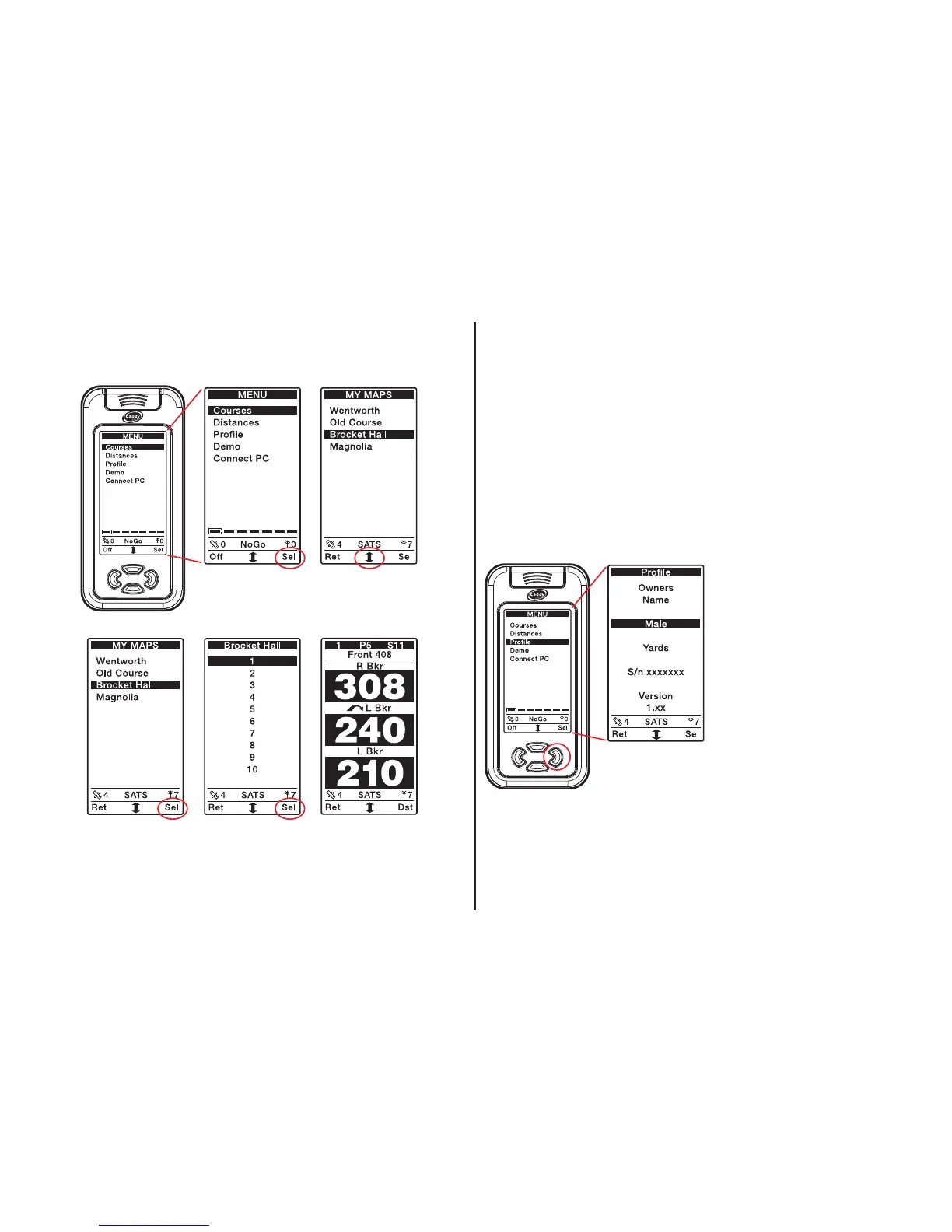
From the menu, select Profile.
Male or Female
To change from Male to Female press the right select button then
when Female is showing in the display press the left return button to
return to the menu screen.
Yards or Metres
To change from Yards to
Metres press the scroll button to
scroll down. Once yards is
highlighted press the right select
button then when Metres is
showing in the display, press the
left return button to return to
the menu screen.
Press the right
button to select
Courses
Scroll down the
course of your
choice
Press the right button
to select Hole 1 or
scroll down to select a
different hole
Press the right
button to select
the chosen course
Clip your Caddy
to the bag and
play golf!


 To Next Page