EasyManua.ls Logo

goliath BASIC LINE - Page 15

goliath BASIC LINE
66 pages
Print Icon
To Next Page IconTo Next Page
To Previous Page IconTo Previous Page
Loading...
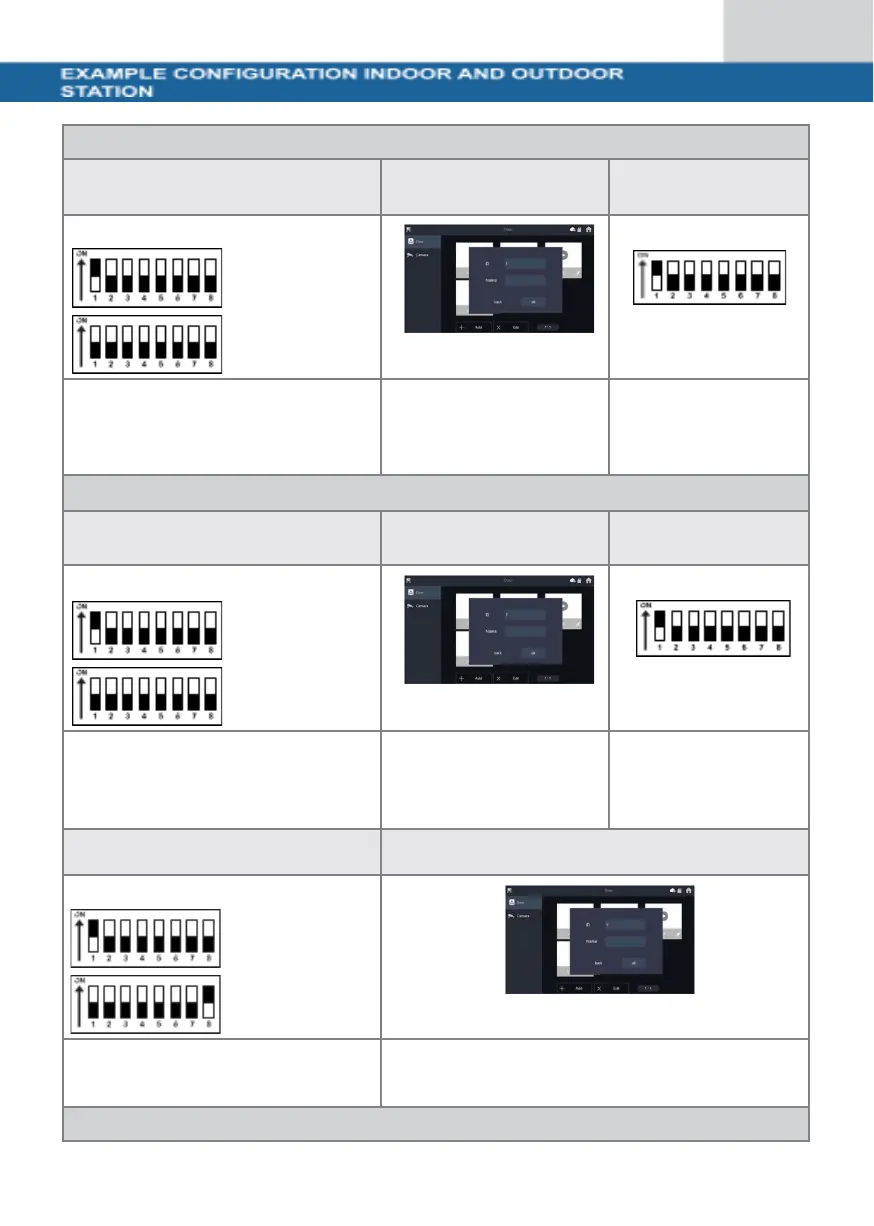
Configuration 1x indoor station and 1x door station
DIP switch indoor station
Indoor station settings
DIP switch door
station
Switch DIP switch 1 to the ON
position (top).
Click on
"Add" to assign a name
to the door station and
set the ID to 1.
Set the DIP-
Switch 1 to the
ON position
(up).
Configuration 2x indoor station and 1x door station
DIP switch indoor station 1
Indoor station settings
DIP switch door
station
Switch DIP switch 1 to the ON
position (top).
Click on
"Add" to assign a name
to the door station and
set the ID to 1.
Set the DIP-
Switch 1 to the
ON position
(up).
DIP switch indoor station 2
Indoor station settings
Switch DIP switch 1 and DIP
switch 16 to the ON position
(top).
Click on "Add" to assign a name to the door station
and the ID
to 1.
Configuration 3x indoor station and 1x door station