Alarm settings (Alarm)
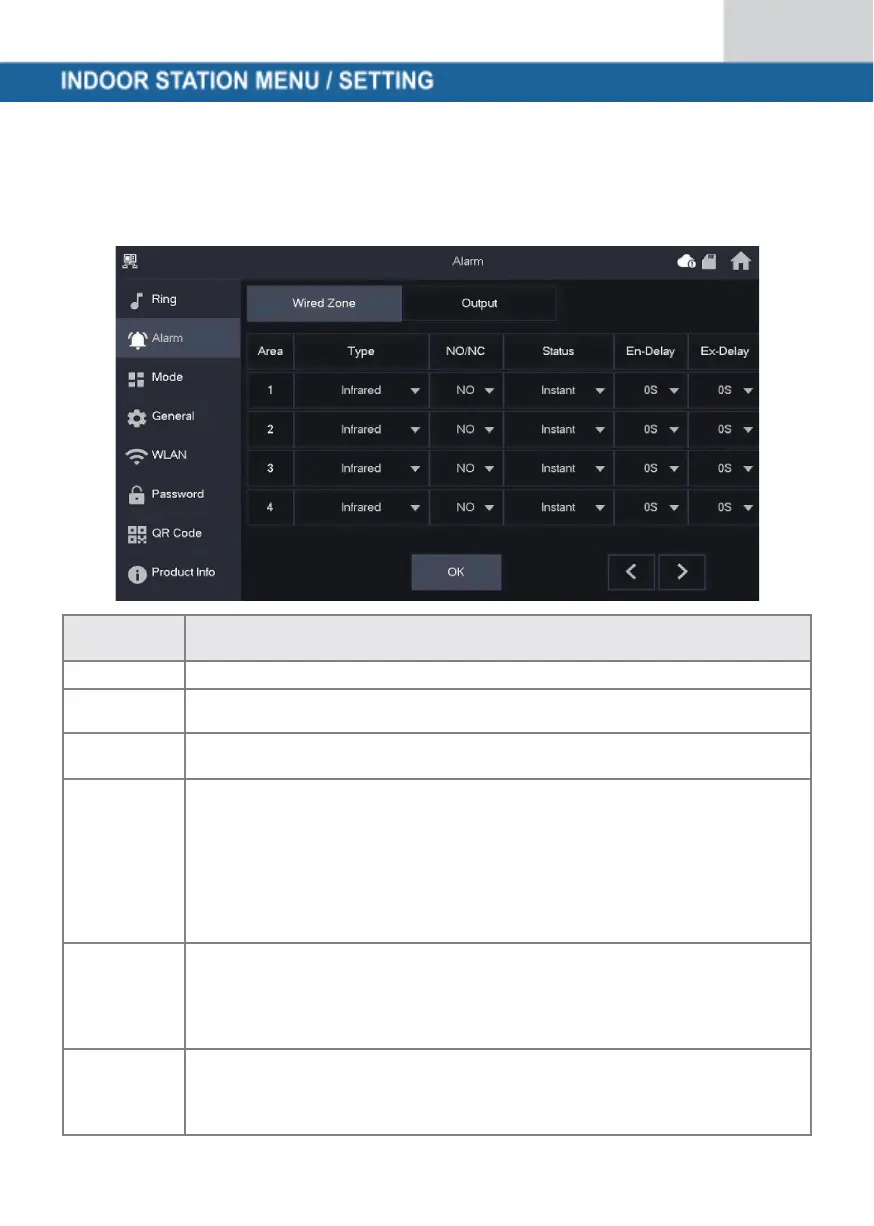
Wired zone (Wired Zome)
You can set the detector type, NO/NC, the alarm status and the input and output delay
Specify which type of detector is connected to this zone. For example:
Infrared motion detector, smoke detector, door contact, etc.
Choose between NO and NC. Which one you choose depends on the type
of detector
• Immediate alarm: The alarm is triggered immediately
• Delayed alarm: After the detector has triggered an alarm,
the alarm is triggered with a delay
• Bypass: Alarm in this zone is not triggered. After the alarm is disarmed
once, the zone is back in normal mode
• Remove: This zone is ignored and does not trigger an alarm
• 24 hours: An alarm is always triggered in this zone, regardless of
whether the alarm is armed or disarmed
After entering the delay time, entering an armed area within the delay period
from an unarmed area does not trigger an alarm with logic operation. An
alarm with linking is triggered when the delay time expires and the area is
not disarmed.
After arming, the time-delay alarm area will change to the armed status at
the end of the output delay.
If several areas define an output delay, the user interface will correspond to
the maximum delay time.


 To Next Page
 Loading...