Configuration Front-door station
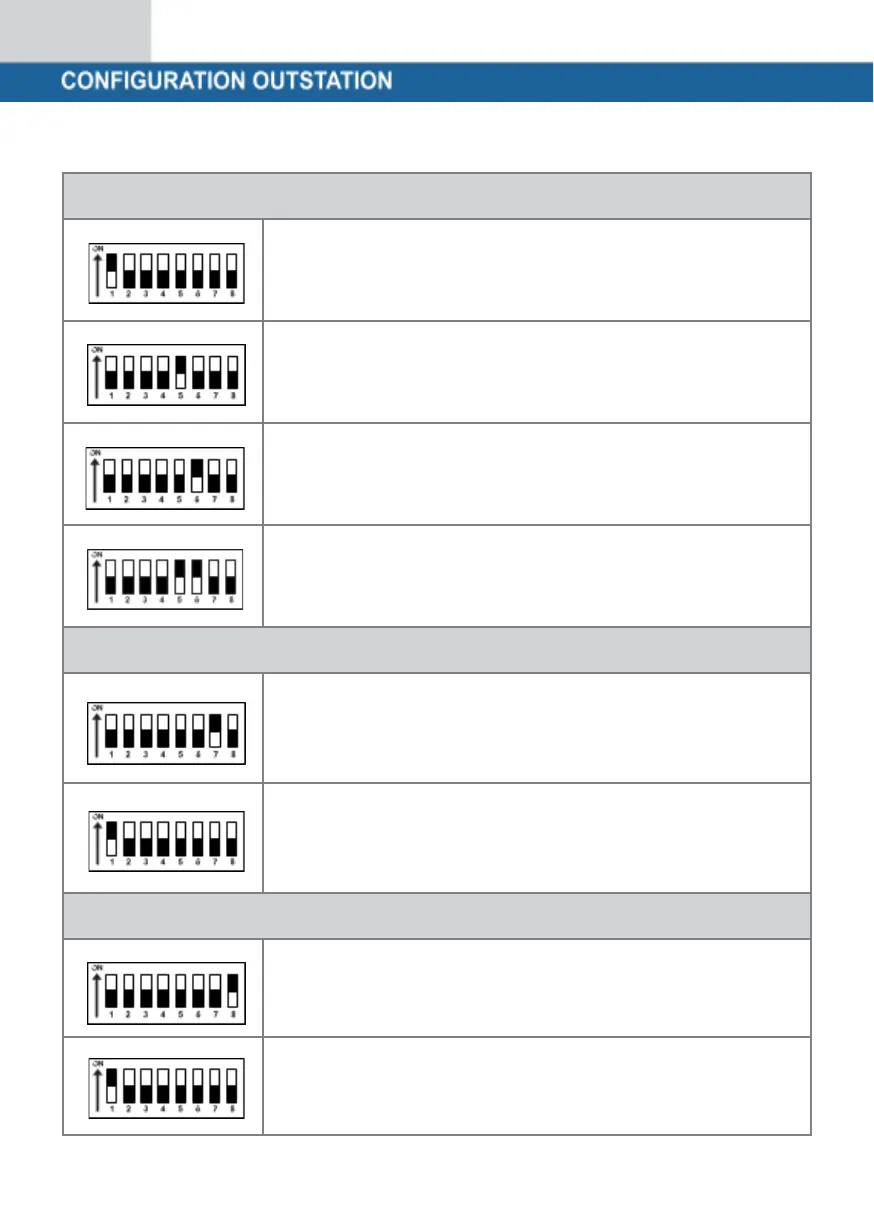
To set the opening time of your door opener to 2
seconds, switch DIP switches 5 and 6 to the OFF
position (down).
To set the opening time of your door opener to 4
seconds, switch DIP switch 5 to ON (up) and 6 to the
OFF position (down).
To set the opening time of your door opener to 6
seconds, switch DIP switch 5 to the OFF position
(down) and 6 to the ON position (up).
To set the opening time of your door opener to 2
seconds, switch DIP switches 5 and 6 to the ON
position (up).
Switch DIP switch 7 to ON (up),
to set NTSC as the video format.
Mainly used in the USA, Canada and Japan.
Switch DIP switch 7 to OFF (down),
to set NTSC as the video format.
Mainly used in Europe, China and Great Britain.
Setting the nameplate illumination
DIP switch 8 to ON (up):
Nameplate lighting is switched on
DIP switch 8 to OFF (down):
Nameplate lighting is switched off.


 To Next Page
 Loading...