BarkWise™ Complete Instruction Manual
Getting Started
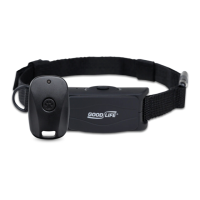
Included In Your Package
BarkWise™ Complete
AC Adapter
Nylon Strap
Remote Control
3. Choose Your Training Type(s)
BarkWise™ oers a combination of sound, vibration,
and remote control training. This is where you’ll choose
the options for your dog’s unique needs.
Many people like to start with an “UP-UP-DOWN”
conguration, as highlighted in the diagram in the
upper right corner of the page.
If you want to start with remote-only training, set
your switches to: DOWN-DOWN-DOWN.
NOTE: If you need help deciding, just give us a call or
send us a message. All contact info is at the end of this
guide.
BarkWise™ Control Panel
Power Jack
Bark Sensitivity Slider
Settings Control Panel
-
+
BARK SENSITIVITY
Setting REM
(Remote)
AUD
(Audio)
VIB
(Vibration)
Auto bark
detection ON
Remote activation
ON
Ultrasonic sound
ON
Audible sound OFF
Vibration OFF
Auto bark
detection OFF
Remote activation
ON
Ultrasonic sound
ON
Audible sound ON
Vibration ON
(up)
(down)
The bark sensitivity slider adjusts the unit’s sensitivity to your dog’s bark. Start by
setting the bark sensitivity slider to low. We recommend setting the slider above
the R in “BARK”. If the sensor is too high, the collar might activate too often which
can stress the dog and hinder training.
NOTE: Only raise the sensitivity level if the unit isn’t responding to your dog’s barking.
Be sure to give your dog time to acclimate to the collar. We recommend waiting 2–3
weeks before adjusting the settings.
Control Panel Conguration Conguration Options
2. Set the Bark Sensor
1. Charge it Up
Before getting started, charge your BarkWise™ for at least
2 hours. The blue LED will light up and remain on while
charging. Battery life lasts 12–24 hours depending on use.
Charge nightly for best results. This will also give your dog a
break from daily training.

 Need help?
 General

 To Next Page