5
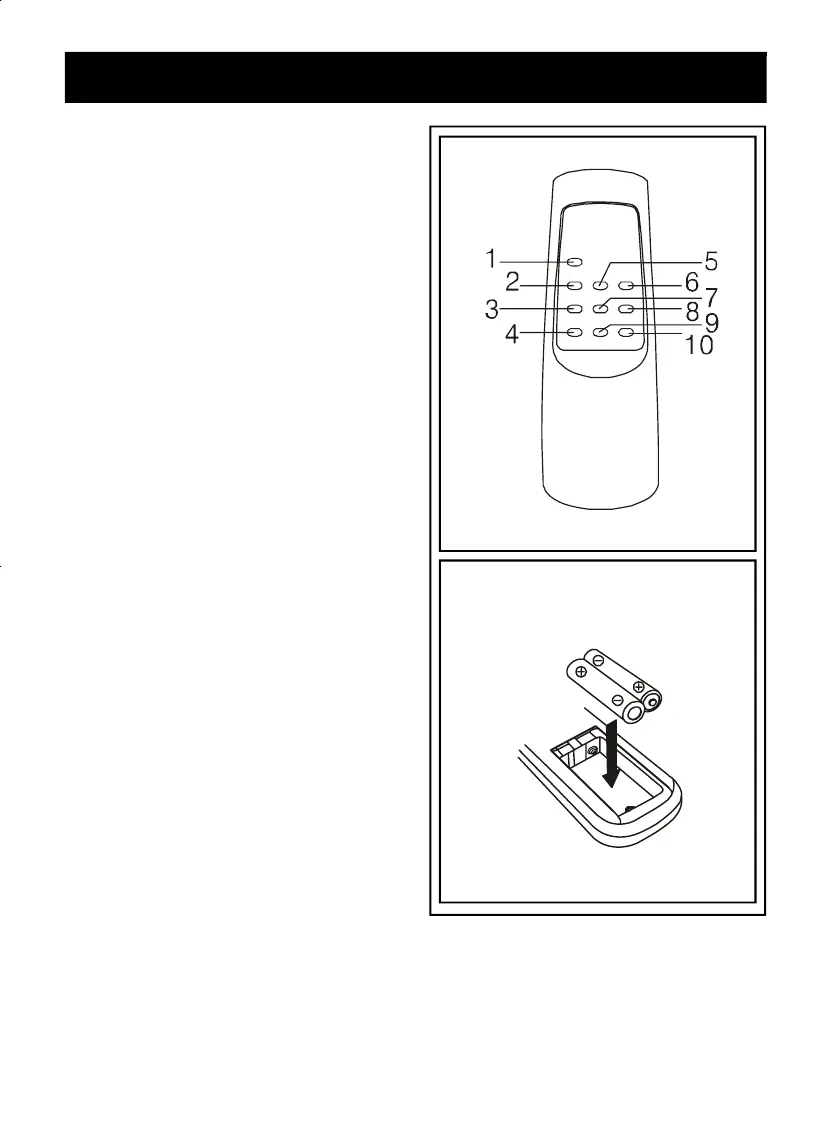
6. REMOTE CONTROL LOCATIONS
In stalli ng b atteries int o th e
rem ote con trol unit
1. Press down on the triangular mark of the
compartment cover, and slide the cover off
to open the compartment.
2. Ins ert 2 x A AA or LR03 batt eries in the
remote batt eries in the remote control
obs erv i ng to the pol ar it y m ar k ings ( " +"
and "-" ) ins ide the compartm ent and
on t h e batteries.
3. Place the cover over the compartment,
press down lightly, and push it upward
until it snaps on.
** BATTERIES NOT INCLUDED **
1. STAN D BY / AL/CD ST OP BUTTON
2. CD/PLAY/PAUSE BUT TON
3. FM/DAB BUTTON
4. MUTE BUTTON
5. SKIP DN / FR / SELECT DN BUTTON
6. SKIP UP / FF / SELECT UP BUTTON
7. SLEEP BUTTON
8. SELECT BUTTON
9. VOLUME DN BUTTON
10. VOLUME UP BUTTON



 To Next Page