
 Need help?
Do you have a question about the Goodmans VP2500-A and is the answer not in the manual?
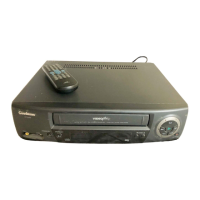
Essential safety guidance and key operational considerations for the video recorder.
Explanation of safety symbols and procedures to follow during power outages.
Overview of the video recorder's physical controls and how to use the remote.
Initial steps for setting up and operating the video recorder for the first time.
Setup instructions for televisions that do not have a Scart socket.
Setup instructions for televisions that have a Scart socket.
Guidance on resolving picture interference issues with the video recorder.
Procedure for the video recorder to automatically search and store TV channels.
How to start a recording and use the long play speed for extended recording time.
Using PDC and VIDEOplus+ codes for automated timed recordings.
Manually setting timers for recordings without using VIDEOplus+ codes.
Guidance on diagnosing and resolving common issues before contacting service.
 General
| Tape Standard | VHS |
|---|---|
| Remote Control | Yes |
| Tuner | Yes |
| Recording Speed | SP, LP |
| Inputs | Antenna |
| Outputs | Antenna, Composite video |
| Power Supply | 220-240V AC |
| Type | Video Cassette Recorder |

 To Next Page