10 11
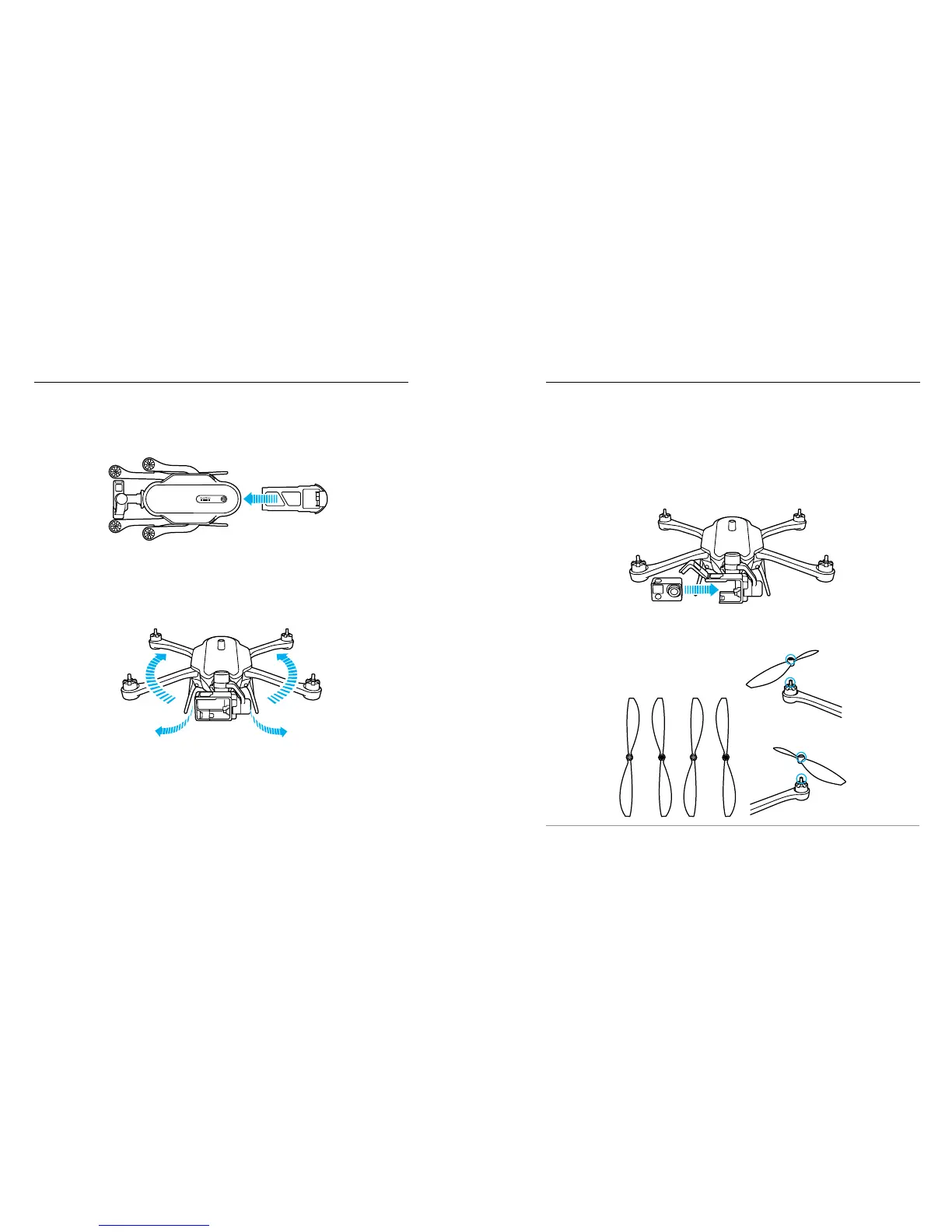
3. Open the harness and insert a camera (sold separately). The included
harness can be used with HERO4 Black, HERO4 Silver, HERO3+,
and HERO3 cameras. (A HERO Session harness is sold separately.)
Shouldn’t we be talking about the H5 Harness?
Note: Although the Karma battery powers both the drone and the camera, the
camera must contain a battery so that Karma is properly balanced.
4. Securely tighten the propellers. Propellers are color-coded to match the
correct motors.
PRO TIP: Replacement parts for Karma or its components are available
at gopro.com.
GETTING STARTED
ASSEMBLING KARMA
1. Insert the battery.
2. Unfold the landing gear and arms.
Note: To close the landing gear, pull the legs toward the back of the drone, then bend
them inward.
CHANGE TO
H5 HARNESS
CHANGE TO
H5 HARNESS
CHANGE TO
H5 CAM + HARNESS
GETTING STARTED





 To Next Page