12 13
GETTING STARTED
SETTING UP THE KARMA SYSTEM
The Karma controller contains everything you need to set up Karma and
control the drone during flight. In addition to flight data and safety info,
the controller contains an interactive flight simulator so you can practice
before Karma leaves the ground.
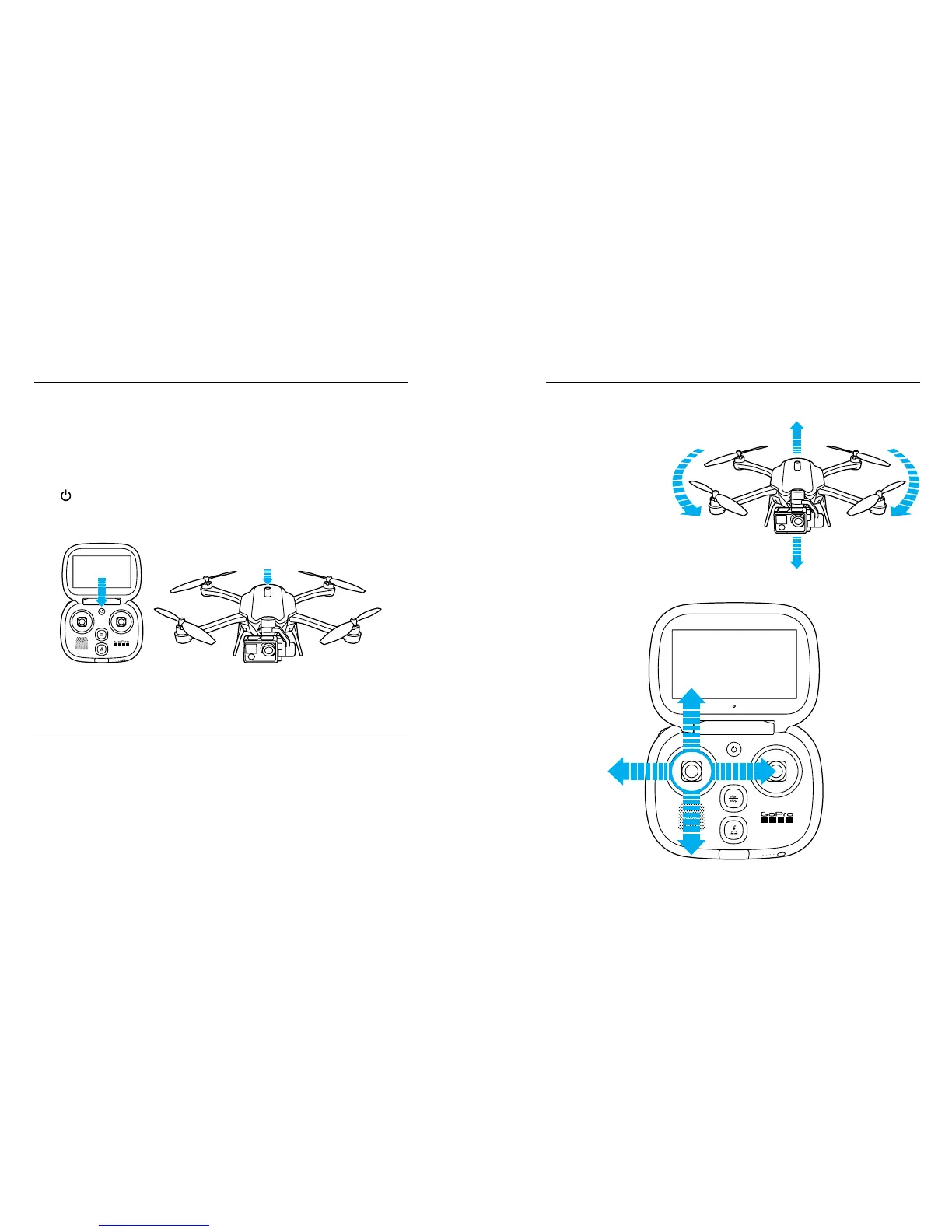
1. Power the controller, then power on the drone. The Power button
[ ] lights turn on. The orientation lights on the arms help you
identify the front and back of the drone during flight. The lights on
the front are green and those on the back are red.
2. Follow the on-screen instructions to set up your system and learn
how to fly.
PRO TIP: You can practice flying at any time with the flight simulator
on the controller. From the Home screen, tap Learn, then tap Practice
Flying.
GETTING STARTED
CHANGE TO
H5 CAM + HARNESS
CHANGE TO
H5 CAM + HARNESS
LEFT JOYSTICK
Fly Higher
Fly Lower
Rotate
Left
Rotate
Left





 To Next Page