14 15
GETTING STARTED GETTING STARTED
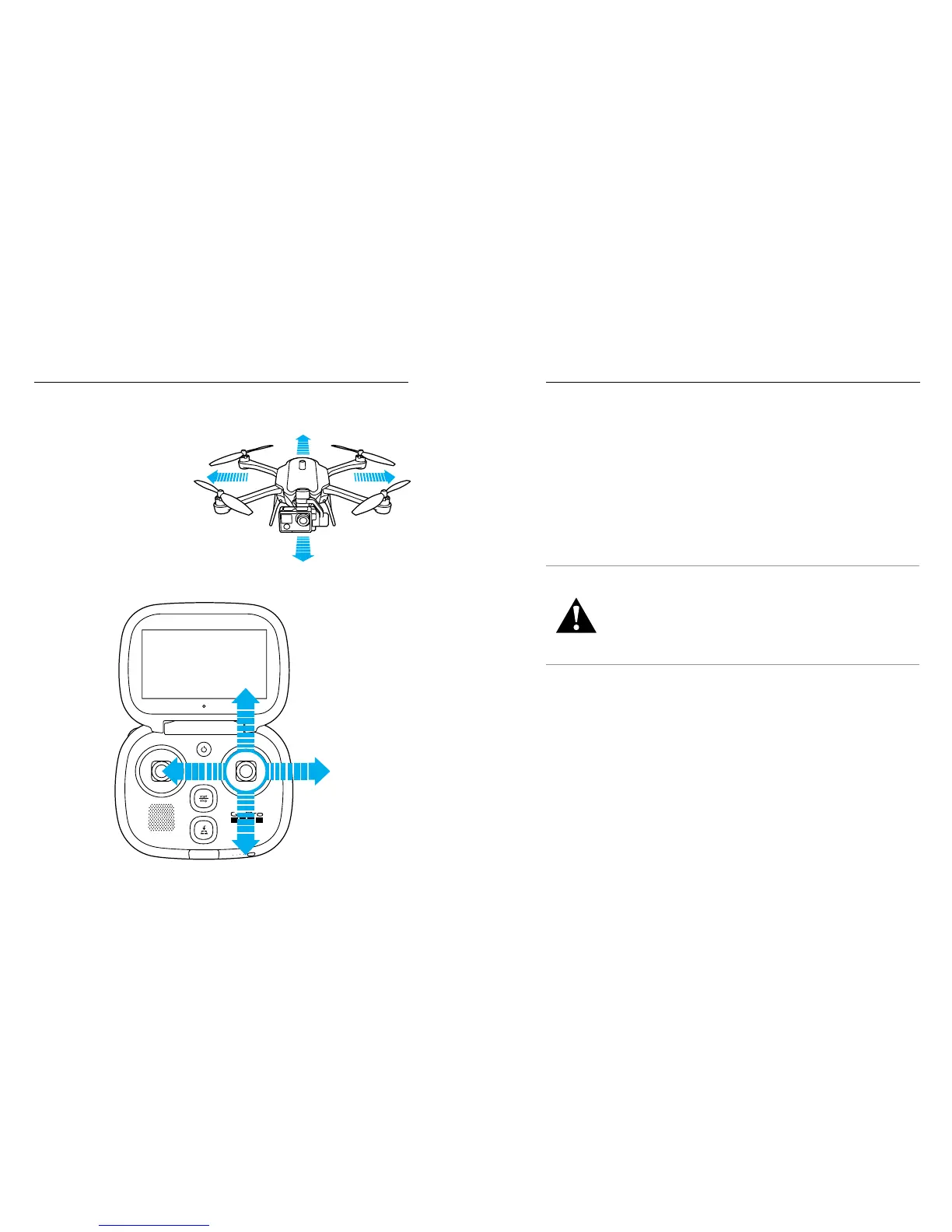
RIGHT JOYSTICK
Fly Forward
Fly Backward
Fly
Left
Fly
Right
KARMA AND YOUR HERO CAMERA
The controller directs both Karma and your HERO camera, so the
camera buttons are disabled when you use your camera with the drone.
In addition, the camera’s wireless is turned off, the camera uses Karma’s
battery, and a drone icon [ICON] appears on the camera status screen.
SOFTWARE UPGRADES
To get the latest features and best performance from your Karma
components, make sure you are using the most current software. The
controller automatically notifies you if a software upgrade is available
and provides instructions about how to download and install it.
WARNING: Abide by all local laws when using Karma and its
accessories. Depending on where you plan to operate Karma,
there may be restrictions on use in certain areas, such as
populated public sporting events, in connection with certain
activities, such as hunting, and in certain Wi-Fi frequencies,
such as countries using the 5 GHz Wi-Fi band. It is solely
your responsibility to comply with all local laws, regulations
and restrictions.
CHANGE TO
H5 CAM + HARNESS





 To Next Page