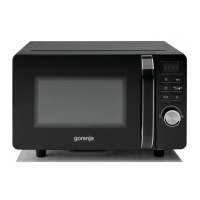
This document provides comprehensive instructions for the Gorenje MO-200 DCE-UR Microwave Oven, covering its installation, operation, safety guidelines, and maintenance.
Function Description
The Gorenje MO-200 DCE-UR is a versatile microwave oven designed for various cooking and defrosting tasks. It offers multiple cooking methods including microwave, grill, convection, and combination cooking, allowing for a wide range of culinary applications from quick reheating to baking and grilling. The appliance features an intuitive control panel and display window to facilitate easy programming and monitoring of cooking processes.
Important Technical Specifications
- Power Consumption: 1.3 kW.
- Safety Fuse: Protected by an internal protective fuse at 250 V, 8 A.
- Power Levels: Offers 5 microwave power levels (10%, 30%, 50%, 70%, 100%).
- Convection Temperatures: Features 5 convection temperature levels (140°C, 160°C, 180°C, 200°C, 220°C).
- Maximum Cooking Time: 60 minutes for most functions.
- Auto Defrost Weight: Maximum allowed weight for auto defrost is 2 kg.
- Combination Cooking Options:
- C-1: Convection (200°C) + Microwave (50%) - Ideal for roasting and baking.
- C-2: Grill (50%) + Convection (210°C) - For fast crisping.
- C-3: Grill (50%) + Microwave (50%) - For fast grilling.
- Ventilation Requirements: Requires 10 cm space at the back and 15 cm on both sides and the top for sufficient airflow.
- Earthing: The appliance must be earthed. Wiring colors are yellow-green for earth, blue for neutral, and brown for live.
Usage Features
Single Button Heating:
The oven can start cooking at 100% microwave power for 1 minute by simply pressing the "START/RESET" button once. To stop cooking before the time elapses, press "START/RESET" again.
Time Setting:
Cooking time can be set using the "10 min," "1 min," and "10 sec" buttons. The maximum cooking time is 60 minutes. For example, to set 12 minutes and 30 seconds, press "10 min" once, "1 min" twice, and "10 sec" three times.
Microwave Power Selection:
To cook at a lower microwave power level, press the "MICRO" button repeatedly until the desired power level (P 10, P 30, P 50, P 70, P 100) is displayed. Then set the cooking time and press "START/RESET."
Auto Weight Defrost:
This function allows defrosting food based on its weight. Press the "MICRO" button until the defrost function (dEF) is selected. Use the "10 sec" button for 0.1 kg increments and the "1 min" button for 1 kg increments to set the weight (up to 2 kg). Press "START" and the oven will automatically determine the defrosting time.
- Special Note for Defrosting: For unevenly shaped foods like chicken or meat cuts, frequent checking is recommended to prevent outer edges from cooking while the center is still frozen. Small pieces of aluminum foil can be used to cover cooking edges, ensuring the foil is at least 20 mm from the internal walls.
Grill Function:
The grill function (G-1) provides a crispy, golden crust. To activate, press the "MICRO" button seven times. Set the grilling time and press "START." During grilling, the microwave function is not active. Halfway through the grilling time, the oven will beep twice to remind you to turn the food over. If not turned, the appliance will resume cooking after a 1-minute delay. The maximum grilling time is 60 minutes. Initial use of the grill may produce slight smoke and an odor, which is normal and will dissipate.
Convection Cooking:
The oven can function as a convection oven with 5 temperature levels from 140°C to 220°C. Convection cooking preheats the oven cavity with hot air, allowing for conventional cooking. The fan operates during and after cooking until the heater cools down.
- Preheating: To preheat, select the desired temperature using the "MICRO" button and press "START." Once preheating is complete, the oven will beep. Then, place food, set the cooking time, and press "START."
- Special Note for Convection: Initial convection cooking times may be longer than conventional ovens. It is advised to note actual cooking times for best results.
Combination Cooking:
Three combination cooking options are available:
- C-1 (Convection + Microwave): 200°C convection + 50% microwave, ideal for roasting and baking.
- C-2 (Grill + Convection): 50% grill + 210°C convection, for fast crisping.
- C-3 (Grill + Microwave): 50% grill + 50% microwave, for fast grilling.
To use, press the "MICRO" button until the desired combination option (C-1, C-2, or C-3) is displayed. Set the cooking time and press "START."
Child Lock:
To prevent accidental use, activate the child lock by pressing and holding the "10 sec" and "1 min" buttons simultaneously for 3 seconds. A beep and a key symbol on the display indicate activation. To deactivate, repeat the process.
Start/Reset Button:
This button starts cooking for 1 minute at 100% microwave power with a single press. It also serves to cancel any operations. If programming issues arise, open the door and press "START/RESET" to clear all settings, and the display will show "0:00."
Maintenance Features
Cleaning:
- Always unplug the oven from the power supply before cleaning.
- Keep the oven cavity clean by wiping food or beverage particles with a damp cloth. Avoid aggressive or abrasive cleaning agents.
- Clean the external surface with a damp cloth and mild soap. Prevent water from seeping into functional parts or ventilation openings.
- Wipe the control panel with a soft, damp cloth. Do not use abrasive cleaners or sprays.
- If steam accumulates around the oven, wipe it with a damp cloth.
- Regularly clean the glass turntable in soapy water or with dishwashing liquid.
- Clean the roller ring and oven cavity floor regularly to prevent noise and ensure optimal performance. Use mild detergent, water, or glass cleaner. Ensure all components are correctly reinstalled after cleaning.
- To eliminate unpleasant odors, place a cup of water with lemon juice and zest in a deep dish, microwave for 5 minutes, then wipe the cavity with a soft cloth.
General Care:
- Do not operate the oven without the glass turntable and roller ring in place. Use only original accessories.
- Allow the turntable to cool before removing it for cleaning.
- For lamp replacement, contact a service center.
Troubleshooting (Normal Situations):
- Interference with TV/Radio: This is normal and similar to interference from other small appliances. Keep the oven away from aerials to minimize it.
- Dimming Oven Lights: When cooking at lower power levels, the oven cycles, causing the light to dim and possibly producing clicking noises. This is normal.
- Steam Accumulation/Warm Air: Steam and warm air from food are normal during cooking. Some steam may condense on cooler surfaces like the oven door.
- Oven Not Activating: Ensure the door is tightly closed and the timer knob is correctly set.
- Food Not Cooked/Overcooked/Undercooked: Check if the cooking time and power level were set correctly and if the door was closed.
- Cracking/Electrical Discharges: Check for metallic utensils, forks, or aluminum foil too close to the internal walls.
This Gorenje microwave oven is designed for household use only.

 Need help?
 General


 To Next Page