This document is the user manual for the GoSmartwatch Pro S9. It provides instructions for setup, usage, maintenance, and troubleshooting of the smartwatch.
Function Description
The GoSmartwatch Pro S9 is a high-performance smartwatch designed to provide a thoughtful and health-focused experience. It offers various functions including time display, notifications, alarms, heart rate monitoring, activity tracking (steps, calories, distance), and remote control features like camera shutter and music control. The smartwatch is intended to enhance daily life by providing convenient access to information and health data directly from the wrist.
Important Technical Specifications
While specific technical specifications like battery capacity, screen resolution, or exact sensor types are not detailed in the provided pages, the manual does mention compatibility requirements for mobile phones. The smartwatch requires a mobile phone running Android 5.1 or iOS 8.0 or above, and Bluetooth 4.0 or above for proper functionality and binding with the companion application. The recommended application for binding and managing the smartwatch is "Da Fit". The heart rate monitoring feature is highlighted, though a warning states that the smartwatch should not be used for any medical purpose despite its dynamic real-time heart rate monitoring capability.
Usage Features
Power-on: To power on the smartwatch, users need to long-press the side button for 3 seconds or plug it into the charging clamp.
APP Download and Binding:
- Download: Users can download the "Da Fit" app by scanning a QR code provided in the manual. For iOS systems, the app can be found by searching "Da Fit" in the App Store. For Android systems, it can be downloaded from Google Play.
- Binding:
- Open the "Da Fit" app.
- Click on "Add Device".
- Select the "GS Pro S9" from the scanned device list.
- Once selected, the smartwatch will be successfully bound to the mobile phone.
Smartwatch Functions (Power-on Status): The manual illustrates various menu interfaces accessible from the main screen, indicating a range of functionalities. These include:
- Watch Faces: Multiple watch face options are available for customization.
- Notifications: Displaying alerts and messages from the connected mobile phone.
- Alarms: Setting and managing alarms.
- Heart Rate Monitoring: Real-time heart rate measurement, indicated by a "HIGH HEART RATE" alert and a numerical reading (e.g., 120 BPM).
- Activity Tracking: Displaying daily steps, calories burned, and distance (e.g., 335KCAL, 12.66KM, 90 steps).
- Training/Workout Mode: A dedicated interface for tracking workout sessions, showing duration and possibly other metrics (e.g., 00:30:00, 80).
- Music Control (NOONLIGHT): Controls for playing, pausing, and skipping music tracks on the connected phone.
- Shutter: Remote control for the mobile phone's camera.
- Other Features: General settings and additional functionalities.
Remove Device:
- Android: Disconnect the smartwatch by simply clicking "remove device" within the "Da Fit" app.
- Apple (iOS): After removing the device from the app, users must go to "Settings" > "Bluetooth" on their iPhone, click the symbol on the right next to the smartwatch's name, and choose "Ignore This Device" to completely unbind it.
Maintenance Features
The manual emphasizes several key tips for maintaining the smartwatch to ensure its longevity and proper functioning:
- Regular Cleaning: Clean the smartwatch regularly, paying special attention to its inner side, and ensure it remains dry.
- Adjust Tightness: Adjust the smartwatch's tightness on the wrist to ensure proper air circulation, which can help prevent skin irritation and ensure accurate sensor readings.
- Avoid Excessive Skincare Products: Do not use excessive skincare products on the wrist where the smartwatch is worn, as these could potentially damage the device or interfere with its sensors.
- Cease Wearing for Skin Allergy/Discomfort: If skin allergy or any discomfort occurs while wearing the smartwatch, users should immediately cease wearing it.
Frequently Asked Questions (FAQs)
The manual addresses common issues users might encounter:
Why does the smartwatch disconnect Bluetooth automatically when the Android screen goes out?
This issue can be resolved by:
- Locking background APP: Ensure the "Da Fit" app is locked in the background. If the app's process is cleared, the smartwatch will disconnect.
- Setting APP self-startup: Configure the "Da Fit" app to self-start.
- Unrestricted background operation: Android phones often restrict background app operations by default. Users should manually set the "Da Fit" app to operate without restrictions in the background.
Why the smartwatch cannot receive message push?
To troubleshoot this:
- Confirm message push switch in Da Fit APP: Verify that the message push switch is turned on within the "Da Fit" app settings.
- Confirm messages display normally in mobile phone notification bar: The smartwatch reads messages from the mobile phone's notification bar. If messages do not appear in the phone's notification bar, the smartwatch will not receive them. Users need to check their phone's notification settings and ensure notification switches for apps like Facebook, Twitter, call, SMS, and other mobile phone clients are turned on.
- Turn on "Notification use right" on mobile phone: Go to the mobile phone's "Settings", search for "Notification use right", and re-open "Da Fit" to grant necessary permissions.
Why can't take a hot bath with the smartwatch?
Taking a hot bath with the smartwatch is not recommended because:
- Hot bath water generates a lot of vapor.
- This vapor consists of small molecular radius gas-phase particles that can easily infiltrate the smartwatch through shell gaps.
- When the temperature drops, the vapor condenses into liquid-phase droplets inside the smartwatch.
- These droplets can cause short circuits, damaging the circuit board and ultimately the smartwatch.

 Need help?
 General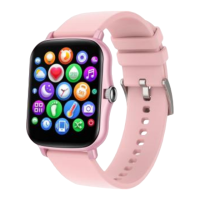

 To Next Page