GOST Phantom – Installation + Programming Guide
support@gostglobal.com or (954) 565-9898 12
“03-Outputs”
The term output is used to describe any type of relay
control the GOST Phantom is using. The GOST Phantom has
three options to trigger outputs, the onboard hardwired to drive
relay, the GMM-RLYZ1, and the GMM-IP67-RLYZ1.
Any of these three options can be programmed to toggle to its
opposite state when a specific event has occurred onboard.
For example, an Output can be used to activate external
sirens, pulse deck lights, turn on ice makers, and much more.
The GMM-RLYZ1 and GMM-IP67-RLYZ1 communicate
wirelessly to the GOST Phantom. The hardwired Outputs on
the back of the GOST Phantom can trigger an external 12V
relay if wireless connection is not needed. The system can
support up to a total of eight Outputs, all of which must be
programmed to follow certain events. Thoroughly review the
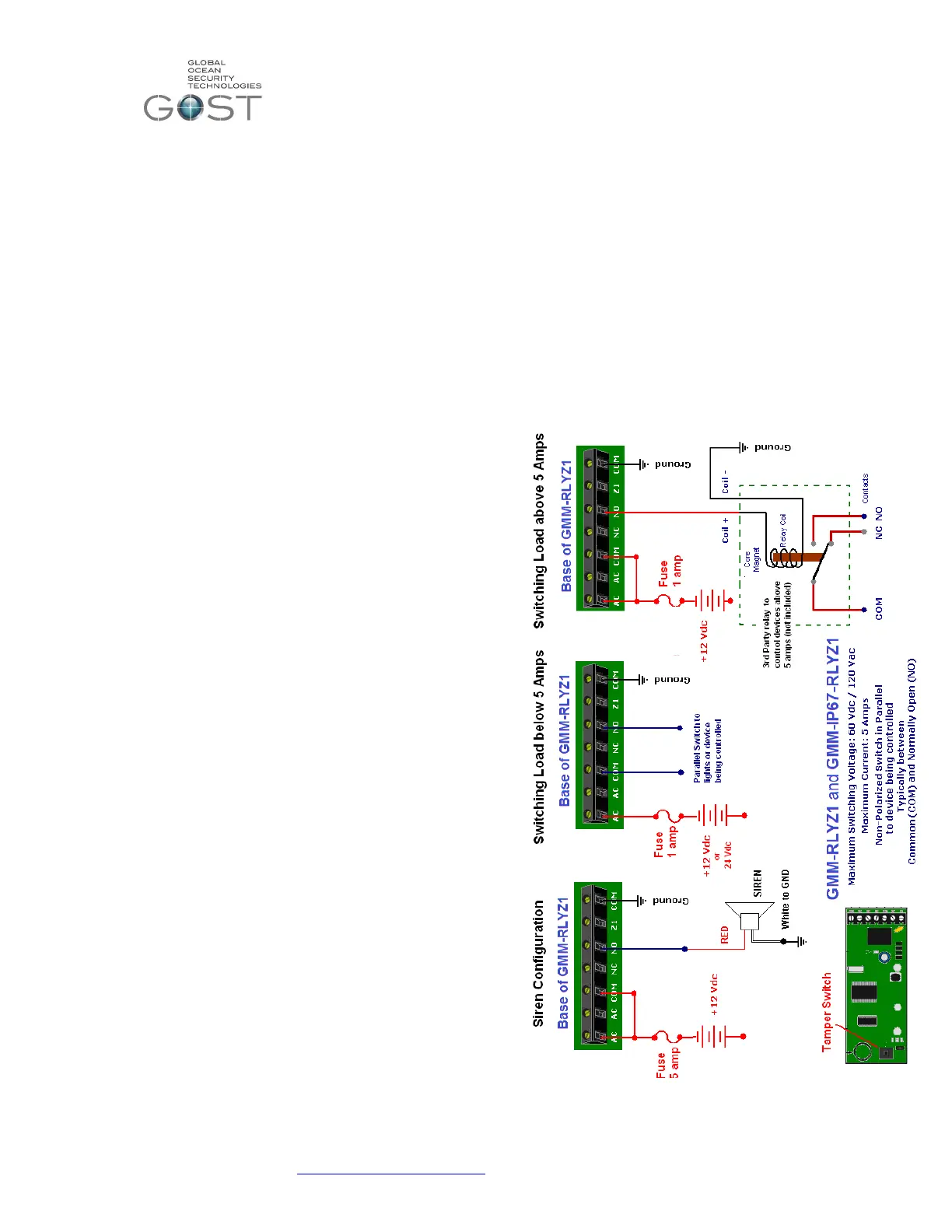
Wireless Output wiring diagram included with the GMM-
RLYZ1or in Figure 11 below. Before hooking up and
programming the output, it is important to understand the most
common activation event definitions.
Remote Access- This event allows the Output to
activate from a remote control button on the key fob remote.
The user can have the PGM toggle on and off from this button
or even have timing cycle of 1, 5, 15, or 30 seconds/ minutes.
This event is also a secondary option with every Output event.
This comes in handy if you want to be able to have the cockpit
lights “Pulse on Alarm” and still be able to turn the lights on
through the remote as a convenience when
boarding/deboarding the boat. Before programming the Output
to activate on a button, at least one key fob remote must be
programmed to the system (see User Profile).
Follow Bell- This event allows the Output to
activate following the Bell cut-off delay. The bell cut-off delay is
the amount of time that the internal 90 decibel siren of the
GOST Phantom will sound before shutting off. The event
scares away would be thieves while shutting off after a period
of time as to not annoy your fellow dock mates. The unit stays
in alarm and will re-initialize if a zone is breached again. By
default, the bell cutoff delay is four minutes
Alarm activation- This event allows the Output to activate
upon alarm in a variety of ways.
Follow Alarm- The Output will activate for the
entire duration while in alarm. The only way to deactivate
the Output is by disarming the system via key pad, key fob,
or phone.
Pulse on Alarm- The Output will activate on (1sec.) and off
(1 sec.) pulsing for the entire duration while in alarm.
Timed Duration- The Output will activate for an
established period of time and then deactivate once the
time is elapsed. The PGM can be programmed to come on
for 1, 5, 15, or 30 seconds/minutes.
Zone activation- The Output will activate whenever a specific
zone(s) opens. The Output can stay on the entire time the
zone is opened or for a set time frame of 1, 5, 15, or 30
seconds/minutes. The installer can specify all zones or
particular zones to activate the Output. Common examples of
this are interior lights that may come on when a certain door
zone is opened.
Follow arm- The Output will activate whenever the system is
armed. Common examples of triggered devices may be visible
red LEDs on the exterior of the vessel to alert users of armed
status.
Follow stay arm- The Output will activate whenever the
system is stay armed. Common examples of triggered devices
may be interior lamps that come on inside the salon.
Custom setup- The Output can be programmed to
activate/deactivate from a variety of specific events from user 5
disarming to a low battery on zone 7. This feature is for
experienced installers only.
Figure 11


 To Next Page
 Loading...