GOST Phantom – Installation + Programming Guide
support@gostglobal.com or (954) 565-9898 11
Delay 1/ Delay 2 When armed, Allows default 45
seconds to board boat interior and
disarm at panel
Instant When armed, alarms instantly on the
zone opening
Follow Full Arm When fully armed, follows delay zone
timer, goes off instantly when no entry
delay engaged, and disables when
stay or sleep arming.
Instant/ stay When armed, alarms instantly and
disables when staying.
24 Hr buzzer Buzzer alarm 24/7 on opening
Delay fire 80 second Delay on breach before
alarm (24/7)
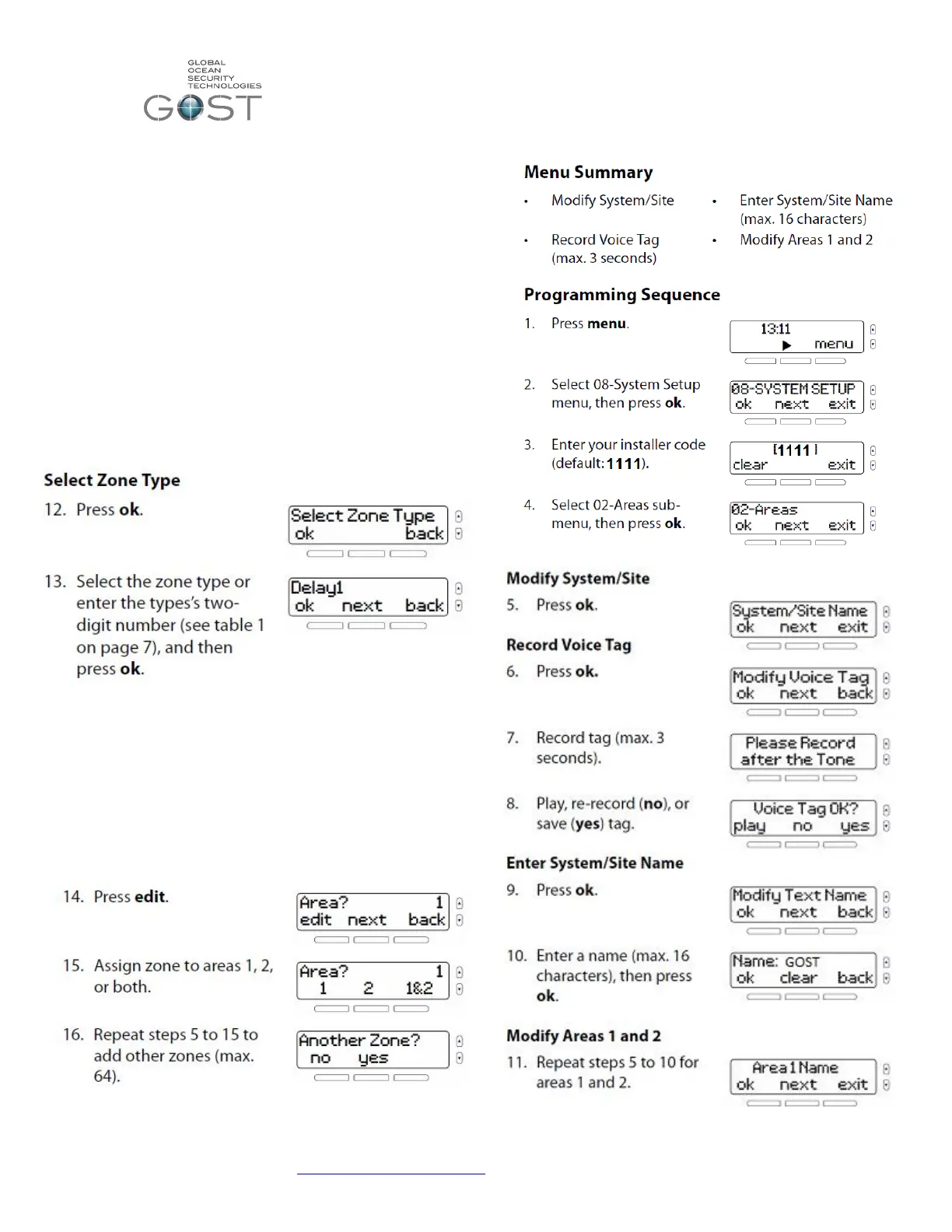
Assigning Zones to Areas
An “Area” of the GOST Phantom can also be described as a
partition. The GOST Phantom has two partitions. This feature
allows two independent areas of the boat to be armed and
disarmed. An example of this would be when an owner wants
to keep the living quarters aboard his boat independent of the
Engine room, Utility areas, and Crew Quarters of the vessel.
Thus allowing them to disarm the access areas while still
securing their primary cabin. In most instances, the GOST
Phantom will only need one area to arm, however the option is
there to keep two independent areas.
“02-Areas”


 To Next Page
 Loading...