9、Negative Ion Purification Function: When the " " icon is illuminated, it indicates that the negative ion
purification function is activated.
10. Defrost function, when it is recognized that the machine condensate sheet is frosted, the product will
automatically start the defrost function, and the“ ” defrost icon will light up.
11. Power off when the water tank is pulled out. There is a built-in smart switch, which can sense the water tank
being pulled out and then power off.
12. Memory function: restart after shutdown (standby state), the default dehumidification mode and light are the
same before shutdown.
13.WIFI operation guide.
a. Press and hold the mode button “ ” for about 3 seconds to trigger the network configuration mode. The WiFi
indicator will blink.
b. The network buzzer will sound upon successful connection, and the WiFi indicator will remain lit to indicate a
successful network connection.
c. The app has the same functions as the power, mode, light, and timer buttons, as well as the ability to view
humidity, but does not have the function of triggering the network configuration mode by pressing and holding the
mode button.
WATER TANK PULL INSTRUCTIONS
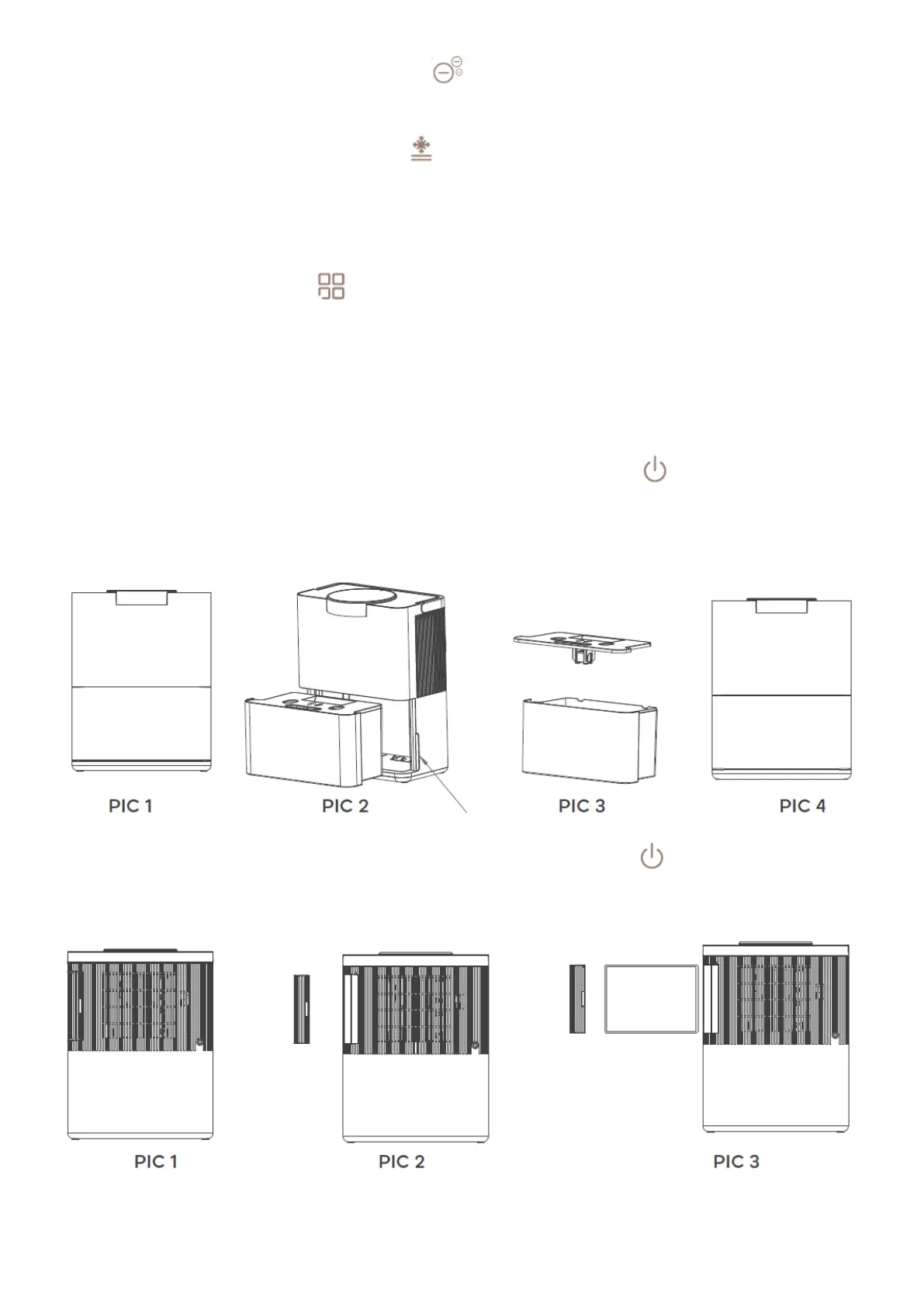
1. Before taking out the tank, please shutdown the machine by pressing switch key In the shutdown state, put
the product in front of you and do not move it, as shown in PIC 1.
2. Pull out the water tank(pull from both sides), as shown in PIC 2.
3. After opening the water tank cover, pour out the water, as shown in PIC 3.
4. Put the water tank cover back and push the water tank back, as shown in PIC 4.
FILTER EXTRACTION INSTRUCTIONS
1. Before taking out the tank, please shutdown the machine by pressing switch key . In the shutdown state, put
the product in front of you and do not move it, as shown in PIC 1.
2. Tighten the handle of the filter element cover behind the water tank with your hand, as shown in PIC 2. 3.Pull
out the drawer box and replace the HEPA filter, as shown in PIC 3.
PRODUCT CLEANING AND MAINTENANCE
Before cleaning and maintenance, please confirm that the power plug is unplugged and the power is off.
1. For surface cleaning, please use a neutral reagent to wipe the body, and clean the water tank separately after
taking it out.


 To Next Page
 Loading...