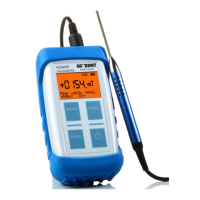
Gaussmeter HGM09s Operating Instructions
Chapter 1
Page 3 / 75
Tab
TabTab
Table of Contents
le of Contentsle of Contents
le of Contents
1
Safety Instructions 5
1.1 Safety Instructions for the Device 5
1.2 Safety Instructions for the Measuring Probes 6
1.3 Safety Symbols 6
2
Brief Introduction 7
2.1 Preparing a Measurement 7
2.2 Running a Measurement 7
2.3 Measuring Unit 8
2.4 Selecting the Measuring Range 8
2.5 Display 9
2.6 Status Display 9
3
Gaussmeter Function 10
3.1 The Hall Effect 10
3.1.1
Linear Properties of the Hall Probe 10
3.1.2
Non-linear Properties of the Hall Probe 11
3.2 Measurement Details 13
3.2.1
Sample Measurement with an NdFeB Magnet 13
3.2.2
Remanence and Hall Gaussmeter
Measurement 14
3.2.3
Accuracy Based on Positioning and Direction 15
3.2.4
External Static Magnetic Fields 16
4
Control Elements and Connections 17
4.1 Front Side Overview 17
4.2 Ports Overview 17
4.3 Power Supply 18
4.4 Batteries 18
4.4.1
Charging the Batteries 19
4.5 Probe Connection 20
4.6 USB Interface 20
5
Operation 21
5.1 Keyboard 21
5.2 Display 22
5.3 Status Display 22
5.4 Switching on/off 24
5.5 Null 24
5.6 Measuring Range 25
5.6.1
Overview Measuring Ranges 25
5.7 Measuring Unit 26
5.8 DC/AC Field Measurements 26
5.8.1
DC Field Measurements 27
5.8.2
AC Field Measurements 28
5.9 Peak Value Measurement 30
5.9.1
Normal Peak Value Recording 30
5.9.2
Fast Peak Value Recording 31
5.10 Probe Data 33
6
Setup Menu 34
6.1 Settings 35
6.1.1
Operating Mode of the USB Interface 35
6.1.2
Selecting the Display Units 35
6.1.3
Operating Mode of the Peak Value Recording 36
6.1.4
DC/AC Field Measurement 36
6.1.5
Range Selection 37
6.1.6
Polarity Display (North/South) 37
6.1.7
Switching off the Device 37
6.1.8
Charging the Batteries 38
6.1.9
Brightness of Display Illumination 38
6.1.10
Display Contrast Adjustment 38
6.1.11
Version Remarks 39
7
Serial Interface 40
7.1 Introduction 40
7.2 Connecting the Gaussmeter to a Computer 41
7.2.1
Connector Plug 41
7.3 Direct Operation on the Computer 41
7.3.1
Example Normal Measuring Mode in Excel
42
7.3.2
Example Fast Peak Value Mode in Excel
42
7.3.3
Example Slow Peak Value Mode in Excel
42
7.4 Operation via Interface 43
7.4.1
Installation on the Computer 43
7.4.2
USB Interface Data Format 43
7.4.3
Character Set 43
7.4.4
Introduction to the SCPI Language 43
7.4.5
SCPI Data Types 45
7.4.6
The SCPI Status Model 48
7.5 Summary of SCPI Commands 51
7.5.1
Control Commands 51
7.5.2
Main Commands 51
7.5.3
Peak Value Functions 51
7.5.4
Probe Functions 52
7.5.5
Parameters 52
7.5.6
Device Functions 52
7.6 Explanation of the Individual SCPI Commands 53
7.6.1
Control Commands 53
7.6.2
Main Commands 57
7.6.3
Peak Value Function 60
7.6.4
Probe Functions 62
7.6.5
Parameters 63
7.6.6
Device Functions 67
8
Unit Conversion Table 69
9
Technical Data 70
10
Declaration of Conformity 72
11
Warranty and Copyright 73
12
Index 74


 To Next Page
 Loading...