Need help?
Do you have a question about the Gourmia GAF1230 and is the answer not in the manual?
Explains the polarized plug design and its use to reduce electric shock risk.
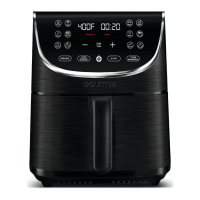
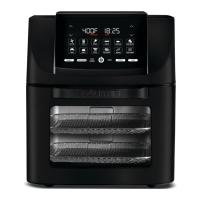
Overview of the air fryer's display and control panel interface, including buttons and indicators.
Explains how to enable/disable turn reminder and preheat features for guided cooking prompts.
Step-by-step guide for using preheat, turn reminder, and managing cooking during operation.
Instructions for stopping, canceling, resuming, and safely turning off the air fryer after use.
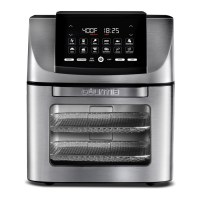
The Gourmia GAF1230 is an all-in-one air fryer designed for household use, offering a versatile range of cooking functions to prepare nutritious and delicious meals. This appliance is engineered for ease of use, featuring a digital display and control panel that allows users to manage temperature, time, and various cooking presets.
The Gourmia GAF1230 serves as a multi-functional cooking appliance, capable of air frying, baking, roasting, broiling, dehydrating, reheating, and keeping food warm. It utilizes rapid air circulation technology to cook food evenly and achieve a crispy texture with little to no oil, making it a healthier alternative to traditional deep frying.
The air fryer comes equipped with several pre-programmed settings for common dishes, including Air Fry, Fries, Wings, Bacon, Seafood, and Vegetables. These presets automatically adjust the temperature and time to optimal levels for each food type, simplifying the cooking process. Users also have the flexibility to manually set the temperature and time using dedicated controls, allowing for customized cooking.
A notable feature is the "Preheat" function, which ensures the air fryer reaches the desired temperature before food is added, contributing to more consistent cooking results. The "Turn Reminder" is another helpful feature that prompts users to turn or toss their food halfway through the cook time, promoting even browning and crispiness. Both "Preheat" and "Turn Reminder" can be enabled or disabled depending on the recipe and user preference.
For specialized cooking, the Gourmia GAF1230 includes a rotisserie spit, forks, and a lift tool, enabling users to roast whole chickens or other large cuts of meat with a rotating motion for uniform cooking. The "Rotate" function on the control panel activates this rotisserie mechanism.
The appliance also features a "Stop/Cancel" button to pause or end cooking, and a "Light" button to illuminate the interior, allowing users to monitor the cooking progress without opening the door. The display provides clear indicators and notifications, such as "PREHEAT," "Add Food," "Turn Food," and "End," guiding users through each stage of the cooking process.
Operating the Gourmia GAF1230 is straightforward. After placing the air fryer on a stable, heat-resistant surface and plugging it in, users turn on the appliance via the power icon. They can then select a desired preset or manually adjust the temperature and time. The display shows the current temperature and remaining cook time.
The "Preheat" function, when enabled, will display "PREHEAT" and begin heating. Once preheated, "Add Food" will appear, signaling that it's time to open the door and carefully place the food inside. If "Preheat" is disabled, users can place food inside immediately after setting the cooking parameters.
The "Turn Reminder" feature, when active, will beep and display "Turn Food" halfway through the cooking cycle. Users are instructed to open the door, carefully remove and turn/toss the food, and then return it to the air fryer to resume cooking. The cook time continues even if the food is not removed immediately.
The rotisserie spit is designed for easy assembly and use. Food is secured onto the spit with forks, and the spit is then inserted into the rotisserie gear on the left wall and rested on the hook on the right wall of the air fryer. The "Rotate" function is tapped after starting the cook cycle to activate the rotisserie.
The air fryer's door can be opened during cooking to check on food, and closing it will automatically resume the cooking process. To completely stop cooking, the "Stop/Cancel" button is pressed twice. The appliance can be turned off by pressing and holding the power icon.
For optimal results, the manual suggests using an oil mister or spray bottle with regular cooking oil for crispier food, rather than cooking spray, which may damage accessories. It also provides tips such as checking food for doneness a few minutes before the cook time elapses, ensuring raw proteins reach food-safe temperatures, and preheating only for the first batch when cooking multiple batches consecutively.
Maintaining the Gourmia GAF1230 is crucial for its longevity and performance. The manual emphasizes cleaning the air fryer after every use. Before cleaning, the appliance must be unplugged from the outlet and allowed to cool down completely.
The accessories, including the rotisserie spit, forks, lift tool, and air fry baskets, are top-rack dishwasher safe. For these parts, hot water, dishwashing liquid, and a non-abrasive sponge are recommended for thorough cleaning. The inside of the air fryer can be cleaned with hot water, dish soap, and a cleaning brush to remove any food residue. The outside of the unit should be wiped with a moist cloth.
Important safety guidelines for maintenance include never immersing the cord, plug, or the entire air fryer in water or any other liquid. Metal kitchen utensils or abrasive cleaning materials should not be used, as they can damage the unit or its accessories. After cleaning, all parts must be completely dry before the air fryer is used again.
For storage, the appliance should be unplugged and cooled, all parts cleaned and dried, and then stored in a clean, dry place. The manual also provides troubleshooting tips for common issues, such as the air fryer not working, ingredients not cooking, or food frying unevenly, offering solutions like checking the plug, adjusting temperature/time, or shaking/turning food.
The Gourmia GAF1230 is designed to be a reliable and convenient kitchen appliance, with clear instructions for both operation and care to ensure a positive user experience.
 General
| Model | GAF1230 |
|---|---|
| Type | Air Fryer |
| Control Type | Digital |
| Pre-Set Programs | 8 |
| Timer | 60 minutes |
| Color | Black |
| Dishwasher Safe Parts | Yes |
| Non-slip Feet | Yes |
| Cool-touch Handle | Yes |
| Temperature Range | 400°F |
| Cooking Functions | Air Fry, Bake, Roast, Reheat |
| Material | Plastic |

 To Next Page