The Govee Smart Meat Thermometer, model H5181, is a device designed for precise temperature monitoring of food, particularly meat, during cooking. It offers both on-device controls and integration with the Govee Home app for enhanced functionality and remote monitoring.
Function Description:
The primary function of the H5181 is to measure the internal temperature of food using a probe and display it on its screen. It allows users to set target temperatures and provides alerts when the food reaches the desired temperature. The device also supports Bluetooth connectivity, enabling real-time temperature monitoring and alert notifications via a smartphone app. It is suitable for various cooking methods, including oven use, and helps ensure food is cooked to a safe and desired doneness.
Important Technical Specifications:
- Model: H5181
- Bluetooth Distance: Up to 70m (in an open environment)
- Battery: AAA battery (2 included)
- Probe Accuracy:
- ±1°C/±1.8°F (0° to 150°C/32° to 302°F)
- ±2°C/±3.6°F (150° to 300°C/302° to 572°F)
- Volume: 80dB (in 10cm distance)
- Probe Measure Range: 0° to 300°C / 32° to 572°F
- App Compatibility: iOS 8.0 (or above) or Android 4.3 (or above)
- FCC Compliance: Part 15 of the FCC Rules, Class B digital device. Requires minimum 20cm separation between radiator and body for FCC radiation exposure.
Usage Features:
- Temperature Detection:
- Clean the probe and insert it into the meat, considering the type of meat being cooked.
- Insert the probe cable into the probe port on the thermometer.
- Long press the orange button for 3 seconds to power the device On/Off.
- The internal temperature of the food will display as "MEAT TEMP."
- Alert Setting:
- Press the "TEMP" button to enter Alert Setting mode; the "SET TEMP" icon will blink.
- Use the "-" or "+" buttons to set the target temperature.
- Press the "TEMP" button again to complete the setting.
- An alarm will sound when the food reaches the preset temperature. If connected to the Govee Home app, an alert notification will also be received.
- Press any button on the thermometer to turn off the alarm.
- Long press the "TEMP" button to reset the alert.
- Backlight:
- Press the orange button to turn on the backlight. It will automatically dim after 10 seconds.
- Govee Home App Integration:
- Download the Govee Home app from the App Store or Google Play.
- Enable Bluetooth on your smartphone.
- Open the app, tap the "+" icon, and search for "H5181."
- Follow on-screen instructions to complete pairing.
- Temperature Monitoring (App): Access a real-time remote view of current food temperatures. Bluetooth range is up to 70m in an open environment. Food temperature charts are generated within 2 hours (cannot be saved or downloaded).
- Alert Preset (App): Recommended preset temperatures for 11 types of food. Users can also adjust preset temperatures themselves.
- Other Functions:
- Temperature calibration.
- Supports muting alarms.
- Can switch between different temperature units (°F/°C).
- Screen Display:
- Bluetooth Connection Icon
- Battery Level
- Current Probe Temperature ("MEAT TEMP")
- Preset Temperature Alert ("SET TEMP")
- Buttons:
- Alert Setting Button/Reset Button ("TEMP")
- Increase ("+")
- Decrease ("-")
- Backlight/Power On/Off (Orange button)
- Physical Features:
- Magnet for convenient attachment.
- Bracket for standing the device.
- Speaker for alarms.
- Battery Compartment.
- Probe Port.
Maintenance Features:
- Cleaning: The needle probe and wire probe are not waterproof. Do not soak them in water or place them in a dishwasher. To clean, rinse gently with water and wipe until completely dry.
- Chemicals: Do not use corrosive chemicals when cleaning the product.
- Safety:
- Keep the product away from children.
- Do not use the product inside a microwave.
- Wear heat-insulating gloves when handling the probe or wire during or after use to avoid burns.
- Troubleshooting:
- "LLL" or "HHH" display: Indicates temperature is outside the 0°C to 300°C / 32°F to 572°F measurement range. "LLL" for below range, "HHH" for above range (triggers alarm).
- App connection issues: Ensure app location permission is allowed, Bluetooth is on and connected, and the smartphone is within 70m of the thermometer (closer is better for pairing). If "single connected," move the smartphone closer for a "two-way connection" to enable full adjustments and settings.
Customer Service:
- Warranty: 12-Month Limited Warranty.
- Support: Lifetime Technical Support.
- Email: support@govee.com
- Official Website: www.govee.com
- Social Media: @Govee (Facebook, YouTube, Twitter, Instagram).

 Need help?
 General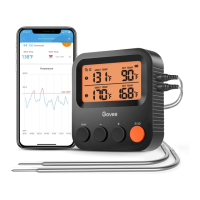

 To Next Page