The Govee Glide Hexa Light Panels (Model: H6061) are designed to provide ambient lighting and decorative patterns for your home. These light panels offer millions of flowing colors, dynamic scene modes, and effects that can synchronize with your music, aiming to deliver a brand-new visual experience.
Function Description:
The Govee Glide Hexa Light Panels are modular lighting units that can be arranged in various patterns to decorate walls. They are controlled via the Govee Home app, offering extensive customization options for colors, scenes, and music synchronization. The device also supports voice control and can be managed through a physical control box. The light panels are designed for indoor use only and are not intended for general illumination but rather for ambiance.
Important Technical Specifications:
- Model: H6061
- Adapter Input: AC 100 - 240V
- Light Panel Input: 24V/1.5A
- Lighting Color: RGBIC (Red, Green, Blue, Independent Control)
- Control Method: App, Voice Control, Control Box
- Working Temperature: -10°C to 40°C (14°F to 104°F)
- Wi-Fi Compatibility: 2.4GHz and 802.11 b/g/n bands (5GHz is not supported).
- Bluetooth: 2.4GHz, Maximum Power <13dBm
- Wi-Fi: 2.4GHz, Maximum Power <15dBm
- Light Source: Non-replaceable. If the light source reaches the end of its life cycle, the entire device should be replaced.
- Waterproof: Not waterproof; avoid exposure to splashing or dripping water.
- Dimming: Dimming is not allowed with this device.
Usage Features:
- Installation: The light panels are ideally used on smooth surfaces such as glass or wood. They are not suitable for uneven, bumpy, or wet surfaces like brick or stucco. Before sticking, ensure the surface is clean and completely dry. When installing, press the central point of the light panel against the wall for more than 30 seconds to maximize adhesion.
- Connectivity: The device pairs with the Govee Home app via Wi-Fi and Bluetooth. To pair, download the Govee Home app, tap the "+" icon, search for "H6061," and follow the on-screen instructions. A 2.4GHz Wi-Fi router is required.
- Control: Control is available through the Govee Home app, voice commands (compatible with Alexa or Google Assistant), and the physical control box.
- Creative Design: Users can design beautiful patterns with the modular hexa light panels to decorate any wall.
- Dynamic Lighting: Offers millions of flowing colors, dynamic scene modes, and music synchronization effects.
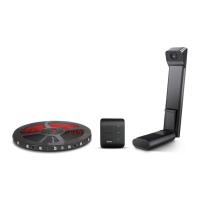
- Microphone: The control box includes a microphone for music synchronization. Ensure the mic is facing up during use.
Maintenance Features:
- Cleaning: Ensure the surface is totally dry before sticking the product on.
- Operating Environment: Maintain an operating temperature between -10°C and 40°C (14°F and 104°F).
- Safety Precautions:
- Avoid exposing the light panel to splashing or dripping water as it is not waterproof.
- Do not allow children to install the light panel alone.
- Do not install the light panel with a dimming driver.
- Avoid installing the light panel near heat sources (e.g., candles, liquid-filled objects).
- The internal light source is not replaceable; if it breaks, the entire light panel must be replaced.
- Troubleshooting: The manual provides comprehensive troubleshooting steps for common issues such as:
- Inability to connect to the Govee Home app (checking power, Bluetooth, proximity, and re-pairing).
- Wi-Fi disconnection or failure to connect (checking power, Wi-Fi steps, 2.4GHz band, correct password, and network functionality with a smartphone hotspot).
- Inability to connect to Alexa or Google Assistant (checking Wi-Fi stability and re-pairing via the app's "User Guide").
- Issues with multiple users controlling one device (ensuring all users use the same account).
- Disposal: Old electrical appliances must be disposed of separately from residual waste at communal collecting points. This contributes to recycling valuable raw materials and proper treatment of toxic substances.
- Battery Safety: The device contains a battery. There is a risk of explosion if the battery is replaced by an incorrect type. Used batteries should be disposed of according to instructions.

 Need help?
 General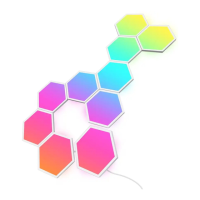

 To Next Page