Need help?
Do you have a question about the Govee H7132 and is the answer not in the manual?
Important safety precautions when using electrical appliances to reduce risks.
Lists the items included with the Govee Smart Heater.
Overview of the Govee Smart Heater's features and benefits.
Identifies and labels the different components of the heater.
Explains the function of each button on the heater's control panel.
Explains the meaning of different indicator lights and their status.
Details the heater's ability to remember previous settings upon power loss.
Explains the automatic shutdown feature after 24 hours of continuous use.
Describes the safety mechanism that shuts down the heater if it overheats.
Explains the safety feature that turns off the heater if it's moved or tipped.
Step-by-step instructions for assembling and setting up the heater.
Instructions for downloading and pairing the Govee Home mobile application.
Guidelines for cleaning the heater to maintain performance and longevity.
Solutions for common problems with the heater.
Solutions for common problems with app and connectivity.
Contains warranty, support contact, and official website information.
Details technical specifications such as model name, power, and dimensions.
Information regarding FCC compliance and operational conditions for the device.
Details FCC limits for radio frequency exposure and safety distances.
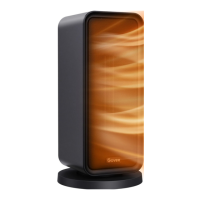
The Govee Smart Heater (Model: H7132) is a versatile heating appliance designed for use in bedrooms, living rooms, and offices. Equipped with PTC heating elements, it offers rapid heating, capable of warming a room in just 3 seconds after being powered on. This smart heater provides instant warmth and enhanced home comfort, especially in cold weather, with convenient control options both on the device and through a dedicated mobile application.
The Govee Smart Heater operates with multiple heating settings, an auto mode, and a fan-only mode, allowing users to customize their heating experience. It features an intuitive control panel with a digital display that shows the target temperature or timer settings. The heater includes a power button for turning the device on or off, and an oscillation button to start or stop the unit's rotation, distributing heat more evenly across a room.
For temperature control, a Plus/Minus button allows users to adjust the target temperature in Auto Mode or set the duration in Timer Mode. The Mode button cycles through different operational modes: Heating Setting I, Heat Setting II, Heat Setting III, Auto mode, and FAN mode. This flexibility ensures that users can select the appropriate level of warmth or simply use the fan for air circulation.
A Timer button is available for setting a specific operational duration, providing convenience and energy efficiency. Additionally, the heater is equipped with a Night Light button, allowing users to turn a soft night light on or off, which can be useful in low-light environments.
The heater incorporates several safety and convenience functions. A Memory Function ensures that the device remembers previous settings (heat settings, oscillation, Wi-Fi connection) when powered off, automatically resuming these settings upon restart. For safety, it includes a 24-hour Automatic Shutdown feature, which turns off the heater if it has been running continuously for 24 hours, preventing accidental prolonged operation.
Overheat Protection is a critical safety feature. If the heater detects an ambient temperature exceeding 104°F (40°C), it automatically powers off, and all indicators flash three times. The heater will resume operation once the ambient temperature drops below this threshold. If overheat protection is triggered, users are advised to unplug the heater and allow it to cool for 30 minutes before plugging it back in, also checking for any obstructions around the heater.
Furthermore, the Govee Smart Heater is equipped with Tip-over and Motion Protection. If the heater is moved or knocked over, it automatically powers off and ceases all functions. This protection is activated by an embedded motion sensor. To reactivate the heater, it must be placed on a firm, flat, and level surface and kept upright.
The Govee Smart Heater offers enhanced control and functionality through the Govee Home App, available on Apple App Store (iOS) and Google Play Store (Android). After downloading the app and enabling Bluetooth on a smartphone, users can easily pair the heater by tapping the "+" icon in the app, searching for "H7132," and following the on-screen instructions. The app allows for remote adjustment of settings, providing maximum convenience.
Through the Govee Home App, users can connect their heater to smart home ecosystems like Amazon Alexa or Google Assistant, enabling voice control for various functions. The app is continually updated, offering expanding features and ensuring a seamless smart home experience.
The heater's indicators provide clear status updates:
Proper care and maintenance are essential for optimal performance and longevity of the Govee Smart Heater. Users should clean the heater at least once during the operating season or before storing it for extended periods.
To clean the heater:
After cleaning, all parts should be allowed to dry completely before storing the heater in a cool, dry place.
In case of troubleshooting, the manual provides solutions for common issues such as the heater not turning on (check power cord connection), a hot plug (securely reinsert plug, check prongs), flashing display (temperature sensor malfunction, contact support), sudden shutdowns due to hot air (overheat protection, unplug and cool down, check for obstructions), and oscillation failure at low temperatures (restart oscillation after heater warms up).
For app and connectivity issues, the manual advises checking smartphone Bluetooth, location services, app version, Wi-Fi network (2.4GHz), password, distance to router, and avoiding electromagnetic interference. It also suggests disabling VPNs and portal authentication if applicable. If the device cannot be found on the app, users should ensure it's not connected to another smartphone. For offline heaters, users should refresh "My Devices" in the app, check router internet connection, and reconnect if the Wi-Fi password has changed. If issues persist, deleting and reconfiguring the heater in the app is recommended.
 General
| Model | H7132 |
|---|---|
| Wattage | 1500 watts |
| Power | 1500W |
| Voltage | 120V |
| Safety Features | Overheat Protection, Tip-Over Protection |
| Special Feature | Overheat Protection, Tip-Over Protection, Adjustable Thermostat |
| Control Method | Touch |
| Heating Modes | High, Low |
| Thermostat Range | 41°F - 95°F (5°C - 35°C) |
| Timer | 1-12 hours |
| Dimensions | 9.8 x 6.3 x 13.4 inches |

 To Next Page