Need help?
Do you have a question about the GPD WIN and is the answer not in the manual?
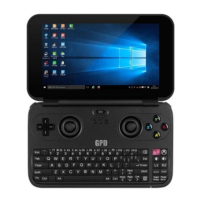
The computer displays the Windows 10 interface after power-on self-test and system guide.
Procedure to shut down the device by clicking the system tray logo and power selection.
Switching to mouse mode and mapping joystick/buttons to mouse functions.
Steps to adjust mouse pointer speed and double-click sensitivity via Control Panel.
Switching the joystick to Dinput mode and testing button effectiveness.
Switching the joystick to Xinput mode and testing button effectiveness.
Steps to connect to a Wi-Fi network using the system tray icon.
Connecting and pairing Bluetooth devices through Windows settings.
Device compliance with FCC Rules, including interference and modification clauses.
SAR limit and testing details for body-worn and general RF exposure compliance.
 General
| Model | GPD WIN |
|---|---|
| RAM | 4GB LPDDR3 |
| Storage | 64GB eMMC |
| Weight | 300g |
| Operating System | Windows 10 |
| GPU | Intel HD Graphics |
| Display | 5.5-inch, 1280x720 |
| Connectivity | Wi-Fi 802.11ac, Bluetooth |
| Ports | USB 3.0, USB Type-C, HDMI, 3.5mm Headphone Jack |
| Category | Handheld Gaming PC |

 To Next Page