6
Quick Start: TV Connection
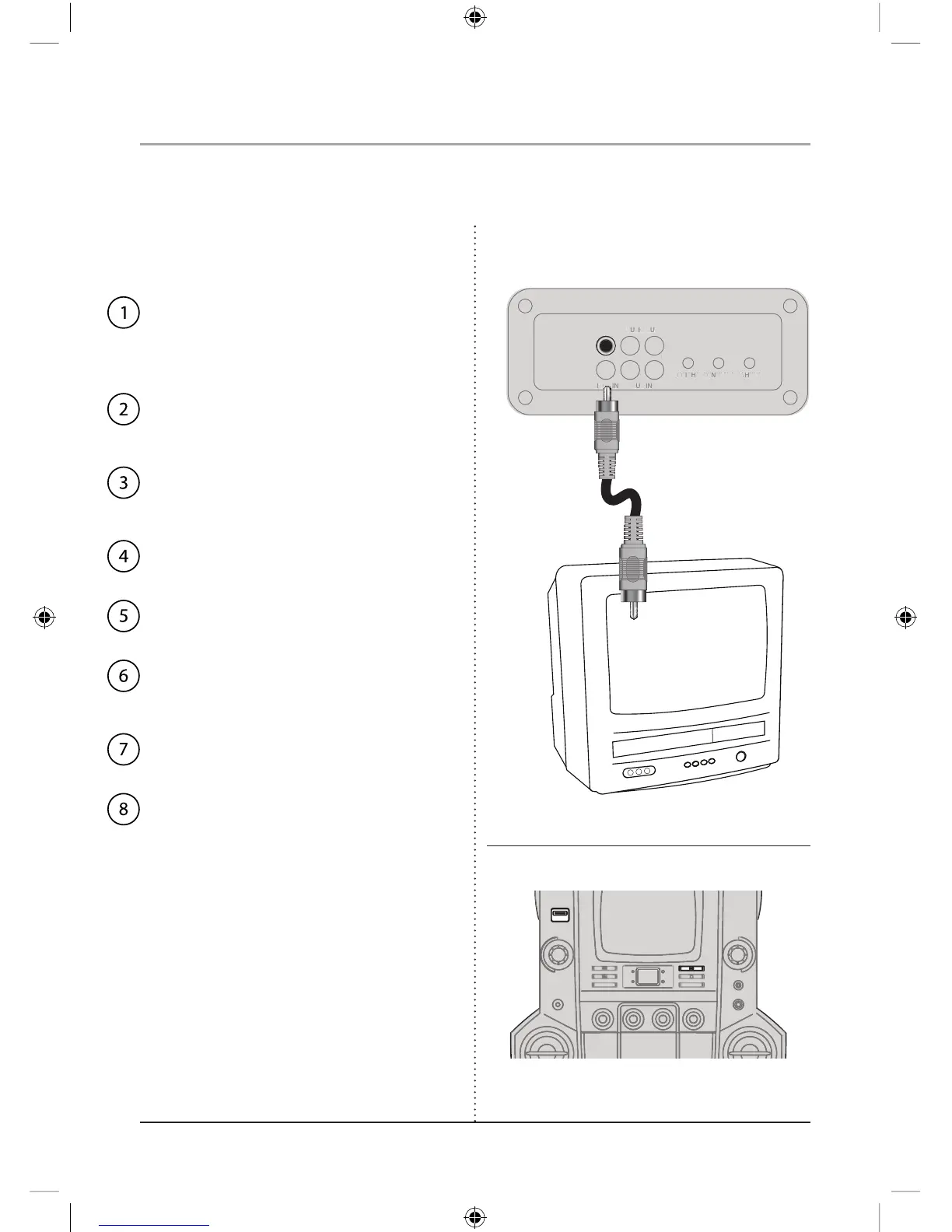
The CD+G lyrics can be displayed on a connected television.
When connecting two products using an RCA Cable,
match the colored ports with the same colored
connection. (Red to Red, White to White, and Yellow
to Yellow)
Video played on the karaoke unit will
now display on the television.
Press the Play Button.
Adjust the Function Switch to CD+G to
match the disc type.
Insert a CD+G disc.
Power on the karaoke unit.
Set the television to the appropriate video
input.
Plug the other end of the RCA Cable into
a video input on the television.
Plug one end of the RCA Cable
(included) into the Video Output on the
karaoke unit.
LR
BRIGHT CONTRAST V-HOLD
AUDI OOUT
VIDE OINAUX I
N
CONFORMS TO
UL STD. 1492
CERTIFIEDTOCSA
STD. C22.2 No.1
9800950
CM
C
US
TESTEDTO COMP LY WITH
FCC STANDARDS FOR
HOME OR OFFICE US
E
DISTRIBUTED BY GPX, INC. 2116 CARR STREET,
ST.LOUIS,MO 63106 USA MADEINCHINA
CD/C D+GKARAOKE SYSTEMWITH 5" B/WMONITOR
POWER SUPPLY: A C~120V/60Hz 48W
MODEL:JM258
THIS DEVICE COMPLIESWITHPART15OFTHE FCC RULESAND DHHS
STANDARDS 21 CFRSUBCHAPTERJ.ATDAT EOFMANUFA CTURE.
OPERATIONISSUBJECT TO THE FOLLOWING TWO CONDITIONS: 1) THIS
DEVICE MAYNOT CAUSE HARMFUL INTERFERENCE, AND2) THISDEVICE
MUST ACCEPTANY INTERFERENCE RECEIVED, INCLUDING INTERFERENCE
THAT MAYCAUSE UNDESIRED OPERATION
.
CLASS1LASERPRODUCT
KLASSE 1LASER PR ODUCT
CLASSE 1APPAR AITLASER
CLASE1PRODUCTO LAZE
R


 To Next Page