8
Remote Control Functions
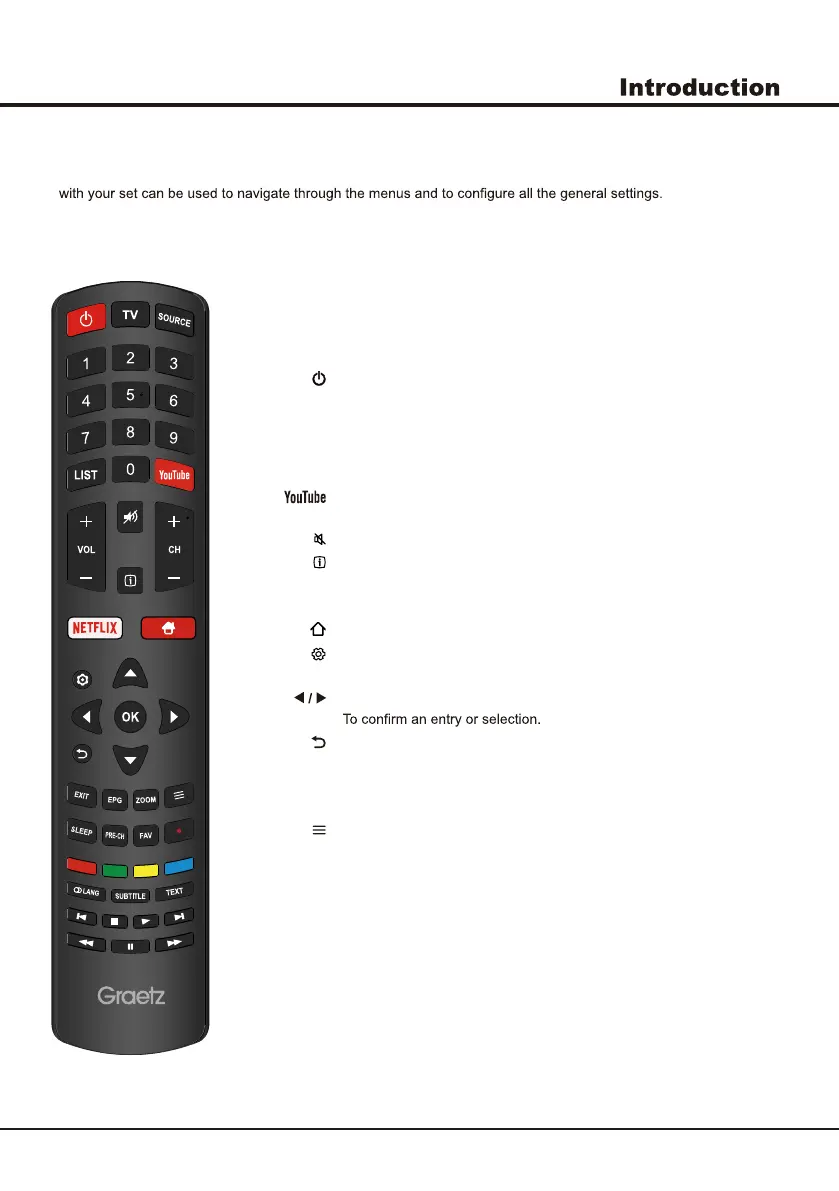
Most of your television's functions are available on the menu that appear on the screen. The remote control supplied
Note: The location and names of the buttons on the remote control may vary according to TV model, and not all
buttons available on all models.
Standby / quit standby.
TV To access TV mode.
SOURCE To select connected devices.
Alphanumeric
buttons
To enter channel numbers; to enter a letter, a digit or a symbol in some
functions.
LIST Displays the Channel List.
VOL +/- To control the volume.
To switch the sound off and back on.
To display programme information, if available.
CH+/- To change channels.
NETFLIX Goes to NETFLIX main page.
To access the Smart TV homepage.
To display the Settings menu.
▲/▼ To navigate through the menus; to select menu options.
To navigate through the menus; to select menu options and change values.
OK
To return to the previous menu.
EXIT To exit the menu, homepage or Teletext, etc.
EPG
Enter the EPG menu.
ZOOM To select the screen mode.
To display the Option menu.
SLEEP To select the sleep timer options.
PRE-CH To return to the previous channel in TV mode.
FAV To bring up your favourite channel list.
Enter the YouTube application.


 To Next Page