Repair Manual MSG 90.6PG Commercial Vehicles, Omnibuses – November 2017
Material no. 1153450_c
3.5 Entire covering – removal and attachment
Page 8 of 9
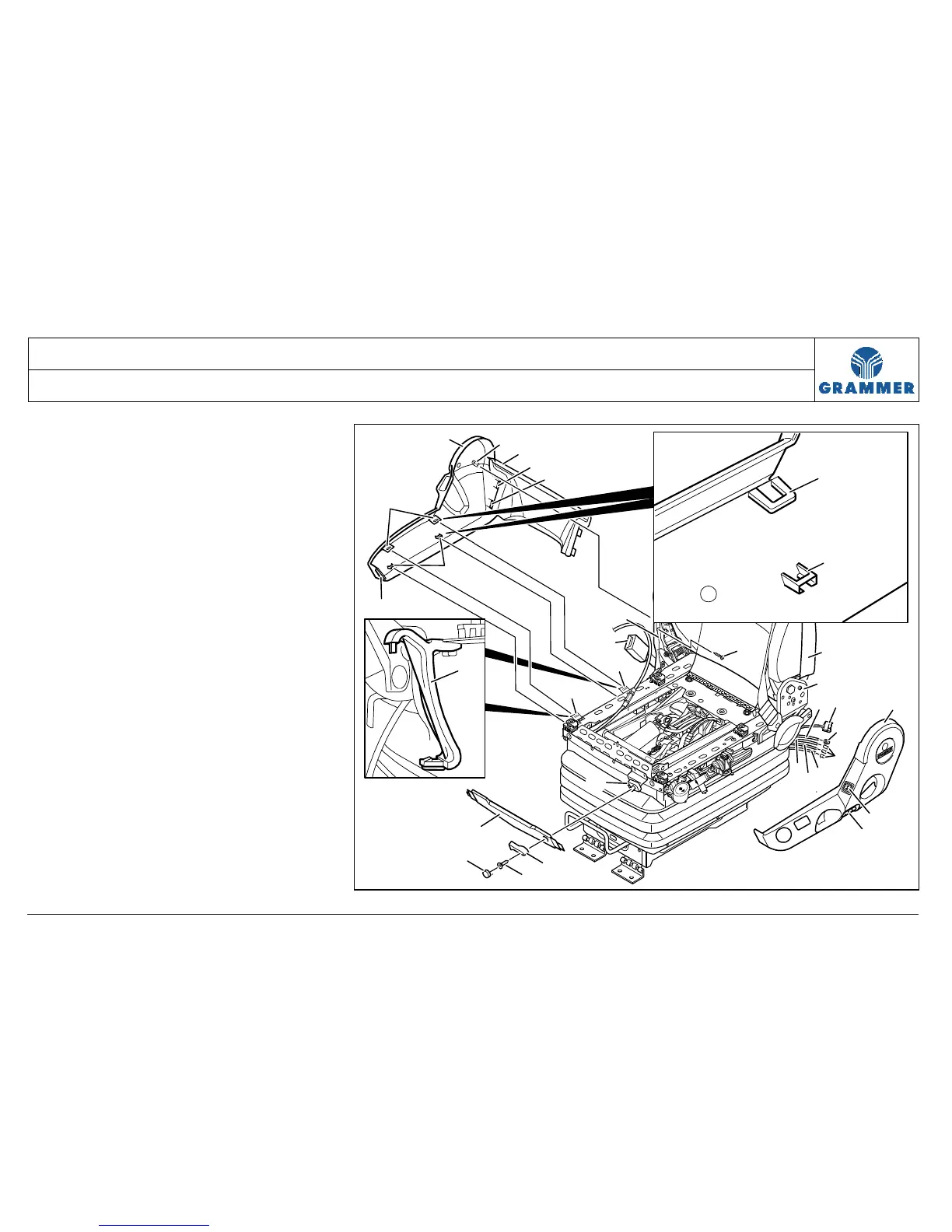
11 Detach the right covering (1) at the
bottom from the supports (14). First
carefully press the bottom snap-on
hook (17) upwards at the level of the
supports (14) and then pull it in
outward direction.
12 Carefully pull out the middle snap-in
hook (24) from the seat support (4)
at the right-hand covering (1).
13 Seat with fore/aft isolator:
13.1 Lever out the cover (19) at the
lever for the fore/aft isolator (21).
13.2 Unscrew the cross-head
screw (20).
Installation note:
Cross-head screw (20), 3 Nm.
13.3 Pull off the lever for the fore/aft
isolator (21) at the eccentric (27).
2
25
24
25
16
21
20
19
27
6
23
7
4
3
4
5
12
22
11
8
9
10
13
14
14
15
18
17
1
1
18
17
26
14
2174


 To Next Page