Repair Manual MSG 90.6PG Commercial Vehicles, Omnibuses – November 2017
Material no. 1153450_c
3.5 Entire covering – removal and attachment
Page 7 of 9
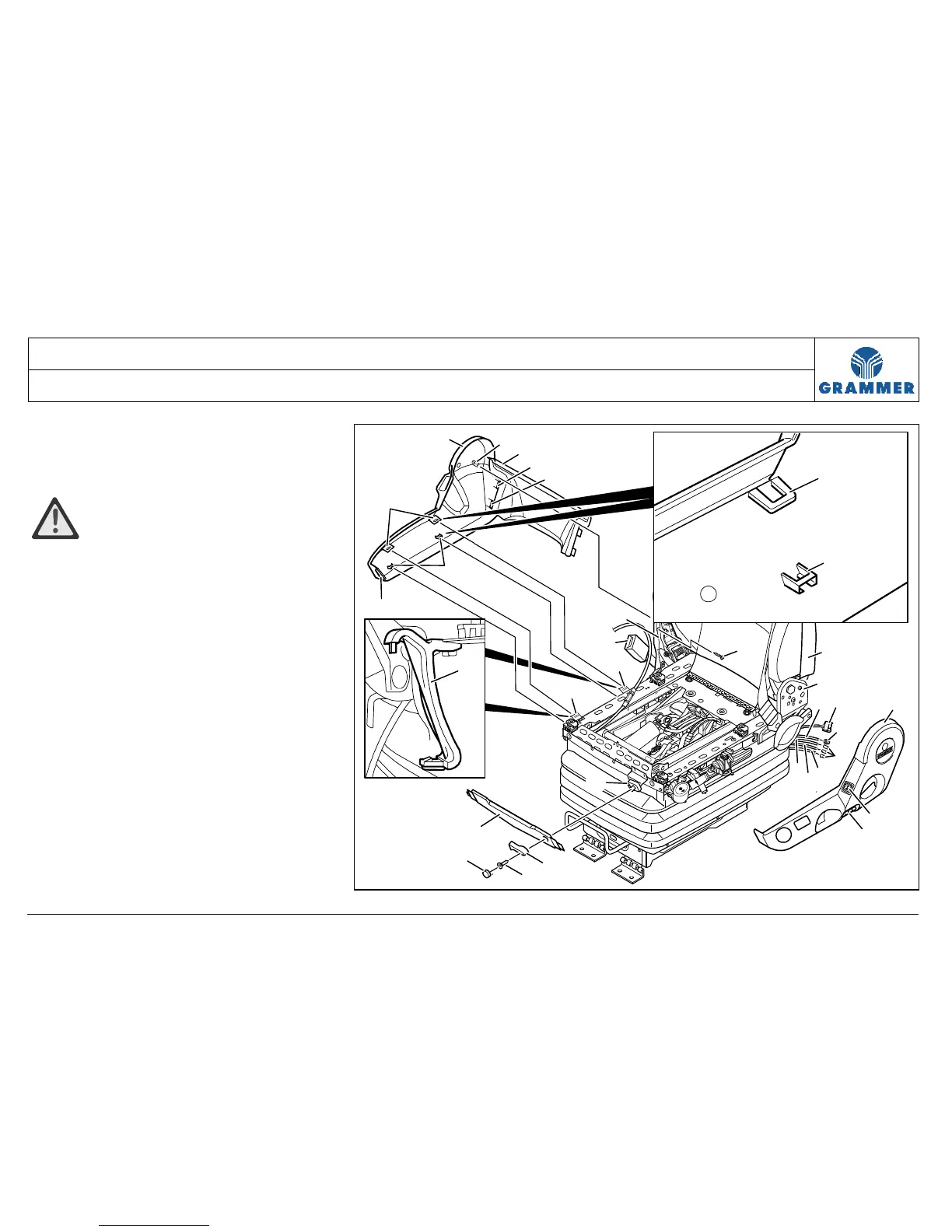
8 Unscrew the round head screw (5).
Installation note:
Round head screw (5), 1.7 Nm.
ATTENTION, risk of breakage!
The right covering (1) is held by snap in
hooks and is wedged into the plastic.
Use suitable screwdrivers to carefully
lever the hooks out.
9 Carefully detach the snap-in hooks at
the back (25) on the right-hand
covering (1) from the covering at the
back (2) and remove the covering at
the back (2).
10 Carefully detach the upper snap-in
hooks (18) on the right-hand
covering (1) from the supports (14).
2
25
24
25
16
21
20
19
27
6
23
7
4
3
4
5
12
22
11
8
9
10
13
14
14
15
18
17
1
1
18
17
26
14
2174


 To Next Page