Repair Manual MSG 90.6PG Commercial Vehicles, Omnibuses – November 2017
Material no. 1153450_c
3.28 Belt buckle with belt buckle cable (delivery option) –
removal and installation
Page 2 of 3
1 Lift off the seat cushion in position for
repair (Chapter 3.1).
2 Remove the left covering in position
for repair (Chapter 3.4).
3 Remove the entire covering
(Chapter 3.5).
Note:
For seat models with fore/aft isolator,
remove only the left and right
covering. Do not remove the front
covering.
Removal and installation
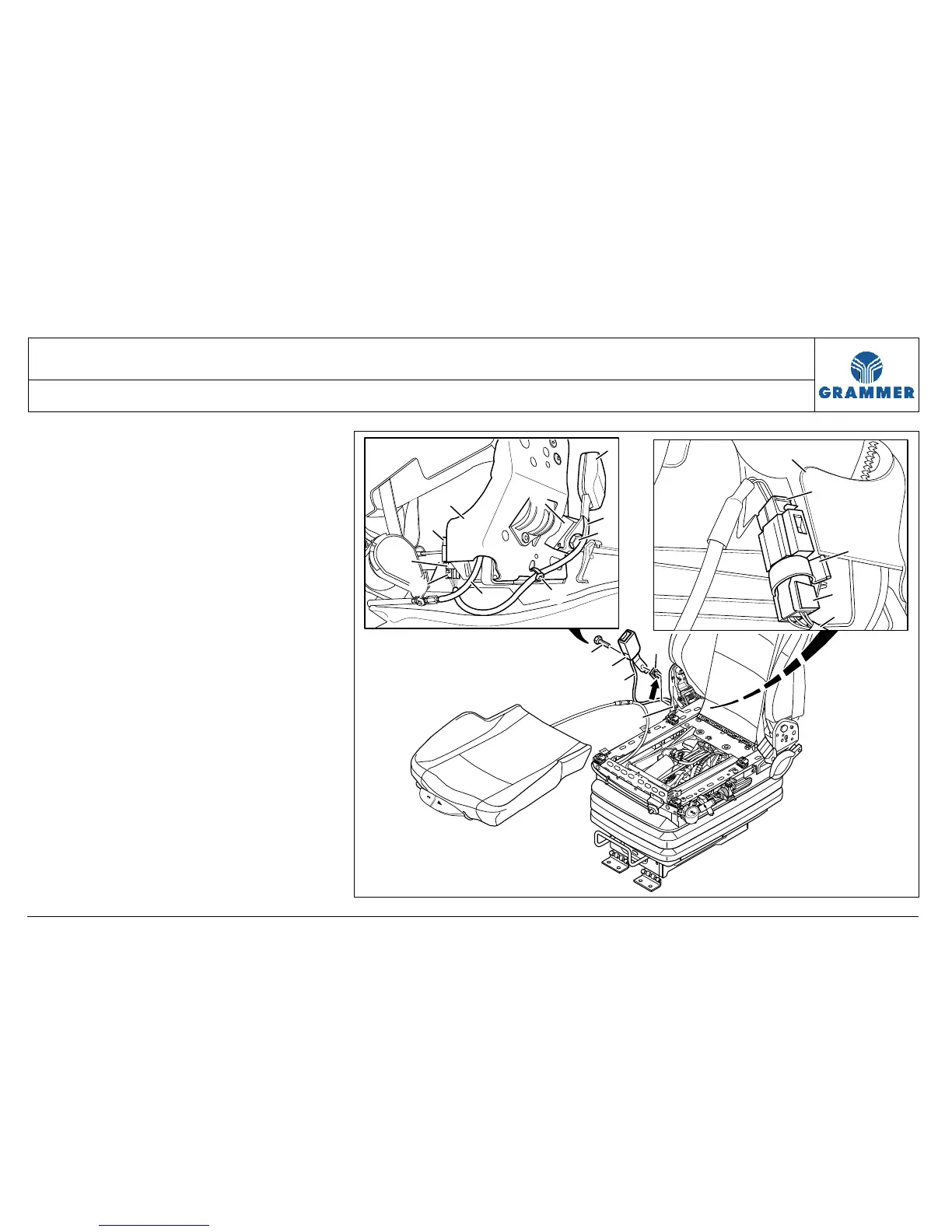
4 Mark the point where the belt buckle
cable (2) is fastened to the seat frame
(10) by means of a cable tie (5) and
remove the cable tie (5).
5 Disconnect the electrical connection
between the plug (7) and the
socket (9).
1
4
2
3
10
2212
7
8
9
10
2
10
3
5
4
6
1
9
8
7
2


 To Next Page