Repair Manual MSG 90.6PG Commercial Vehicles, Omnibuses – November 2017
Material no. 1153450_c
3.31.2 Backrest cover – removal and installation
(seat with climate control system)
Page 6 of 6
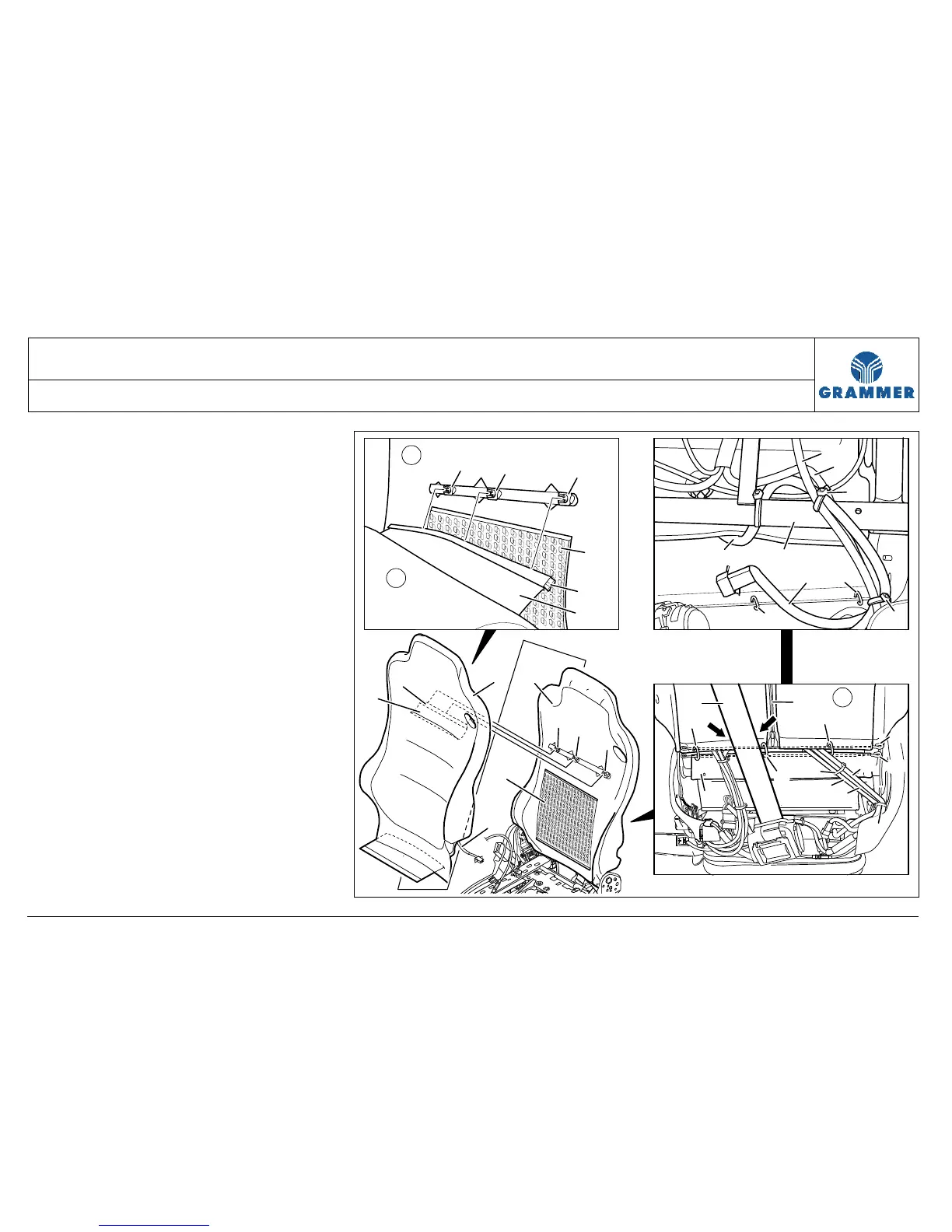
14 Pull off the backrest cover (1) over
the foam plastic part (2) in upward
direction.
Installation notes:
• When installing a new backrest
cover (1), cut in the holes for the belt
guide and belt bracket mounting.
• Put the backrest cover (1) to the
top of the headrest and evenly pull it
down onto the foam plastic part (2).
• When pulling the backrest cover
(1), release the tension by
compressing the foam plastic
part (2).
• Ensure that the ventilation cushion
(4) has been placed correctly in the
foam plastic part (2).
15 Re-install the components in the
reverse order of their removal.
8
1
1
10
12
12
13
14
9
9
10
2544
2
1
7
11
11
9
1
5
6
2
4
3
6
5
4
12
12
15
11
11
9
9
13
14
3
3
3
3
3


 To Next Page