Repair Manual MSG 90.6PG Commercial Vehicles, Omnibuses – November 2017
Material no. 1153450_c
3.33 Lumbar support – removal and installation
Page 3 of 5
Removal and installation
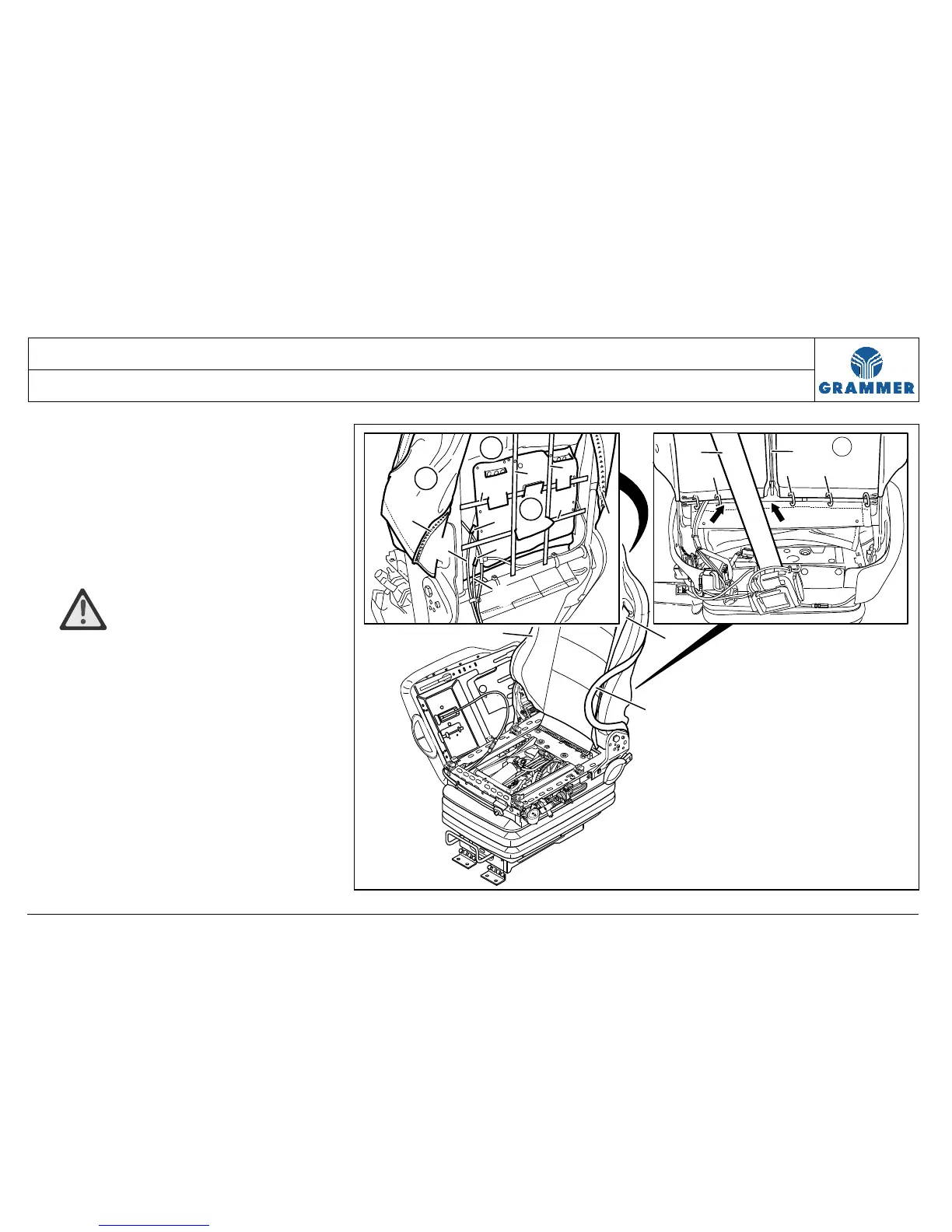
5 Hang in the seat belt (2) at the left
curvature of the backrest (1).
6 Bend open the covering clamps (11)
in the zipper area (10) and remove
them.
Installation notes
• ATTENTION Damage!
Attach the new covering clamps (11)
with the pointed side pointing towards
the foam plastic part (4). Do not attach
any covering clamps (11) in the safety
belt area (2) (arrow).
• Replace the covering clamps (11).
7 Completely open the zipper (10).
3
4
5
6
6
6
8
10
10
7
9
9
6
2
2
1
2
10
3
1111
11
2236


 To Next Page