The device is a "Save A Battery" system, available in several configurations: a Tester Alarm Monitor Voltmeter (Part # 1295), a Charger Maintainer Conditioner (Part # 2365, with variations for 6, 24, 36, and 48 volts), and a Charger Tester Maintainer Alarm Monitor Conditioner Rejuvenator Voltmeter (Part # 1702). These units are designed for comprehensive battery management, including charging, maintaining, testing, monitoring, and rejuvenating lead-acid batteries.
Function Description:
The core function of the "Save A Battery" system is to manage and extend the life of 12-volt lead-acid, VRLA, AGM, or Gel type batteries, with some models supporting 6V, 24V, 36V, and 48V. It employs a microprocessor-controlled Pulse Charging technology, which offers several advantages over traditional chargers.
- Charging: The system initiates charging in a "Bulk Charge Mode," which handles 80% of the charging process efficiently, often twice as fast as many other maintainers due to its 50-watt output. Once 80% charge is reached, it transitions to "Absorption Mode" to slow down the charging rate, preventing overcharging, electrolyte loss, and battery damage.
- Maintaining: After full charge, the system enters "Maintenance Mode," providing just enough power to keep the battery fully charged. Periodically, it switches into a "pulse mode" to clean battery plates and de-stratify the electrolyte, which helps equalize cells and reduce sulfation, thereby improving battery life.
- Testing: The device includes a built-in Load Tester that can assess a battery's capabilities and life by applying a small load, slowly discharging it. This feature is crucial for determining if a battery is good or bad and for cycling batteries back to life.
- Monitoring: An Alarm Monitoring System is integrated, which sounds an audible alarm if the battery voltage drops below 11 volts, preventing damage from excessive discharge. This monitor uses very little power and can be connected indefinitely.
- Rejuvenating: The system can rejuvenate weak batteries by cycling them between charged and discharged states using the Load Tester and Alarm Monitor. This process helps improve the overall condition of batteries that have not been used for prolonged periods.
- Voltmeter Function: Many models include a digital voltmeter for testing the 12-volt electrical system of a vehicle, boat, RV, or truck. It can diagnose electrical and charging system problems, including checking alternators/generators and fuses, and can be permanently installed for continuous monitoring of battery and charging voltages.
- Alternator/Generator Tester: The device can check the output of a vehicle's charging system (alternator or generator) to ensure it's operating within acceptable voltage limits (not exceeding 15 volts at higher RPMs), preventing overcharging.
Usage Features:
- Easy Connection: The device offers multiple connection options:
- Alligator Clip-on Cable: For temporary connections, available in 6' and 20' lengths, with bright yellow heavy-duty wire and gold contacts with dust shields to prevent oxidation.
- Battery Terminal Lug Cable: For permanent installation, connecting directly to battery posts using existing nuts and bolts. It includes a 5-amp in-line fuse for protection against accidental shorts and is available in 2' and 6' lengths.
- Cigarette Lighter or Auxiliary Power Cable: For convenient connection to a vehicle's cigarette lighter or auxiliary input, typically active even when the key is off, allowing for charging and maintenance. Available in 6' and 20' lengths.
- Extension Cables: Available in 10' and 20' lengths (Part # 2307, 2050) to extend the reach of connection cables up to a total of 30 feet.
- LED Indicators:
- Power LED: Indicates that AC power is present.
- Battery LED: Illuminates when the battery is connected properly.
- Status LED: Flashes during charging and remains solid when in maintenance or rejuvenation mode.
- Fault LED: Indicates issues such as reverse polarity, incorrect battery voltage, or a bad battery.
- LCD Display: Provides real-time voltage readings and can be turned off for long-term storage or monitoring.
- Load Tester Switch: Activates the built-in load for battery testing or cycling.
- Low Voltage Alarm Switch: Activates the audible alarm for low voltage monitoring.
- Safety Features: Microprocessor control prevents sparks, short circuits, and fire by checking for a good battery connection before turning on. It also includes protection against overcurrent, overvoltage, short circuit, and reverse polarity.
- Multi-Charger Power Cord: An optional AC Power Cord with 4 outputs (Part # 1513) allows powering up to four chargers simultaneously.
- Portability: A padded carrying case (Part # 2360) is available for easy transport.
Maintenance Features:
- Battery Rejuvenation Cycle: To rejuvenate a weak battery, connect the charger/tester, read the voltage. If below 11 volts, plug into AC to charge. Once the Status LED is solid, disconnect AC, turn on Load Tester and Low Voltage Alarm. When the alarm sounds (indicating low voltage), turn off Load Tester and Alarm, then reconnect AC to recharge. Repeat this cycle 3-4 times to improve battery performance.
- Preventative Maintenance:
- Ventilation: Ensure good ventilation for both the battery and the charger to prevent overheating and potential fire.
- Clean Terminals: Keep battery terminals clean and tight to ensure proper current flow and prevent heat, sparks, and improper charging. Use a battery post cleaner if necessary.
- Avoid Shorting: Exercise extreme caution to prevent shorting battery terminals, especially when removing a battery (disconnect negative first). Remove jewelry and metal objects.
- Sulfuric Acid Safety: Be aware that battery acid is dangerous. Wear eye protection and use water and soap immediately if contact occurs. Work in a well-ventilated area.
- Proper Voltage Use: Use the charger/maintainer only with batteries of the voltage specified on the product label.
- Avoid Covering: Do not cover the battery or the charger/maintainer.
- Engine Off: Do not connect the charger/maintainer when the engine is running. Keep wires away from moving parts.
- Distilled Water: If the battery is not maintenance-free, check electrolyte levels and replenish with distilled water only, taking care not to overfill.
- Storage Temperature: Try to keep stored batteries below 110° F.
- Avoid Over/Undercharging: The pulse charging technology helps prevent this, but monitoring the charging system (alternator/generator) in vehicles is also important to prevent overcharging.
- Regular Charging: Keep the battery on the charger/maintainer as much as possible to counteract self-discharge and prevent sulfation, especially if the vehicle is used infrequently or has high parasitic drains.
- Device Maintenance:
- Do Not Disassemble: Do not disassemble the charger/maintainer. If dropped or cracked, send it back for repair.
- Cord Integrity: Do not use if the power cord is damaged or cut; replacement cords are available.
- Mounting: The units can be wall-mounted or installed in a vehicle using a removable mounting bracket system (Part # 6140). This allows the charger/maintainer/tester to be easily detached for remote use. Two screws attach the bracket to a surface, and two screws on the underside of the unit slide onto the bracket slots.

 Need help?
 General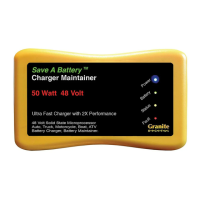

 To Next Page