EasyManua.ls Logo

Gravis GamePad - Page 16

Gravis GamePad
17 pages
Print Icon
To Next Page IconTo Next Page
To Previous Page IconTo Previous Page
Loading...
GLOSSARY
Button
Switch
The
switch
on
the
side
of
the
GamePad
opposite
the
cable.
It
controls
the
button
functions
of
the
GamePad
by
setting
the
buttons
in
one
of
two
operating
modes.
Control
Switch
The
switch
on
the
GamePad
closest
to
the
cable.
It
controls
whether
the
GamePad
will
function
as
a
left
or
right
handed
device.
By
setting
the
Button
Switch
and
the
Control
Switch
independently,
you
have
a
choice
of
one
of
four
operating
modes.
Direction
Controller
The
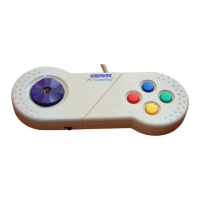
large
purple
“button”
on
the
GamePad.
Inside
the
GamePad
are
switches,
which
respond
when
the
Direction
Controller
is
pressed,
making
your
game
character
move
left,
right,
forward,
backward
and
at
45°
angles.
Joystick
Handle
The
small,
detachable
gray
handle
that
screws
into
the
gold
colored
hole
in
the
Direction
Controller.
Replace-
ment
handles
are
available
from
Advanced
Gravis
Customer
Service.
Game
Port
A
computer
circuit
designed
to
read
the
position
of
a
joystick
or
game
controller.
Also,
a
place
on
your
computer
where
you
plug
in
a
joystick
or
game
controller.
Mouse
Port
On
the
Amiga,
a
game
port
and
a
mouse
port
are
the
same
thing,
because
you
can
plug
either
type
of
device
in
and
have
it
work.
On
the
Atari,
the
mouse
must
be
plugged
into
a
specific
port,
but
the
GamePad
can
be
plugged
into
either.
Turbo
A
button
function
mode
in
which
a
button
is
held
down
|
and
continues
to
fire,
simulating
continuous
rapid
button
presses.
45