This document is the user manual for the DAB-PC2, a DAB/DAB+ and FM digital radio manufactured by GREADIO.
Function Description
The DAB-PC2 is a versatile digital radio capable of receiving both DAB/DAB+ and FM broadcasts. It features a range of functions including radio operation, choosing functions, DAB radio, FM radio, AUX mode, volume control, Bluetooth mode, setting menu, alarms, sleep timer, and an equalizer.
Radio Operation
The radio can be turned on by long pressing the "Power" button. To turn it off, long press the "Power" button again. The device features a panel, antenna, charge LED, USB port, Aux port, earphone port, and power button. Navigation is handled by "Enter & Volume +/-" and "Back", "Next", "Prev", "Preset", and "Info/Menu" buttons. A "Speak" function is also listed.
Choose Functions
To access functions, press the "Power" button to enter the interface. Navigate using "ENTER", "NEXT", and "PREV" buttons to select or confirm functions. Press "POWER" to return to the interface.
DAB Radio
To enter DAB radio mode, select the DAB icon and press "ENTER".
- Preset: Short press the "PRESET" button to view and select preset memory channels.
- Info/Menu: Short press the "INFO/MENU" button to view channel information. Long press "INFO/MENU" to enter the DAB setting menu.
- Station list: View DAB channel list.
- Preset recall: View all preset programs.
- Preset store: Store up to 40 favorite DAB radio channels by pressing "Enter".
- Scan: Search DAB channels.
- Manual Tune: Manual adjustment.
- Prune Invalid: Delete invalid settings.
- Next/Prev: Short press "NEXT" or "PREV" to call up station list for selection.
FM Radio
To enter FM radio mode, select the FM icon and press "ENTER".
- Next/Prev: Short press "NEXT" or "PREV" to select channels.
- Scan/Enter: Short press "SCAN" or "ENTER" to automatically search for channels and pause scanning.
- Next/Prev: Long press "NEXT" or "PREV" to search semi-automatically.
- Preset: Short press the "PRESET" button to view and select preset memory channels quickly.
- Info/Menu: Long press the "INFO/MENU" button to enter the FM setting menu.
- Preset recall: View all preset programs.
- Preset store: Store up to 40 favorite radio channels by pressing "Enter".
- Audio Setting: Use stereo or mono.
- Scan setting: Enter the signal priority selection interface.
AUX Mode
To enter AUX mode, select the AUX icon and press "ENTER". Connect an external audio playback device (MP3 or mobile phone) to the Aux port. The unit will play the audio signal from the connected device.
Volume Control
Volume is controlled by turning the "ENTER" button.
Bluetooth Mode
- Select the Bluetooth icon and press "ENTER" to enter pairing mode. The screen will display pairing information.
- Open the Bluetooth device on your phone, search for "DAB_PC2", and click to pair.
- Upon successful pairing, you will hear a "ding" sound, and the screen will display "Connected".
- Use "NEXT" and "PREV" buttons to switch between songs.
- Press the "ENTER" button to play or pause the song.
To enter the setting menu from any function, long press the "INFO/MENU" button. Use the "ENTER" button to select and confirm options. Press the "BACK" button to return.
Backlight Setting
- Timeout: Set screen backlight timeout (Always On, 10, 20, 30, 45, 60, 90, 120, 180 seconds).
- Level: Adjust screen brightness (Low, Medium, High).
Time / Date Setting
- Set Time/Date: Configure day-month-year-hour-minute.
- Set Hour System: Choose between 24-hour and 12-hour systems.
- Set Date Format: Select day-month-year, month-day-year, or year-month-day.
- Clock Style: Choose Analog or Digital.
- Auto Update: Select No Update or Update From Radio.
Alarms
- Set alarm 1 alarm 2 on / off: Enable or disable alarm 1 and alarm 2.
- Set alarm time: Configure the alarm time.
- Source: Choose alarm source (FM, DAB, Buzzer).
- Repeat: Set alarm repeat (Once, Daily, Weekends, Workday).
- Volume: Set alarm loudness (0-20).
- Note: When the alarm goes off, press the "POWER" button to turn it off. Press the "ENTER" button to set the snooze time (5, 10, 15, 30 minutes).
Sleep
- Set sleep time: Configure sleep timer (OFF, 15, 30, 45, 60, 75, 90, 105, 120 minutes).
EQ (Equalizer)
- Set 8 audio playback effects: Choose from Normal, Classic, Pop, Jazz, Rock, Flat, Movie, News.
Language
- Set the system language display: 9 language settings available.
Factory Reset
- Factory reset settings: Reset all settings to factory defaults.
System Version
- View the system version number.
- Note: If no operation is performed after entering the setting menu, it will automatically return to the previous interface after 10 seconds.
Important Technical Specifications
- Frequency Range:
- DAB: 170-240MHz
- FM: 87.5-108MHz
- Power Input: Micro USB 5V 1A
- Audio Input / Earphone Output: 3.5 mm
- LCD Display: 2.4-inch/320*240 dot
- Power Source: 18650 2000mAh 3.7V Li-ion battery
- Dimension: 6.69 x 3.74 x 1.25 inches
- Weight: 320 g
- Temperature: 0°C ~ 45°C
- Charge Time: About 4 hours
- Bluetooth Version: 5.0
Usage Features
- Digital Radio: Supports both DAB/DAB+ and FM for a wide range of radio stations.
- Preset Memory: Store up to 40 favorite DAB and FM radio channels for quick access.
- Automatic Search: Automatically scan for available radio channels.
- Manual Tuning: Fine-tune radio frequencies manually.
- AUX Input: Connect external audio devices like MP3 players or smartphones.
- Bluetooth Connectivity: Wirelessly stream audio from Bluetooth-enabled devices.
- Alarm Function: Set up to two alarms with customizable source (FM, DAB, Buzzer), repeat options, and volume. Snooze function available.
- Sleep Timer: Automatically turn off the radio after a set period.
- Equalizer: Adjust audio output with 8 preset sound effects.
- Backlight Control: Adjustable screen backlight timeout and brightness levels.
- Time and Date Settings: Configure time, date, hour system, date format, and clock style. Auto-update option for time.
- Multi-language Support: 9 language settings for the system display.
- Factory Reset: Easily restore default settings.
Maintenance Features
- Avoid Exposure: Do not expose the unit to liquid, humid, or moist areas.
- Cleaning: Do not use chemical solvents to clean the unit.
- Temperature: Avoid extreme temperatures (hot or cold).
- Physical Damage: Do not touch sharp objects to prevent scratches. Do not insert objects into the unit.
- Disassembly: Do not attempt to disassemble the unit as it is not serviceable.
- Storage: If unused for a long time (one to two months), ensure the unit is fully charged to prevent complete discharge. Store in a dry area, away from temperature changes and dusty places.
- Warranty: The product comes with a 12-month warranty against production defects from the date of purchase.
Packing List
- DAB radio x 1
- User Manual x 1
- Micro USB Cable x 1
- AUX Cable x 1

 Need help?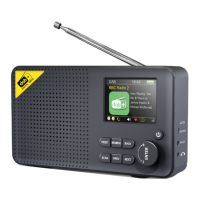

 To Next Page
 General