EasyManua.ls Logo

Great Well Electronic BT-020 User Manual

Great Well Electronic BT-020
5 pages
To Next Page IconTo Next Page
Page #1 background imageLoading...
Page #1 background image
BT-020 User's Guide
1. Introduction
1.1 Bluetooth technology
Bluetooth is a standard of wireless communication. Bluetooth technology is a kind of
short distance wireless communication technology and a kind of open global criterion.
The Bluetooth products work on universal industry, science, medical (ISM) frequency.
In order to avoid intervene, adopt jumping frequency technique, divide 2.4GHz ~
2.48GHz into 79 channels, transmit data at 1600 time/sec. The transmission distance
is about 10m (Class ).
ISM frequency of 2.4GHz is free open frequency, no need to apply for license.
Operation
instructions
Introduction
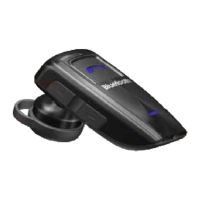
BT-020 Bluetooth headset key-press and key-press function explanation
A. MFB key-press: realize power on, power off, receiving, voice dialing, hang-up,
pairing etc.
B.
Volume +: realize increasing volume, mute, rejecting incoming call, redialing etc
C. Volume -: realize decreasing volume etc.
Power on
In the state of power off, long press MFB, speaker will give off short BEEP sound. Blue light
fleshes. Then BT-020 will power on.
Power off
In the standby state, long press MFB, speaker will give off long BEEP sound. Blue light closes.
Then BT-020 will power off.
Pairing
Firstly, confirm BT-020 Bluetooth headset is in the state of power off and is in the effective
distance with other Bluetooth devices.
a. Long press MFB, speaker will send BEEP sound two times. Blue and red indicator will flash
alternately. Then BT-020 will in pairing state.
b. Open Bluetooth function of mobile phone, choose Bluetooth device on mobile phone to
search function, and proceed to search for BT-020 Bluetooth headset until BT-020 shows on
mobile phone.
c. Select Bluetooth device
Question and Answer IconNeed help?

Do you have a question about the Great Well Electronic BT-020 and is the answer not in the manual?

Great Well Electronic BT-020 Specifications

General IconGeneral
BrandGreat Well Electronic
ModelBT-020
CategoryHeadsets
LanguageEnglish

Summary

Introduction

Bluetooth technology Overview

Bluetooth is a short-distance wireless communication technology operating on the 2.4GHz ISM frequency.

Headset Operation Instructions

Visual guide to headset components like MFB, LED, MIC, ports, and buttons for operation.

Key-press Function Explanation

Explains the functions of the MFB, Volume +, and Volume - buttons on the BT-020 headset.

Powering the Headset On

Instructions on how to turn on the BT-020 headset using the MFB button.

Powering the Headset Off

Instructions on how to turn off the BT-020 headset using the MFB button.

Pairing with Bluetooth Devices

Step-by-step guide for pairing the BT-020 headset with other Bluetooth devices.

Headset Usage Modes and Features

Power-Saving Mode Details

Details on automatic power off for pairing failure or disconnection events.

Receiving Incoming Calls

How to answer an incoming call using the MFB button on the headset.

Initiating Voice Dialing

Instructions on how to initiate voice dialing with the headset.

Rejecting Incoming Calls

How to reject an incoming call using the VOL+ button.

Redialing Last Number

Instructions on redialing the last number by long pressing the volume + button.

Adjusting Volume Levels

How to adjust volume levels during calls or standby using volume buttons.

Low Battery Warning Indicators

Information on the indicators that signal a low battery status on the headset.

Automatic Reconnection

How the headset automatically reconnects to a previously paired device.

Headset Charging Process

Instructions for charging the BT-020 headset using the provided adapter.

Ending Calls and Technical Specifications

Ending a Call

How to end an ongoing call by pressing the MFB button.

Performance Parameters

Technical specifications including range, frequency, battery, and charging details.

Troubleshooting and Environment

Trouble Clearing Guide

Lists common issues like no power, no voice, or echo with their solutions.

Storage Environment Recommendations

Recommended temperature and humidity ranges for storing the headset.

Regulatory and Safety Information

FCC Caution and Notes

User cautions regarding modifications and notes on FCC compliance for digital devices.

FCC Radio Frequency Energy Warning

Warning about device compliance with FCC rules and potential interference.

RF Exposure Compliance

Information regarding co-location and operation with other antennas and transmitters.