MODEL: APT230 FCC ID P4M-APT230
QUALCOMM 3G CDMA
Made in China 13.08
1234567
MODEL: APT230 FCC ID P4M-APT230
QUALCOMM 3G CDMA
9
10
11
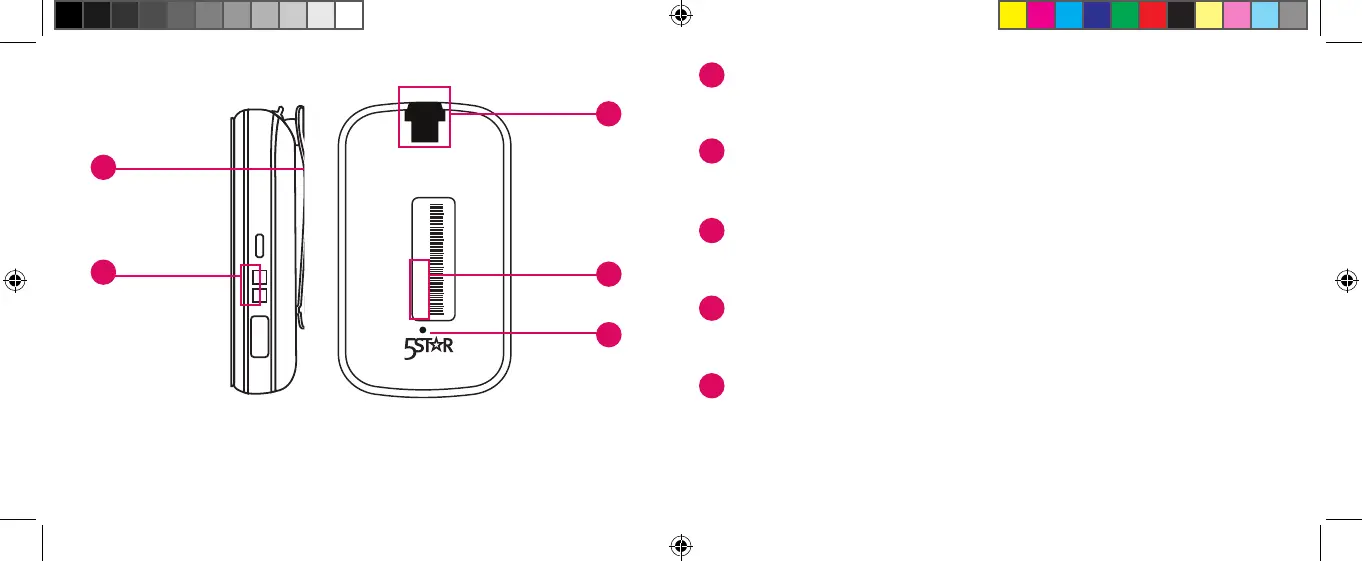
BACKRIGHT SIDE
Accessory
Slot
Serial
Number
Charging
Contacts
Accessory
Clip
Reset
Button
7
8
7
Accessory Clip – Allows you to attach the device to a purse,
backpack, or other items.
8
Charging Contacts – Allows charging with the supplied
Charging Cradle.
9
Accessory Slot – Allows you to attach accessories such as a
clip or keychain for carrying.
10
Serial Number – This number is used for activating the device
for the rst time.
11
Reset Button – ONLY use if you are instructed to do so by a
GreatCall Customer Service Representative.
5Star_gen2_UserGuide_111252013_WJC.indd 14-15 11/25/2013 3:47:50 PM



 To Next Page