This document describes the GRECELL 2001A portable power station, a robust device designed for various power needs, offering a range of input and output options, a user-friendly display, and safety features.
Function Description
The GRECELL 2001A is a 2000W portable power station that provides a versatile power solution for charging and operating multiple devices. It features a bypass mode (UPS function) that allows it to directly output from AC without passing through the battery, ensuring continuous power supply. In UPS mode, if the AC input power from the mains is cut off due to a power outage, the device automatically switches to its internal battery within 10 ms to maintain AC output. This makes it suitable for sensitive electronics that require an uninterrupted power supply. The device is equipped with an internal cooling fan to maintain optimal operating temperature, which automatically activates during discharge or recharging, especially under higher output loads.
Important Technical Specifications
General Specs:
- Rated Capacity: 1997Wh
- Net Weight: ≈22kg
- Weight (including accessories): ≈23kg
- Product Size: 392279323mm
Input:
- Recharging Input Voltage: 100V-120V
- Recharging Input Power: 1100W
- Solar Charge Input: 11.5-50V (supports up to 500W max solar input)
- Car Charger: 12/24V
Output:
- AC Output Voltage: 100V-120V~50-60Hz
- Rated Output Power: 2000W
- Output Waveform: Pure Sine Wave
- USB Output: 12W
- USB 3.0 Output: 18W
- Type-C Output: PD100W
- DC 55*2.1 Output: 12V 3A
- XT60 Output: 12V 25A
- Car Port Output: 12V 10A
- LED Light Output: 1W
- Overload Protection Power: 2100W
Battery:
- Battery Type: 32130 LiFePo4
- Charging Temp: 0-40°C
- Operating Temp: -10 to 40°C
- Storage Temp: -10-40°C
Usage Features
The GRECELL 2001A offers a comprehensive set of features for ease of use and safety:
Controls:
- Power On/Off Control Button: This is the master switch. A long press turns the device on or shuts down the output(s) when not in use.
- LED Light Control Button: A short press turns on and changes the light mode (light/SOS). A long press (1-2 seconds) turns off the LED light.
- USB Control Button: Activates USB outputs. A short press turns them on/off.
- USB-A x 2 (5V/2.4A)
- USB-A x 2 (QC3.0-18W)
- TYPE-C x 2 (PD-100W)
- DC Control Button: Activates DC outputs. A short press turns them on/off.
- Output x 2 (12V/3A)
- Cigar Lighter x 1 (12V/10A)
- XT60 x 1 (12V/25A)
- AC Control Button (50Hz/60Hz Switching Control): Activates AC outputs. A short press turns them on/off. To change frequency, long press for 2s until 50Hz/60Hz flashes, then press again to select. Quick short press 10 times to switch voltage to 100V or 110V.
Display:
- LCD Screen Display: Shows remaining power and usage data. It enters Sleep Mode after 30s of inactivity and wakes up upon charging cord input or any button press.
- Indicators: Remaining discharge time, fan status, high/low temperature warning, battery level, total input power, total output power, LED light status, AC output status, Type-C output status, USB output status, AC charging status, Anderson charging status, DC output status, Cigarette lighter output status, XT-60 output status.
Charging:
- AC Charger Charging: Uses the provided AC charger for 1100W fast charging, fully charging the device from 0 to 100% in 2 hours.
- Notice: Do not use extension cords or cable taps. Do not plug other products into the same socket when charging. Avoid plugging multiple devices into an extension socket simultaneously to prevent high current and damage. Do not connect other devices to the same socket when charging this product; if household wiring exceeds 1500W, the safety circuit breaker will activate.
- Solar Panel Charging: Supports up to 500W max solar input (solar panels not included) via the included Anderson to MC4 conversion cable. Charging time depends on solar light intensity.
- Notice: Do not charge with solar panels exceeding 50V.
- Car Charger Charging: Uses the provided car charger (90-120W). Charging time will be longer; for quicker charging, use the AC adapter.
UPS Mode:
- Connect the product between the wall socket and electrical appliances. When the product is ON, it will directly use AC power from the grid. If grid power is lost, it automatically switches to the internal battery.
- Limitations: Maximum AC output in UPS mode is below 1100W. If AC output exceeds 1100W, the AC output icon will blink, indicating overload.
Maintenance Features
Overload Protection:
- Prevents damage from excessive AC input current (e.g., lightning, power grid fluctuations). The overload protector cuts off AC input.
- To restore AC input:
- Turn off the power button and unplug all ports.
- Confirm all parts are standard, then turn on the power button.
- Press the overload protection button to switch on the AC line.
Fault Resolution:
- Output exceeds standard (short circuit):
- Remove the output device.
- Check if the overload protector is activated. If so, press the overload protection button, then the AC output button.
- If the overload protector doesn't spring up, directly press AC output to restore function.
- High/low temperature warning:
- Remove equipment, turn off power, and wait for the device to reach the appropriate temperature.
- Bad wire connection (charging unavailable):
- Confirm connection status of the line and power supply.
- Overload protection activated (charging unavailable):
- Turn off the power button and remove cables from all ports.
- After verifying all components are normal, turn on the power button.
- Press the overload protection button to connect the AC cable to recover AC input.
General Warnings:
- Avoid using in high temperature, high humidity, direct sun, or near fireplaces.
- Do not disassemble or modify the product; it can cause malfunction and fire.
- Dispose of the product according to local laws.
- Avoid dropping the product from a high place.
- Keep out of reach of children.
- Use only genuine accessories.
- Ensure at least 30cm clearance from the side suction and exhaust ports for proper heat dissipation.
- Turn off and unplug the power cord when not using the product. Store in a cool, dry place away from direct sunlight.
- For long-term storage, consume power from full to no power every three months, then recharge to about 50%.
- Do not use the product or its accessories if there is a defect.
- Do not store the product for long periods in high humidity/low temperature places or in a car/field warehouse to avoid shortening battery life.
Safety Instructions (UL 1741, UL 62109-1, UL 60950-1, CAN/CSA C22.2 No. 60950-1, UL 1310, No. 223, No.1, No. 223, No. 107.1):
- The external power supply must be a power source in accordance with relevant UL and CSA standards.
- The connector plug shall incorporate a fuse or other protective device having a current rating not greater than 15 A.
- Risk of fire, electric shock, or injury to persons:
- Basic precautions should always be followed.
- Read all instructions before using.
- Reduce risk of injury; close supervision is necessary when used near children.
- Do not put fingers or hands into the product.
- Use of an attachment not recommended or sold by the power pack manufacturer may result in fire, electric shock, or injury.
- To reduce risk of damage to the electric plug and cord, pull by the plug, not the cord.
- Do not use a battery pack or appliance that is damaged or modified.
- Do not operate the power pack with a damaged cord or plug, or a damaged output cable.
- Do not disassemble the power pack; take it to a qualified service person if repair is needed. Incorrect reassembly may result in electric shock or fire.
- To reduce risk of electric shock, unplug the power pack from the outlet before attempting any instructed servicing.
- Risk of explosive gases:
- Follow instructions and those published by the battery manufacturer and manufacturer of any equipment you intend to use with the battery. Review cautionary markings on these products and engines.
- Personal precautions:
- Have plenty of fresh water and soap nearby if battery acid contacts skin, clothing, or eyes.
- Wear complete eye protection and clothing protection. Avoid touching eyes while working near the battery.
- If battery acid contacts skin or clothing, wash immediately with soap and water. If acid enters the eye, immediately flood with running cold water for at least 10 minutes and get medical attention.
- NEVER smoke or allow a spark or flame in the vicinity of the battery or engine.
- Be extra cautious to reduce the risk of dropping a metal tool onto the battery. It might spark or short-circuit battery or other electrical parts that may cause an explosion.
- When charging the internal battery, work in a well-ventilated area and do not restrict ventilation in any way.
- Under abusive conditions, liquid may be ejected from the battery; avoid contact. If contact accidentally occurs, flush with water. If liquid contacts eyes, additionally seek medical help. Liquid ejected from the battery may cause irritation or burns.
- Do not expose a power pack to fire or excessive temperature. Exposure to fire or temperature above 130°C may cause an explosion.
- Servicing performed by a qualified repair person using only identical replacement parts. This will ensure that the safety of the product is maintained.
Disposal/Recycle:
- Do not place equipment and its accessories in the trash. Dispose of items properly following local regulations. Refer to www.epa.gov for additional information.
Warranty:
- All GRECELL products come with a full 2-year limited warranty from the date of purchase (accessories excluded). Damage due to incorrect use or force majeure will void the guarantee.

 Need help?
 General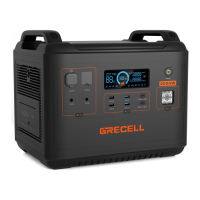

 To Next Page