EasyManua.ls Logo

GRECELL T300 - User Manual

GRECELL T300
14 pages
Print Icon
To Next Page IconTo Next Page
Loading...
GrRECELL
T300
r
L_"
1 i
GRECELL
USER
MANUAL
Thank
you
for
purchasing
GRECELL
portable
power
station
To
make
sure
your
personal
safety,
property
security
and
user
experience,
please
read
this
manual
carefully
before
operating
and
retain
it
for
future
reference.
A
CHARGE
FIRST!
Before
using
your
new
Power
Station
T300,
plug
it
into
a
suitable
power
outlet
until
it
is
fully
charged.
Then
you
can
start
your
exciting
journey
with
it.
Highly
recommend
to
charge
T300
when
battery indicate
less
than
20%.
Question and Answer IconNeed help?

Do you have a question about the GRECELL T300 and is the answer not in the manual?

Summary

Feature Details

Output Ports Overview

Details of AC, USB, DC 5521, and cigarette lighter output ports.

Input and Control Features

Covers DC input, power buttons, and status indicators like SOS mode.

Design and Safety Features

Includes the folding handle, anti-collision strip, and cooling vents.

Button Functions

Master Power Control (Button A)

Button A serves as the master switch to turn the unit ON/OFF.

LED Light and SOS Mode (Button B)

Button B controls the LED light and activates SOS mode.

DC Output Control (Button C)

Button C is used to turn the DC output port ON/OFF.

USB Output Control (Button D)

Button D manages the power for the USB output ports.

AC Output Control (Button E)

Button E controls the power for the AC output port.

LCD and Cooling System

LCD Screen Features

Details on the LCD display elements like battery level and output status.

Cooling Fan Operation

Explains the internal cooling fan's role during operation.

General Specifications

Charging Methods

AC Adapter Charging

Instructions and time estimate for charging via AC adapter.

Solar Panel Charging

Guidelines for charging using solar panels.

12 V Car Charger Charging

Instructions for charging using a 12V car charger.

Device Powering Capabilities

Powering Various Devices

Examples of devices the T300 can power and duration.

Pass-Through Charging

Ability to charge the unit while powering connected devices.

Overload Condition Handling

How the unit responds to output overload conditions.

Safety Instructions and Precautions

Product Use Safety

Guidelines for safe usage, avoiding hazards like water and heat.

Product Recharging Safety

Precautions for charging, including temperature and cable usage.

Equipment Cleaning

Instructions for cleaning the device safely and effectively.

Storage Guidelines

Recommendations for storing the power station.

Maintenance and Troubleshooting

Product Maintenance

Routine checks and maintenance for optimal performance.

Troubleshooting Common Issues

Solutions for 'does not discharge' and 'not charging' problems.

Important Safety Information

Risk of Fire, Electric Shock, Injury

Critical warnings and basic precautions for product usage.

Risk of Explosive Gases

Instructions to reduce the risk of battery explosion.

Personal Precautions

Safety measures for handling potential battery acid contact.

Disposal and Support

Disposal and Recycling

Proper methods for disposing of the device and accessories.

Warranty and Customer Support

Information on the product warranty and how to get support.

Overview

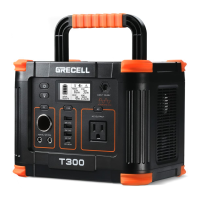
The GRECELL T300 is a portable power station designed to provide reliable power for various devices, ensuring personal safety, property security, and a positive user experience. It features a robust design with a folding handle for easy portability and an anti-collision strip for added durability.

Function Description

The T300 serves as a versatile power source, capable of charging and powering a wide range of electronic devices. It incorporates multiple output ports, including DC, USB, and AC, to accommodate different charging needs. The device is equipped with an LCD screen that displays essential information such as battery level, input status, and the status of DC, AC, and USB outputs. An integrated SOS mode and LED light provide additional utility for emergencies or low-light conditions.

Usage Features

Before initial use, it is crucial to fully charge the T300 by plugging it into a suitable power outlet. For optimal battery health, it is recommended to recharge the T300 when the battery level drops below 20% and to fully charge it every three months if not in regular use.

The power station operates through a series of intuitive buttons:

  • T300 Power ON/OFF Button (Button A): This is the master switch for the device. Pressing it turns the power station on or off, and also shuts down all active outputs when not in use.
  • SOS Mode & LED Light Button (Button B): This button controls the integrated light. A single press activates the LED light in standard mode. A double-click switches it to SOS mode. Pressing it again from SOS mode returns it to LED light mode, and another press will turn the light off. This function is available regardless of whether the main power button (Button A) is activated.
  • DC Output Power ON/OFF Button (Button C): To activate the DC output ports, ensure the main power button (Button A) is on, then press Button C. Pressing it again will shut down the DC outputs.
  • USB Output Power ON/OFF Button (Button D): Similar to the DC output, the main power button (Button A) must be active before pressing Button D to turn on the USB output ports. Pressing Button D again will shut down the USB outputs. If a USB-C port does not work with a specific device, it may be due to protocol endorsements, and using an AC adapter for charging is suggested.
  • AC Output Power ON/OFF Button (Button E): To use the AC output, first ensure the main power button (Button A) is active, then press Button E. Pressing it again will shut down the AC output.

The LCD screen provides real-time feedback on the device's status. It will enter Sleep Mode after 20 seconds of inactivity and will wake up when a charging cord is connected or any button is pressed. If the output power of a connected device is less than 5W, the T300 will enter hibernation after more than 8 hours. It can be "awakened" by charging or pressing any button. When not in use, it's advisable to turn off the output to conserve power.

The T300 supports pass-through charging, allowing it to charge connected devices via DC and USB outputs while the power station itself is being charged.

In case of an overload condition on an OUTPUT port, the T300 will automatically turn off the AC Output power. The white indicator light on the LCD screen will remain illuminated, and the DC OUTPUT Status will maintain its usual display.

Charging the T300:

The T300 can be charged via multiple methods:

  • AC Adapter Charging: Using the provided AC adapter, a full charge typically takes 6-7 hours.
  • Solar Panel Charging: The T300 supports 60W/80W/100W/120W Max Solar Panels (not included). Charging time varies from 5-9 hours depending on solar conditions and light intensity. It is important to place solar panels in direct sunlight and ensure the operating voltage is within DC12-26V.
  • 12V Car Charger Charging: Using the provided car charger, a full charge takes approximately 7-9 hours when the car is running. The LCD display will show 100% battery power when fully charged.

Maintenance Features

To ensure the longevity and safe operation of the T300, several maintenance guidelines should be followed:

  • Cooling Fan: The T300 has an internal cooling fan that activates automatically during discharge or recharging, especially under higher output loads, to maintain an optimal internal temperature. The fan may operate intermittently. It is likely to start when the AC circuit is activated.
  • Storage: Store the product in a clean, dry environment, away from direct sunlight, and out of reach of children. If storing for more than one month, charge the battery to 50% capacity and keep it indoors at normal temperature. The maximum storage time should not exceed 6 months. Avoid storing in environments below -20°C or above 45°C, as extreme temperatures can impair performance and reduce service life.
  • Cleaning: Before cleaning, ensure the device is disconnected from all input power and output devices. Wipe with a clean, dry, non-soft cotton cloth. Remove any foreign objects, dirt, or obstructions from the vents on both sides. Do not allow debris to enter the equipment. Avoid using corrosive cleaners, solvents, or compressed air, as these can cause damage or short circuits. Do not use metal objects to clean the ports to prevent electric shock.
  • Regular Checks: Periodically check all ports and wall chargers for any debris, dirt, damage, and corrosion.
  • Battery Health: To maintain battery life, charge and discharge the T300 every 3 months under normal temperature if it's not used regularly.
  • Disassembly: Do not disassemble the device privately. Any service or repair should be performed by a qualified service person using identical replacement parts to ensure product safety.
  • Ventilation: Do not cover the equipment with towels, clothes, or other items, as this can restrict ventilation. Regularly observe the side vents for dust and foreign matter and clean them according to the manual's procedures.

Troubleshooting:

  • T300 does not discharge: Check if connecting wires are inserted correctly, if the total output power exceeds the rated output power, or if the equipment's temperature is too high.
  • T300 is not charging: Confirm that the AC socket and charging cable are fully inserted. Check if the battery pack wiring is in good condition and if the battery pack switch is on. If the device cannot be charged immediately after discharge, set it aside for an hour and try again, as it might be in over-temperature protection.

GRECELL T300 Specifications

General IconGeneral
AC Output300W (600W peak)
DC Output12V/10A
Charging MethodsAC Adapter, Solar Panel, Car Charger
Cooling SystemFan Cooling
Battery Capacity288Wh
Charging Time5-6 hours (AC)
Input Voltage100-240V
Output Voltage110V
Output Current2.7A (AC)
Efficiency85%
Protection FeaturesOvercharge, Short Circuit, Overheat Protection
Output Ports2 x AC Outlets, 1 x USB-C Port, 2 x USB-A Ports, 1 x DC 12V/10A Port, 1 x Car Port 12V/10A
USB-A Output2 x 18W

Related product manuals