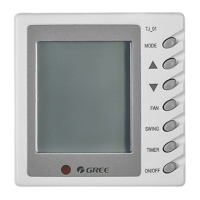
This document is the Owner's Manual for a Central Air Conditioner Thermostat, specifically models WK-010PW and WK-010PS, manufactured by Gree Electric Appliances, Inc. of Zhuhai. It provides original instructions for installation, operation, and maintenance of the thermostat.
Function Description
The Gree Central Air Conditioner Thermostat is designed to control commercial air conditioning units. It allows users to set the desired temperature, select operating modes (cooling, heating, air supplying, floor heating), adjust fan speed, and utilize a sleep function. The thermostat also supports Modbus communication for integration into a larger monitoring system, enabling control of up to 255 thermostats simultaneously. It features power failure memory, retaining settings such as unit on/off status, modes, temperatures, fan speeds, temperature units, fan operation at set points, and Modbus address.
Important Technical Specifications
- Supply Voltage: AC85~265V 50/60Hz
- Temperature Setting Range: 16~35°C (61°F~95°F)
- Operation Temperature: 0~50°C
- Humidity: Relative humidity 5~95% (no condensate)
- Load Current: 2A (resistive load); 1A (inductive load)
- Connecting Terminal: Recommended to use neutral and live lines of less than 2.0mm² in size and 1.0mm² wires for other loads.
- Outline Dimensions: 86×86×14.5mm (Width x Height x Thickness)
- Protection Class: IP30
- Installation Requirement: An 86x86 unconcealed or concealed standard junction box with more than 40mm interior height and standard 60mm hole spacing.
- Modbus Communication: Transmitted at 9,600bps by default. Default address is 1, settable between 1~255.
Usage Features
The thermostat features a clear LCD display and intuitive button controls.
Thermostat Panel and Keys:
- Display Elements: Cooling mode indicator, Heating mode indicator, Sleep function indicator, Fan speed indicator, Temperature or failure codes display, Air supplying mode indicator, Floor heating indicator, °C/°F unit display.
- Control Buttons:
- SPEED (8): Switches between four fan speeds (Low, Medium, High, Auto).
- MODE (9): Switches between operating modes.
- WK-010PW: Cooling, Air supplying, Heating, Floor heating.
- WK-010PS: Cooling, Air supplying, Heating.
- UP (10) / DOWN (12): Adjusts temperature settings. Each press increases/decreases by 0.5°C (within 16°C~35°C) or 1°F (within 61°F~95°F).
- ON/OFF (11): Starts or stops the unit.
Key Operations:
- ON/OFF: Press the ON/OFF button to start or stop the unit. When on, the screen displays mode, temperature, and fan speed. When off, only temperature appears.
- Mode Setting: Press the MODE button to cycle through available modes after starting the unit.
- Fan Speed Setting: Press the SPEED button to cycle through fan speeds after starting the unit.
- Temperature Setting: Use the UP (+) and DOWN (-) buttons to adjust the set temperature. The default displayed temperature is the setpoint.
- Indoor Ambient Temperature Search: After starting or stopping the unit, press and hold the DOWN (-) button for 5 seconds to view the indoor ambient temperature. Press any key to exit, or it will return to the setpoint display after 20 seconds of inactivity.
- Sleep Function: Press and hold the MODE button for 5 seconds to enable or disable the sleep function. When enabled, the sleep symbol appears on the homepage.
- Cooling Mode Sleep: Set temperature rises by 1°C after 1 hour, and another 1°C after another hour (max 2°C rise), stabilizing at 28°C, then the function disables automatically.
- Heating Mode Sleep: Set temperature drops by 1°C after 1 hour, and another 1°C after another hour (max 2°C drop), stabilizing at 16°C, then the function disables automatically.
- Fan runs at low speed during sleep.
- Sleep function is not available in air supply and floor heating modes.
- Parameter Setting (after unit stop):
- Temperature Unit Setting: Press and hold ON/OFF for 5 seconds to switch between Celsius (°C) and Fahrenheit (°F).
- Fan Operation at Temperature Set Points: Press and hold SPEED for 5 seconds to enter the setting page. Use UP/DOWN to select "00" (fan works as to set speed, default), "01" (fan works at low speed), or "02" (fan stops). Press SPEED for 5 seconds to save and exit.
- Temperature Calibration: Press and hold UP (+) for 5 seconds to enter the calibration page. Use UP/DOWN to adjust the ambient temperature between -5°C and +5°C with a precision of 0.5°C (0°C by default). Press UP (+) for 5 seconds to save and exit. This function is only available for Celsius degrees.
- Modbus Address Setting (after unit stop): Press and hold MODE for 5 seconds to enter the setting page. Use UP/DOWN to adjust the address number (1~255). Press MODE for 5 seconds to save and exit.
Maintenance Features
The manual outlines procedures for handling common failures, emphasizing that product maintenance should only be performed by qualified technicians.
Failure Handling:
- Start-up or Display Failure:
- Check L/N wires and wiring safety.
- Check connections between the main control panel and power supply board.
- Check ON/OFF key effectiveness.
- Try replacing the main control panel first; if that doesn't work, replace the power panel.
- Blown Fuses:
- Check wiring correctness.
- Replace the power panel.
- Abnormal Output with a Normal Display:
- Check connections between the main control panel and power supply board.
- Try replacing the main control panel first; if that doesn't work, replace the power panel.
Ambient Temperature Sensor Failure:
- If the ambient temperature sensor fails, the screen will display "F5" instead of the ambient or set temperature.
- In this state, the unit will continue to operate at a default ambient temperature of 24°C.
- The user is still able to adjust the set temperature.
- "F5" indicates "Indoor ambient temperature sensor failure."
Installation Notices:
- Hard plastic lines, if used, must be bent at a proper angle.
- Wiring must be in accordance with the wiring diagram.
- The thermostat must be fitted according to the installation diagram.
- One thermostat controls only one coil unit.
- Do not hurl or forcibly press the LCD.
- Protect the unit from deformation by avoiding hits and drops.
- Keep the inside clean from water and mud.
- The 86x86 junction box must be flame-retardant.
- No inflammables should be placed near installation locations.
- A fireproof metallic 86x86 junction box is required for fireproof areas.
- The thermostat should be fitted 1.5 meters above the floor.
- Avoid installation in closed thermal pipelines/flues, near cool/hot air pipes and radiators, near direct sunlight/airflow/other heating objects (e.g., television), or in corners/edges of doors/windows.

 Need help?
 General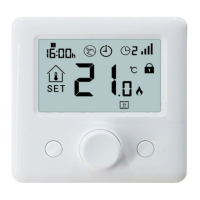

 To Next Page