I
nstallation / Operating Instruction
for 7 day Fused Timer Spur Switch
- Model: T205-C
OPERATING INSTRUCTIONS
‘ON’ Indicator
Programme
Button
Time
Button
Fuse
Holder
Front Cable
Entry
Double Pole
Isolation Switch
Reset
Button
‘+’ and ‘-’
Button
Dia.1
Dia.2
Dia.3
Dia.4
SETTING THE DAY OF WEEK
AND TIME
Note: Time setting is 24 hour mode.
1. Press the ‘TIME’ button for 2 seconds. Day of
week will start flashing (example shows 7 Day
setting Dia.3)
2. Use the ‘+’ or ‘-’ button to change the
display to the correct day of the week.
3. Press the ‘TIME’ button and the hour digits will
flash.
(Dia.4)
4. Use the ‘+’ or ‘
-’ button to set the hours.
5. Press the ‘TIME’ button and the minute digits will
flash. (Dia.5)
6. Use the ‘+’ or ‘-’ button to set the minutes.
7. Press the ‘TIME’ button to save the setting
and return to operating mode.
RESET THE DEVICE
1. To fully reset this unit press the recessed
‘Reset’ button with a insulated blunt probe.
2. A full display will show when the battery is
charged, then revert to the default screen
( : ). No display indicates that the
battery requires charging for a minimum 3
hour period. (Dia.2 - Full display)
Please read the instructions fully before attempting installation.
IMPORTANT
This unit should be installed by a competent person
in accordance with the current IET Wiring Regulations.
I
f in doubt consult a qualified electrician
.
• Timer Spur must not be mounted on a flammable surface.
• Ensure that the Timer Spur does not come into contact with any
combustible materials such as towels or bedding.
• Ensure at least a 300mm air space is allowed around the Timer Spur
switch.
• A 12mm pattress is provided if extra spacing is required.
• Twin Earth terminal provided.
Note: Where earthing termination is required this must be connected to
a earth terminal as provided in a metal back box.
Dia.22
SUMMER MODE
1. In operating mode, pressing the ‘PROG’
and ‘TIME’ (combination of buttons) to set
the summer mode. The clock will forward
o
n one hour (showing the icon
Dia.22).
Note: Battery is fully charged after 14.5 hours.
The non-replaceable, fully charged battery, will retain any program information
for a period of 700 hours should their be power loss or the unit switched off with
the double pole isolation switch.
Display is not visible during this period unless a button is pressed.
S
Note: Pressing the ‘PROG’ and ‘TIME’ (combinations of buttons) to exit the summer mode.
WIRING DIAGRAM
BATTERY BACK UP/LIFE
Display: LCD
Working Voltage: 230V-50Hz
Rated Impulse Voltage: 2,500V
Operating Temp: -5°C to +40°C
Operation: Integrated Control
Max Load:
Resistive - 13A
Inductive - 6A
Isolation: Double Pole Isolation
Switch
Conforms to: BS 1363-4:1995+A4:2012,
BS EN 60730-1:2011,
BS EN 60730-2-7:2010.
Working Environment: Indoor use only
Pollution Degree: 2
TECHNICAL INFORMATION
(Example: the clock will change to ‘11.00’, if the time is ‘10.00’ now
press “PROG’ and ‘TIME’.)
T205
Supply
Load
TIMER
13A Fuse
Isolation Switch
L
N
N
L
Issue no: 704698
WEST ROAD . HARLOW
ESSEX . CM20 2BG . UK
info@greenbrook.co.uk
www.greenbrook.co.uk
GUARANTEE
Your GreenBrook Fused Timer Spur Switch
is guaranteed for 1 year from
the date of purchase.
This is in addition to your statutory rights.
PLEASE KEEP THESE INSTRUCTIONS
SAFE FOR FUTURE REFERENCE

 Need help?
 General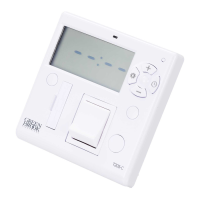

 To Next Page