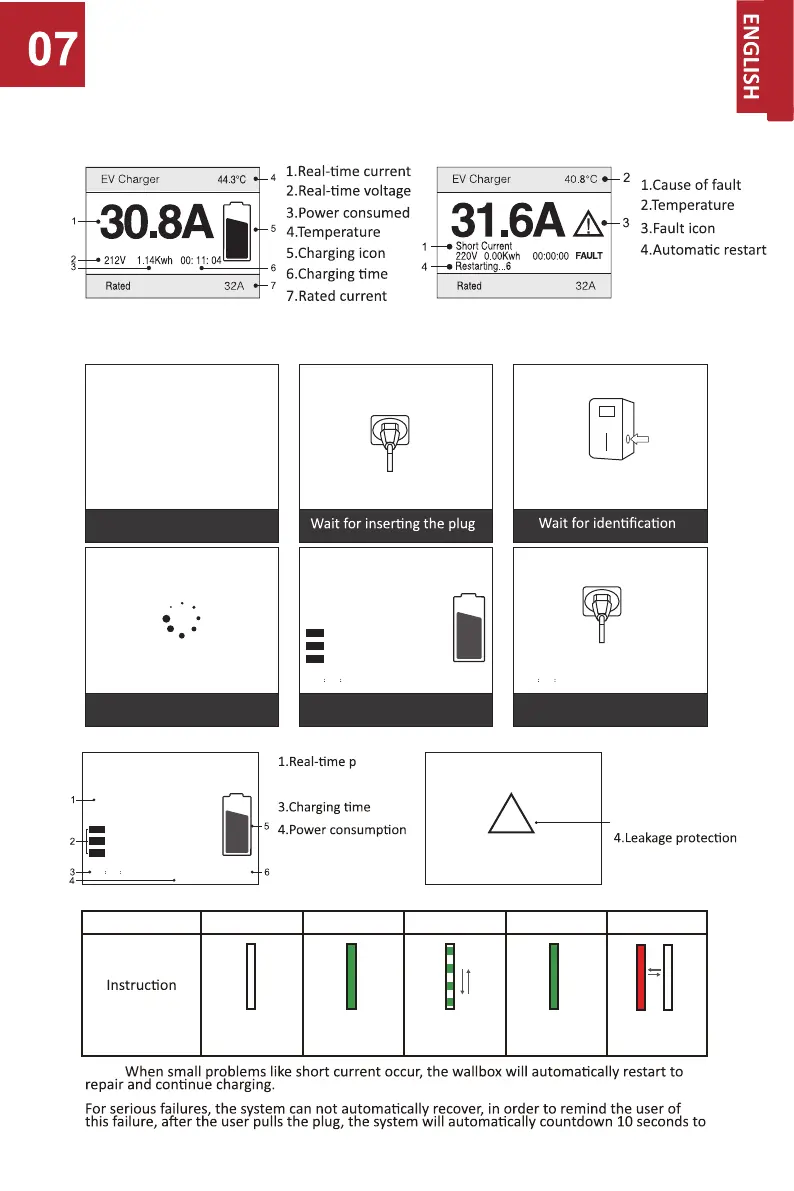
Illustration of Screen and LED
ower
2.Three Live Wire data
6.PCB Temperature
5.Charging icon
1.Emergency stop
3.Over Temperature
2.Over Current
5.Short Current
Note:
restart
IDLE CONNECTED CHARGING FINISHED ERROR
of LED Status
OFF
light
Connuous Connuous
light
Rolling
Red
flashing
EV Charger
23.7℃0.00Kwh00 00 06
KW
L1:220V 0.00A
0.08A
0.08A
L2:220V
L3:220V
0.0
Wait for the car to be ready
During charging process
Stop charging and wait for
pulling out the plug
Start-up screen
(the version no. is for reference only)
EV AC Charger
EV Charger
22.8℃
EV Charger
22.8℃
EV Charger
22.8℃
WAITING
EV Charger
22.8℃0.00Kwh00 10 00
Disconnect the Charging Connector
Connect the Charging Connector Press The Button
EV Charger
23.7℃0.00Kwh00 00 06
KW
L1:220V 0.00A
0.08A
0.08A
L2:220V
L3:220V
0.0
THREE PHASE
SINGLE PHASE
EV Charger
29.4℃
Short Current
Possible
fault warning
!


 To Next Page