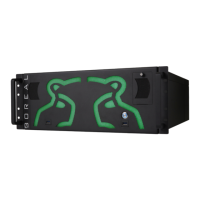
The Hippotizer Stage is a media server designed for creative video solutions, offering real-time manipulation of video and images across multiple layers. It functions as an 8-layer video player, mixer, and effects engine, providing instant access to over 250 parameters for dynamic visual control.
Function Description
The Hippotizer Stage allows users to manage and display media (video clips, still images, live video feeds) across up to 8 independent layers. Each layer can have two effects engines applied, along with scaling, zooming, rotation, and positioning in X and Y planes. Mix modes determine how layers interact. The Master Canvas provides overall control for all 8 layers, including master color balance and keystone correction for projection setups.
The system supports various output configurations:
- Single Output Mode: Connects to one VGA or DVI display, with the option for a control center on a second display.
- Dual Output Mode: Provides two independent outputs, typically for two projectors or monitors, with a third display for the control center.
- Pan Output Mode: Creates a single large canvas spread across two monitors (e.g., 2048 x 768 resolution), with a third display for the control center.
- Composite / S-Video Output: Directly outputs composite video or S-Video, suitable for monitors or vision mixers. This is available on the second output in single mode for the main output, or for the second screen in dual/pan modes.
Control of the Hippotizer can be achieved through its built-in Control Centre for hands-on operation or via external controllers using various protocols:
- DMX: Supports DMX 512 for controlling all parameters, with options for full and preset modes.
- ARTNET: Uses Artnet as its default protocol for Ethernet-based DMX control.
- MIDI: Allows control via MIDI controllers, keyboards, and sequencers, with all parameters mapped to specific MIDI commands.
- RS232: Provides serial communication control.
- Keyboard: Offers shortcuts for displaying layer information and resetting parameters.
The system includes a Beat Detection Engine that can analyze incoming audio and use its rhythm to control effect parameters, adding a dynamic, music-synchronized element to visuals.
Important Technical Specifications
- Hardware: Industry standard 19" rackmount case.
- Graphics Cards: 2 ATI Graphics cards, supporting a maximum of 3 display devices.
- Output Resolutions: Up to 1024 x 768 in Single and Dual mode, and up to 2048 x 768 in Pan mode.
- Video Inputs: Supports composite and S-Video inputs for external cameras or video sources.
- Media Formats:
- Movie Files: Recommended MPEG2 (.mpg, .m2v, .m2p, .vob, .mp2) for hardware decoding, faster playback, and smaller file sizes. Also supports QuickTime (.mov) and Windows Media (.wmv), though performance may vary.
- Still Images: Jpeg (.jpg), Bitmap (.bmp), Portable Network Graphics (.png), Targa (.tga), Tagged Image File Format (.tif).
- Alpha Channels: Supported in Uncompressed AVI and some Quicktime codecs for movies, and in still image formats that support transparency.
- Sound Support: Basic playback for AVI and Quicktime files, without remote control of level or fading.
- Dimensions: 178 (H) x 480 (W) x 530 (D) mm.
- Weight: 25kg.
- Power: Line input Voltage: 100V to 240V AC.
- Software Version: 2.1.4.
Usage Features
- Media Management: Media is organized into "banks" (folders) on the D: drive, with clips and images stored within. The system automatically detects new media and creates thumbnails on startup.
- Show Manager: A utility for loading, backing up, and resetting shows, including media, presets, and settings.
- Presets: Allows saving and recalling layer parameters (excluding layer level) and master canvas parameters, enabling smooth transitions and dynamic adjustments.
- Keystone Correction: 10 controls for correcting image distortion when projecting onto non-perpendicular surfaces.
- XYZ and Colour Control: Fine-tune layer position, zoom, rotation, contrast, brightness, and color levels (Cyan, Magenta, Yellow) for individual layers and the master canvas.
- Mix Modes: A variety of mix modes (Add, Sub, Darken, Lighten, Softlight, Hardlight, Overlay, Difference, Gobo, Screen, Opaque, Sprite, Luma, Matte, Alpha) to control how layers interact and blend.
- Digital Effect Engines: A wide range of effects grouped by category (General FXs, Colour Effects, Breakup Effects, Distortion Effects, Softedge Effects), each with adjustable levels and parameters. Examples include Blur, Mask, SatHue, Multi, XYZ, Aspect, Pall, Neon, C-Lab, CTB-O, Pixidust, Shift, Conc, Style, Bump, LED, Pixel, Movie, Plasma, Flow 1 & 2, Kaleidoscope, Glass, Aqua, Tunnel, and Planes.
- Timecode Synchronization: Layers can be synchronized to an external MIDI timecode signal, allowing for precise timing of clips and effects, especially useful for soft edge blending across multiple Hippotizers.
- Audio Setup: Adjusts volume levels for incoming music and provides a visual representation of the audio level, with a beat indicator for the Beat Detection Engine.
- DMX Tester / MIDI Tester: Tools to confirm correct reception of DMX/ArtNet or MIDI data.
Maintenance Features
- Airflow and Cooling: The unit is cooled by fans, requiring a clear air-gap at the front and rear. Vents must not be obstructed to prevent damage from high temperatures.
- Filter Cleaning: Periodically (once a month) clean the filters located in the doors.
- Disk Defragmentation: Regular defragmentation of the D: drive is recommended to maintain optimal playback performance, especially after adding or removing large quantities of media.
- Software Updates: Continuous updates are provided, and users are advised to check the support website for the latest versions of the manual and system software.
- Firmware, BIOS, and Drivers: The system uses a fixed set of firmware, BIOS, and drivers. Users are advised not to download and install newer versions unless instructed by Green Hippo support.
- Troubleshooting: Consult the manual, contact the local dealer, or Green Hippo support for assistance with problems. The "Info" tab in the Hippotizer Setup provides system details useful for support.

 Need help?
 General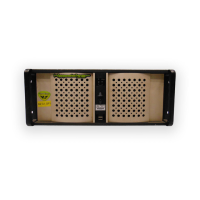

 To Next Page