06
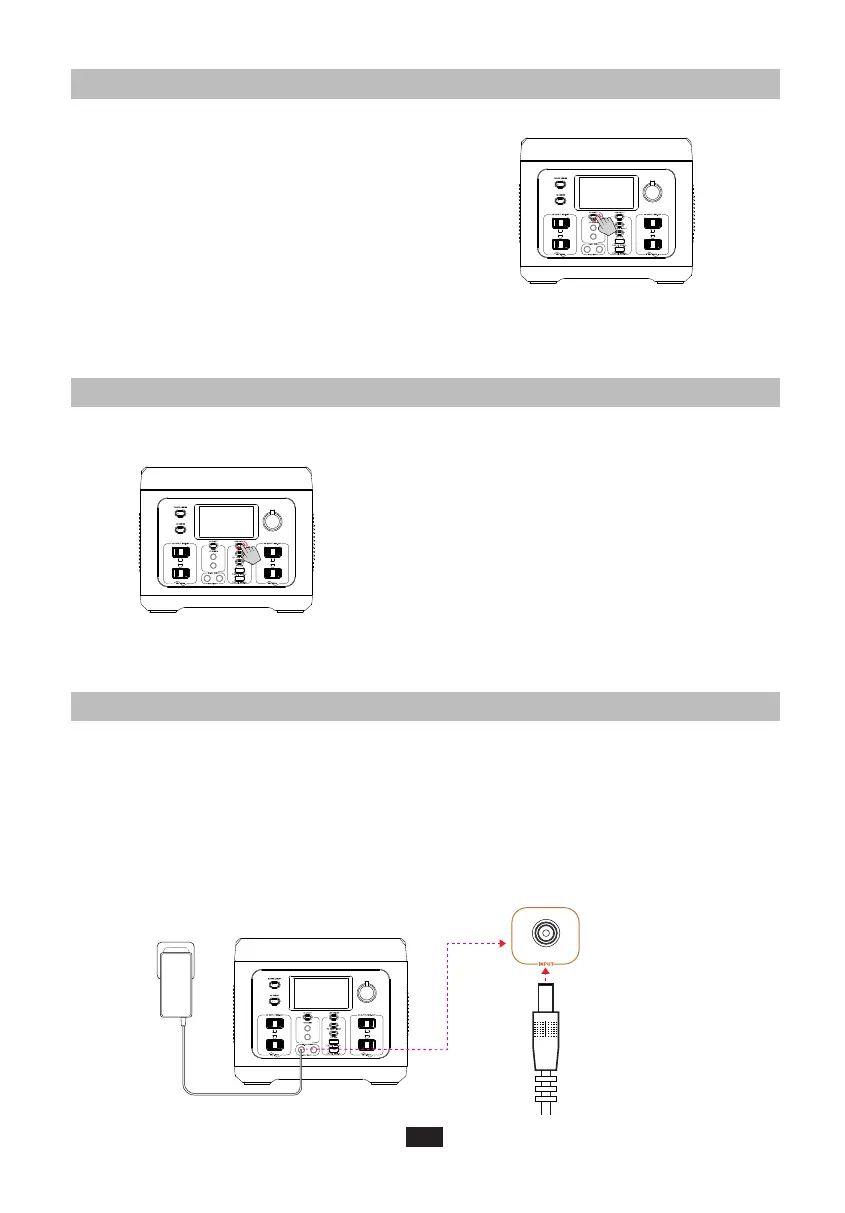
4.3 12V DC OUTPUT PORT
1. With the Main Power Button turned on,
short press the DC Power Button to use
the 12V DC Output ports.
2. Insert the power cable of the device into
the 12V DC Output ports, and total DC
power output will display on the LCD
Screen.
3. Short press the DC Power Button again
to turn it off.
4.5 AC CHARGING
1. First, connect the supplied AC Adapter to a standard 120V AC socket.
2. Connect the AC Adapter with the DC Input Port on the front of PS700.
3. On the LCD screen, you can see the charging status and current power.
Disconnect the AC adapter until it is fully charged.
4.4 USB OUTPUT PORT
1. With the Main Power Button turned on,
short press the USB Power Button to use
the USB Output ports,and Wireless Charging.
2. Insert the power cable of the device into
the USB Output ports and total USB
power output will display on the LCD
Screen.
3. Short press the USB Power Button again
to turn it off when not in use to save
power consumption.
AC Charging
Cable
Short Press DC Power Button
Short Press USB Power Button
Caution: You can speed up rechargeability of the power station through the AC
adapator and 100W PD USB-C port simultaneously. It takes only 2 hours to
recharge 80% battery of the power station by this way.
Caution: With the DC Power Button on, the
product will not automatically shut down.
Caution: With the USB Power Button on, the
product will not automatically shut down.



 To Next Page