
 Need help?
Do you have a question about the GreenMouse EP-TWS10 and is the answer not in the manual?
Lists the items included in the package: TWS earphones and user manual.
Identifies key physical components like Type-C port, LED indicators, and touch buttons.
Details meanings of various safety and compliance symbols like Warning, CE, and WEEE.
Advises to avoid high volume to prevent hearing damage.
Warns to keep plastic bags away from children to prevent suffocation.
Provides basic precautions for safe use, handling, and storage.
Caution against using the device if exposed to water or other fluids.
Advises against using the device if there are visible signs of damage.
Prohibits attempting to disassemble or modify the device.
Covers warnings related to battery handling, charging, and electrical shock risks.
Warns against excessive heat, crushing, puncturing, or piercing the device.
Provides guidance on how to clean the device's exterior safely.
Details the process for charging the charging box/dock via Type-C.
Explains how to place the earphones into the charging dock to charge them.
Describes how to automatically power the earphones on and off.
Guides on how to pair the earphones with a mobile device via Bluetooth.
Instructions for playing music and controlling volume/tracks using the earbuds.
Covers answering, ending, and rejecting incoming calls using touch controls.
Lists technical details such as driver diameter, impedance, frequency response, and battery specs.
Provides guidance on the proper disposal and recycling of electronic equipment.
This document serves as a user manual for TWS (True Wireless Stereo) in-earphones, model EP-TWS10. It provides comprehensive instructions for safe operation, usage, and maintenance of the device. Users are advised to read all instructions carefully and retain the manual for future reference.
The earphones are designed for personal and domestic use, offering a wireless audio experience. They are not intended for commercial use. The manual emphasizes the importance of safety, including warnings about electrical shock, potential injury, and proper handling of the device and its components.
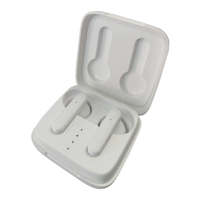
The TWS in-earphones are designed to provide wireless audio playback and hands-free calling. They connect to a mobile phone or other compatible device via Bluetooth (BT) technology. The device consists of two independent earphones and a charging box/dock. The charging box not only stores the earphones but also recharges them, extending their usage time.
The package includes the TWS in-earphones and a user manual.
The charging box features a Type-C port for charging, an LED indicator to show charging status, and a touch button. The earphones themselves have a touch button and a microphone/LED indicator.
The manual highlights several critical safety warnings. Users are cautioned against electric shock and potential serious injury. Special attention is required when handling the device to prevent hazards. The CE marking indicates compliance with European safety, health, and environmental protection requirements. The Wheelie Bin symbol advises on proper disposal of electronic waste. Warnings regarding hearing damage emphasize the need to adjust volume levels carefully. To prevent suffocation, plastic packaging should be kept away from babies and children.
Users must read and follow all instructions carefully. The device should only be used as intended and not exposed to direct sunlight, heat sources, excessive humidity, or corrosive environments. Children aged 8 and above, and individuals with reduced physical, sensory, or mental capabilities, can use the device under supervision and with proper instruction. Packaging materials should not be left carelessly as they can pose a risk to children.
The device should not be used if it has fallen into water, been exposed to rain or moisture, or shows visible signs of damage. Disassembly or repair by unauthorized personnel is strictly prohibited to avoid electric shock and damage.
The charging box battery requires approximately 1.5 hours for the initial charge. The device should never be left charging unattended. Do not use damaged charging cables or faulty devices. Keep the device and charging cable away from heat sources. Once charging is complete, disconnect the cable. To prevent injury or damage, do not insert metal objects into the charging port or contacts. The rechargeable batteries are built-in and not replaceable. Opening the casing can result in electric shock. Avoid exposing the device to excessive heat or direct sunlight. Do not crush, puncture, or dismantle the device, as this can damage the battery and potentially lead to explosion or fire. In case of battery fluid leakage, wash skin immediately with soap and water, and flush eyes with clean water for at least 10 minutes, seeking medical attention if necessary. Do not dispose of the device in fire.
To charge the charging box, connect the Type-C connector of the charging cable to the device's charging port and the USB connector to a USB charger. The LED indicator on the charging box will flash sequentially during charging. Once fully charged, all four LEDs will light up steadily, and charging will stop. A fully charged charging dock can provide up to 4 full charges for the earphones.
Place the earphones into the charging dock. The charging ports will automatically make contact, and the earphones will begin charging. The LED indicators on the earphones will turn red during charging and turn off once fully charged.
The earphones automatically power ON when removed from the charging dock. If there is no Bluetooth connection for 3 minutes, they will automatically switch OFF. To power them ON again, place them back into the charging dock and then remove them. When powered ON, the LED indicator on the earphones will flash blue/red alternately, indicating pairing mode. If the earphones have been previously paired, they will automatically connect to the smartphone/tablet, and the LED indicator will turn off after 3 seconds. To power OFF the earphones, simply place them back into the charging box/dock. They can also be powered ON again by simply putting them back in the charging dock.
Remove the earphones from the charging dock; they will power ON automatically. The LED indicator on the earphones will flash blue/red, indicating pairing mode. The two earphones will pair with each other automatically. Once paired, the LED indicator of one earphone will switch OFF, while the other will continue to flash blue/red alternately. Keep the TWS earphones and your mobile phone or device within 1 meter (3ft) during the pairing process. Activate the Bluetooth function on your mobile phone or device and search for the TWS earphones. Select "GreenMouse" from the list of found devices. Two beeps will confirm successful pairing, and the indicator on the earphone will switch OFF. If a paired mobile phone or device is within range, the TWS earphones will connect automatically when detected. If the earphones do not have a BT connection for 3 minutes, they will automatically switch OFF. To connect to a different mobile phone or device, first disconnect the earphones from the currently paired device or switch off its BT function.
To play music, open your media player on your mobile phone or device and press play. Volume control can be managed via your mobile phone or device. The TWS earphones also offer control over media playback and volume:
For an incoming call, short press the touch button of either the left or right earbud once to answer. Calls can also be answered directly on the phone, and the audio will automatically connect to the TWS earphones. If music is playing, it will pause upon receiving a call.
To end an ongoing call, short press the touch button of either the left or right earbud twice, or use the "call end button" on your mobile phone. If music was playing before the call, it will automatically resume from where it left off.
To reject an incoming call, long press the touch button of either the left or right earbud for 2 seconds.
Before cleaning, always disconnect the device from the charging cable. Do not use abrasive cleaning solvents. Clean the exterior of the device with a damp cloth.
 General
| Product type | Headset |
|---|---|
| Product color | White |
| Wearing style | In-ear |
| LED indicators | Yes |
| Operating keys | Play/pause, Track \u003C, Track >, Volume +, Volume - |
| Volume control | Touch |
| Backlight color | Blue |
| Control unit type | On-ear control unit |
| Recommended usage | Calls/Music |
| Designed for children | No |
| USB connector | USB Type-C |
| Frequency band | 2.402 – 2.480 GHz |
| Wireless range | 10 m |
| Bluetooth version | 5.3 |
| Bluetooth profiles | A2DP, HFP, HSP, SPP |
| Connectivity technology | Wireless |
| Impedance | 32 Ω |
| Ear coupling | Intraaural |
| Diaphragm diameter | 13 mm |
| Headphone frequency | 20 - 20000 Hz |
| Maximum input power | 0.25 mW |
| Headphone sensitivity | 95 dB |
| Intraaural headphones type | In-ear monitors |
| Microphone type | Built-in |
| Microphone direction type | Omnidirectional |
| Manual languages | English |
| Charging case type | Wired |
| Charging case capacity | 300 mAh |
| Battery type | Built-in battery |
| Battery voltage | 3.7 V |
| Battery capacity | 25 mAh |
| Continuous audio playback time | 12 h |
| Battery recharge time (charging case) | 1.5 h |
| Charging time | 60 min |
 Weight and Dimensions
| Weight | 40 g |
|---|

 To Next Page